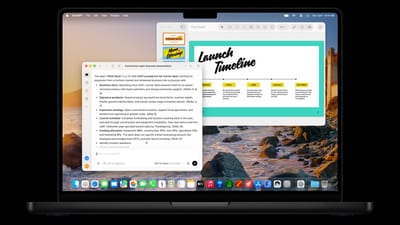
Google shipped computer use in the Gemini app for Mac on Nov 19, 2026. You describe a task in chat. Gemini navigates menus, types information, and clicks through apps to finish it. The work happens in an isolated background window with a live preview right in your chat, and your main screen and cursor stay free. This is Google's move in the desktop agent race. Apple's own computer-control agent is still unreleased, as we covered in our report on Apple's in-development AI agent, and Google has been pushing Gemini onto Apple platforms all year, from CarPlay Live chats to this.
What Gemini computer use actually does on a Mac
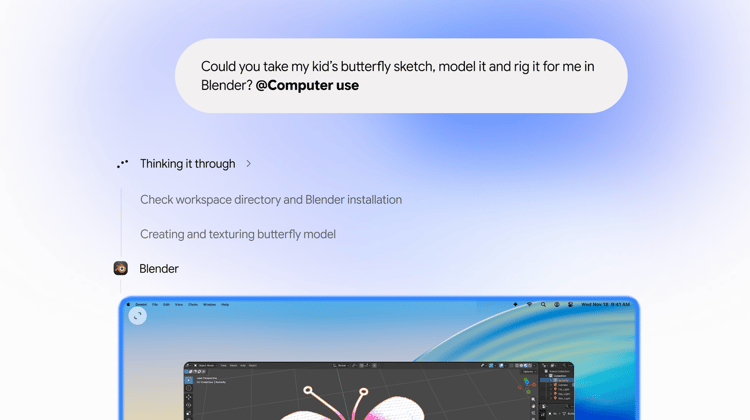
Google's launch post names four starting points. Batch color-grade photos in design software or set up complex 3D scenes. Extract weights, dimensions, and addresses from local PDFs to fill out multi-box shipping quotes. Pull metrics and screenshots from live dashboards and build a presentation in Google Slides. Analyze clothing photos from a local folder, research pricing, and stage listings on resale platforms. In the official @GeminiApp demo, Gemini turned a quick sketch into a rigged 3D model in Blender.

The official wording: Gemini handles "the clicking, typing, menus, and forms." The Gemini Apps release notes for 2026.11.19 add that it handles multi-step clicking, typing, and form-filling across desktop apps and websites.
What you need before you start
Google's Mac app help page lists the basics for the app itself. A Mac running macOS Sequoia (15.0) or later with Apple Silicon, 8 GB of RAM or more, and at least 200 MB of available disk space. A stable internet connection. A personal Google Account you manage. Computer use on top of that is limited to personal accounts for users 18+ on Google AI Plus, Pro, or Ultra, and it is rolling out in English in the U.S. for now.
Google's One plans page lists AI Plus at $4.99 with 400 GB of storage, and MacRumors writes the plans start at $4.99 per month. One discrepancy to know before you pay. The announcement lists Plus, Pro, and Ultra, but AppleInsider reports Google's support documentation currently specifies only Pro and Ultra for controlling desktop apps. Confirm computer use actually appears on your account first.
How to set up Gemini computer use on a Mac
- Open gemini.google/mac and click Download for Mac. The release notes point to gemini.google/desktop instead. Both land on the same official download page as of Nov 20, 2026.
- Open the .dmg in your Downloads folder, drag the Gemini icon to Applications, then open Applications and double-click Gemini. Sign in with your Google Account if asked.
- Update before trying the feature. At the top of the app, click Gemini, then Check for Updates, then Install update if one is offered.
- Start a task. 9to5Google reports you add "@Computer use" to your prompt, and that Customize, then Connectors now shows a "Desktop" group where Blender and Autodesk Fusion join the existing Git and Obsidian integrations. Google's own help pages do not document that click path yet, so treat it as reported and confirm in the app.
- Choose which apps Gemini may use. Watch the live preview in the chat, stop anytime in one click, and expect Gemini to pause at logins and payments and to ask before sensitive actions.
Two shortcuts from Google's pages. Option + Space opens the Gemini chat window once the app is running, and you can customize it in the app's settings. The download page also lists Option + Shift + Space for the full chat experience.
Permissions to grant and risks to watch
AppleInsider, citing Google support documentation, warns that enabling computer use may prompt macOS Accessibility and Screen & System Audio Recording access. Gemini also asks before controlling each app, with an "Always allow" choice that can persist access. Gemini may act through your already signed-in app sessions and can see multifactor codes visible on screen. Prompt injection from untrusted content in one permitted app could steer actions in another. Access for code editors could allow shell commands or wider filesystem changes. On-demand backups are temporary. They expire after 24 hours or when you submit another prompt, and some app changes cannot be undone. Their advice is simple. Do not give an agent broad control of a Mac that holds sensitive files or accounts.
One sidebar. macOS 27.3 will warn more clearly when an app asks for unrestricted access and will let you limit access to specific apps and folders, with a transparency indicator when one app controls another. MacRumors says permissions already granted carry over, so those users skip the new explanation screens. Our earlier guide to limiting Full Disk Access on macOS 27.3 covers what you can tighten today.
Computer use is not Tasks or Speak to Window
The Gemini Mac app already had adjacent features, and Google's help pages keep them separate. Tasks with Connected folders only reads files or folders you add to the Connected folders toolbar, and the Mac app can be controlled remotely from another Gemini device. Speak to Window, the press-and-hold fn feature, is voice input into a window. Neither one drives your mouse and keyboard. Computer use is the feature that clicks through apps for you, inside its own window.
Photo: Google (hero image and Blender demo still, via the Google blog)
Source: Google blog, Nov 19, 2026; Gemini Apps release notes 2026.11.19; Gemini Apps Help 17011627 and 17208717; 9to5Google, AppleInsider, MacRumors, all Nov 19, 2026