Signal's latest iPhone update turns off screenshots inside the app. By default. The reason is Siri AI. Signal says it does not want Apple's on-device assistant, or third-party AI agents, reading what is on screen while you chat. The change ships in Signal 8.37 on iOS 27, and there is a toggle to undo it.
What the Block Siri AI setting does on iPhone
The control sits in Signal under Settings → Privacy and it is labeled Block Siri AI. Signal's own description reads: “Prevent Siri AI from scanning Signal content. This will also block you from taking screenshots in the app and App Switcher.” Three things get blocked at once. Screenshots and screen recordings inside Signal. Signal content in the iPhone App Switcher preview. And on-device AI assistants reading what is on the screen. That list is from Signal's official support page for the feature.
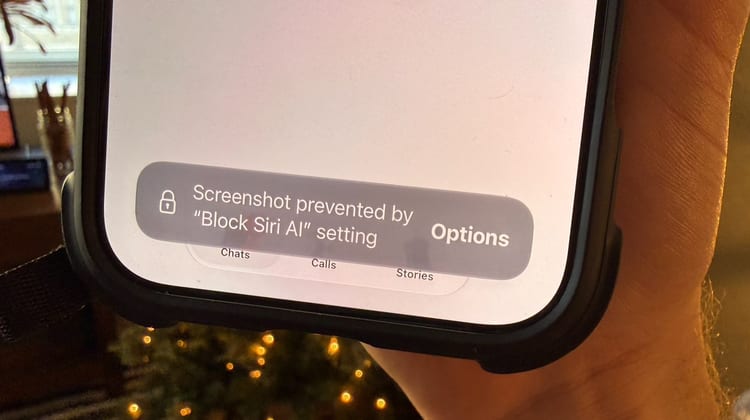
Try to take a screenshot while the setting is on and Signal shows a message: “Screenshot prevented by 'Block Siri AI' setting.” 9to5Mac reported the change on November 20, and the iPhone requirement is exact: Signal 8.37 or later, on iOS 27 or later.
How to take a screenshot again in Signal
Path on iPhone: Settings → Privacy → Block Siri AI. Pick Off to bring screenshots back for good. Or pick Off for 10 Minutes if you only need one screenshot now. The 10-minute option turns screen security back on automatically after the timer runs out.
One detail matters for anyone worried about message security. Signal's support page says the feature only affects screen capture and on-device scanning. It does not change how your messages are encrypted. So the screenshot block is a screen privacy measure, not a change to the encryption model.
Why Signal says it had to act before Apple did
Signal told Reuters that Apple does not currently provide better tools for iOS developers to safeguard app content from Siri AI and third-party AI agents. Signal president Meredith Whittaker wrote in a blog post that these agentic AI integrations are “changing this environment in a way that's making it increasingly hostile to privacy. This is an existential threat to Signal, and our ability to responsibly uphold our mission.” Reuters carried the report on November 20.
Signal calls its own protections incomplete. It has asked Apple, Google, and Microsoft for concrete ways for developers to block agents. Apple, Google, and Microsoft did not immediately respond to Reuters' requests for comment. Signal blocked Microsoft's Recall AI on Windows last year. The company also says it cannot reliably offer the same protection on macOS, so there is no Block Siri AI setting in the Mac app.
Apple has a system exclusion, but Signal built its own block
iPhone users can already exclude specific apps from Siri AI in iOS settings. 9to5Mac notes that became even easier in iOS 27.2. Apple has also been opening Siri AI to all developers in the iOS 27.3 beta, and it is building a broader AI agent to control apps and write code. Signal did not just point users to the system option though. It turned its own block on by default. A defensive move, and a sign of how little trust app makers put in OS-level AI boundaries right now. Users who want both sides covered can also review our 10 iCloud privacy settings list after the UK ruling.
If you updated Signal on an iPhone and suddenly cannot screenshot chats, the Block Siri AI toggle is why. Check Settings → Privacy in Signal before blaming iOS.
Photo: 9to5Mac
Source: 9to5Mac, Signal Support, Reuters