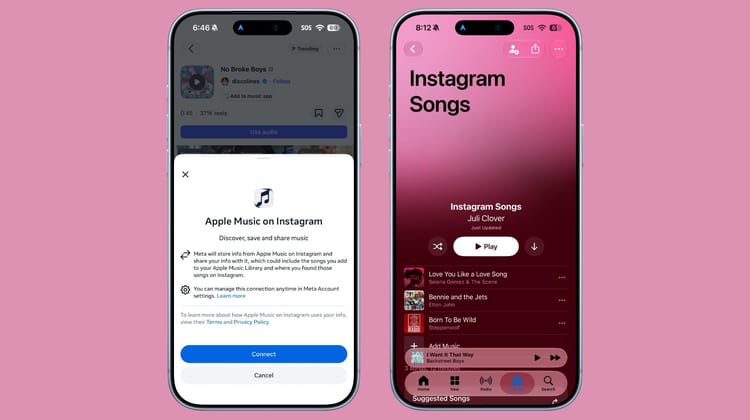
Instagram now lets you save Instagram songs to Apple Music instead of losing them when you scroll past a post. Sometime in the last week or two, Instagram added the ability to link an Apple Music account, MacRumors reports (Juli Clover, November 18, 2026). Tap a song on a post or Story, connect Apple Music when prompted, and the track lands in an "Instagram Songs" playlist inside the Music app. The steps below come from MacRumors and iThinkDiff, because as of November 20, 2026 neither Apple nor Instagram has published a help page for this button.
How to save a song from an Instagram post or Story
The saving flow is short. Three moves.
- In the Instagram app, tap the song link on a post or a Story. The first time you do this, Instagram asks you to connect to Apple Music, according to iThinkDiff (Imran Hussain, November 19, 2026).
- After the accounts are linked, tap the song name on the post, then tap the "Add to Apple Music" button. iThinkDiff counts this as two taps.
- Open the Music app and look under Library → Playlists for the "Instagram Songs" playlist. Apple's own playlist steps use the same Library → Playlists path (Apple Support 118289).
That is the whole trick. The button saves into Apple Music. It does not post anything back to Instagram.
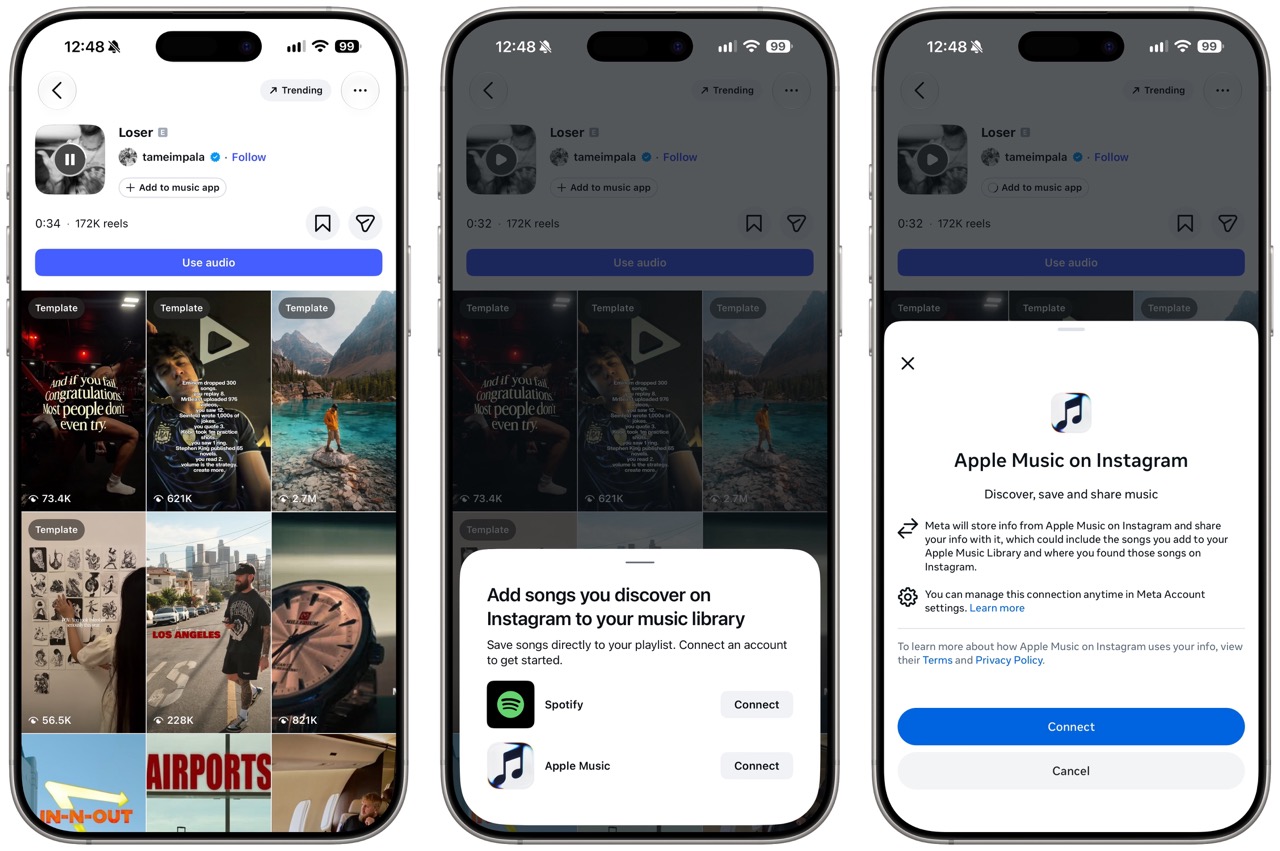
Where saved songs land in the Music app
Every save goes to one place: the "Instagram Songs" playlist in the Library section of the Music app. Both outlets describe the same destination. Save one song, then open Music → Library → Playlists and the playlist should be there.
Two official Music settings sit near this flow, though the reports do not say Instagram uses them. Settings → Apps → Music → Add Playlist Songs puts playlist songs into your library as well (iPhone User Guide). MacRumors only confirms the playlist, so whether saves also appear in your library is not confirmed. Sync Library, also under Settings → Apps → Music, carries library changes to your other devices if you subscribe. Without a subscription, changes show up the next time you sync with a computer.
One thing the button does not do: downloading. Saved songs are not downloaded for offline playback automatically. That is a separate step in the Music app, and it costs storage. Our Apple Music storage tips cover keeping that in check. If you want more to play once the playlist fills up, see the Apple Music Best of 2026 lists and the Apple Music features worth trying.
This button is the reverse of Instagram's older Apple Music sharing
Instagram already let people share Apple Music songs in Stories and direct messages. What was missing was the other direction. There was no way to keep a song you heard in a post (MacRumors). The share sheet in the Music app also runs outward: open a playlist, tap Share, choose Instagram (Apple Support 118235). That path sends a playlist out. The new button pulls songs in.
Spotify users have had the pull direction for a while, with saves landing in Liked Songs. Apple Music keeps a dedicated Instagram Songs playlist instead (MacRumors, iThinkDiff). TikTok added its own "Add to music app" button in 2023, covering Apple Music, Spotify and Amazon Music (iThinkDiff).
If the Add to Apple Music button is missing
Do not go looking for a Settings switch. No toggle is documented for this feature. Instagram has not announced a rollout schedule or the countries that get the button first (iThinkDiff), so "Add to Apple Music" may simply not be on your account yet.
One thing to try: update Instagram. Open the App Store, tap your picture, tap App Updates, then Update next to Instagram (iPhone User Guide). This is not a promised fix. A staged rollout can skip you no matter which app version you run.
When an app does ask for media access, you can review it later under Settings → Privacy & Security → Media & Apple Music, where access can be turned off again (Apple Support 102515, May 20, 2026). Apple does not document there what Meta receives after you connect Apple Music, and neither outlet could say either.
Photo: MacRumors (featured), iThinkDifferent, Apple. Source: MacRumors, iThinkDiff.