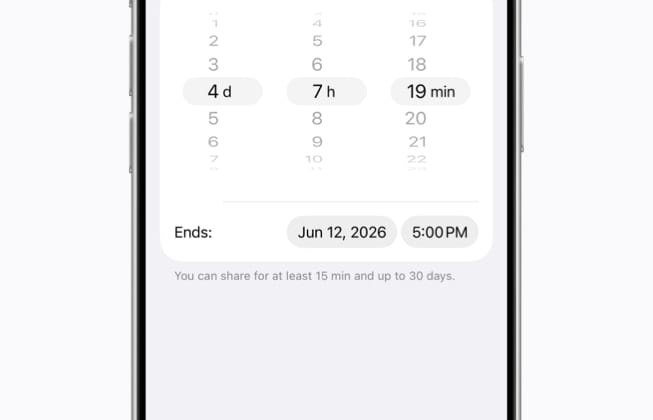
Before iOS 27, Find My offered three sharing lengths: one hour, until the end of the day, or indefinitely. If none fit the plan, you shared indefinitely and hoped you remembered to stop. iOS 27 fixes this. A Custom option shares your location for a set number of minutes, hours, or days, or until a date and time you pick. Apple lists it in the iPhone User Guide and in support article HT105104, updated October 5, 2026. It is part of public iOS 27, not a beta-only switch. As of Apple's iOS 27 update page (November 9, 2026), the newest public release is iOS 27.2.1.
Turn on Share My Location before you add anyone
The duration picker only appears when sharing is set up. Open Find My, tap the Me tab, and turn on Share My Location. The device sharing appears next to Sharing From. If it is not this iPhone, tap Use This iPhone as My Location. The same switches live in Settings → [your name] → Find My.
If a friend still cannot see you, check Settings → Privacy & Security → Location Services → Find My and make sure Location Services is on. This is the step people miss most. They set a Custom time, the sheet closes, and nothing arrives on the other phone. For the rest of the setup, see 10 Find My and AirTag settings to check before something goes missing and the Notify When Left Behind reminder for AirPods and AirTag.
In Find My, choose Custom in the duration picker
Tap People, tap the Add (+) button, then choose Share My Location. Enter a name in the With field or pick a contact. Next comes the length. Apple's June 9, 2026 announcement describes it as "a number of minutes, hours, or days" or "a date and time for when sharing will stop". The iPhone User Guide compresses the steps to one line: "Set a duration or an end time for your location sharing by choosing Custom and adjusting the fields."
Apple's pages do not name the buttons or print a minimum and maximum length. Outlets that tested the build do. AppleInsider, Engadget, and Six Colors all report four choices: For One Hour, For Today, Always, and Custom. The Custom field covers days, hours, and minutes. AppleInsider and Six Colors put the range at 15 minutes to 30 days, and Engadget reports the same 15-minute floor.
Use the dials when the plan has a length, like the next six hours. Use the end date and time when the plan has a deadline, like until a flight lands on Sunday. After Start Sharing, a notification shows when the period ends.
The same custom duration works from Messages
You do not have to open Find My. In a conversation, tap the Plus button, scroll to Location, and choose the sharing length. HT105104 documents "a custom time period" here too, and Six Colors confirms the same four choices in Messages. Both people need an iPhone with iOS 15 or later for Live Location. In an SMS thread, send a pinned location instead. In a group message, everyone in the group can see your location. A share started in Find My is visible in Messages and the other way around.
How to stop early, and what does not stop it
Find My → People → tap the person → More → Stop Sharing My Location. In Messages, tap the name at the top and choose Stop Sharing My Location. Stopping in one app stops it across apps. The other person is not notified. To pause instead of stop, tap Hide Location under My Location. Apple describes it as lasting "for the rest of the day" in HT105104, and the June 9 announcement says it pauses sharing "until the end of the day for specific people". Do not expect a custom pause timer.
Two cleanup traps. Turning off Share My Location on the Me tab hides you from everyone, and turning it back on restores sharing with the people you shared with before. Deleting the Find My app does not end anything. People can still see your location until you reinstall Find My and stop sharing there.
Custom duration is not Check In or Family Sharing
Check In in Messages, our step-by-step Check In tip, notifies a contact that you arrived. It does not share your ongoing location. A dropped pin is one snapshot that never updates. Family Sharing has its own path in Settings → Family → Location Sharing, with an Automatically Share Location switch for members added later. The Custom picker above is for a friend share. If personal safety is at risk, Apple points to Safety Check for cutting everything off quickly.
Photo: Apple Newsroom, "Apple unveils innovative features and intelligence experiences across services" (June 9, 2026). Source: Apple Support.