On X this week people still mix up iCloud storage with the space left on the phone. One common reply points to Optimize iPhone Storage under Photos. Another says empty Recently Deleted or the library never shrinks. Apple documents the menus. Here are 10 Photos and iCloud Photos settings to check on iOS 27 when the gallery feels stuck, or when full-size files only load on Wi-Fi.
1. Sync this iPhone under iCloud Photos
Open Settings, tap your name, tap iCloud, then Photos. Turn on Sync this iPhone. Apple uploads every photo and video at full resolution to iCloud, then keeps the library aligned across devices signed into the same Apple Account.
Steps sit in Set up and use iCloud Photos. Edits and deletes follow the same Apple Account everywhere iCloud Photos is on.
2. Optimize iPhone Storage or Download and Keep Originals
Still in iCloud > Photos, tap iPhone Storage on iOS 27. Choose Optimize iPhone Storage to keep space-saving versions on the phone while originals stay in iCloud. Or pick Download and Keep Originals if you want full files on device.
Optimize is the switch people mean when they say “I pay for iCloud but the phone is still full.” Apple’s storage note is in Manage your photo and video storage. Without Optimize, iCloud Photos does not free local space.
3. Sync Immediately, and Pause
Open Photos, tap Collections, then the profile button. Sync Immediately > For Today pushes new items first. It turns off after one day. Pause holds uploads for a day when the status says the library is busy.
Apple warns Sync Immediately can use more battery and cellular data, and it pauses under Low Power Mode or Low Data Mode. The same profile screen shows the last sync time.

Photo: Apple
4. Read the sync badges on Collections
In Photos > Collections, the account icon can show a yellow pause badge, a yellow almost-full warning, a red full mark, a blue Shared Library or Shared Album note, or a blue ring while uploads run. A gray ring means uploads are paused.
Tap the icon for detail. If syncing stalls for days, we already wrote a fix path in iCloud Photos not syncing or stuck on Syncing Paused.
5. Recently Deleted, then Delete All
Photos > Collections > Utilities > Recently Deleted. Face ID or Touch ID unlocks it by default. Items stay about 30 days. Tap Select, then Delete All, if you already meant to free space.
Apple’s delete guide is Delete photos on your iPhone or iPad. With iCloud Photos on, a delete on one device removes the shot on the others too.
6. Merge Duplicates under Utilities
Same Utilities list, open Duplicates. Tap Merge on a set, or Select / Select All, then Merge. The phone keeps the highest quality copy and related data. The extras go to Recently Deleted.
Detection can take time after a big import. If the album is missing, there may be no duplicates yet.
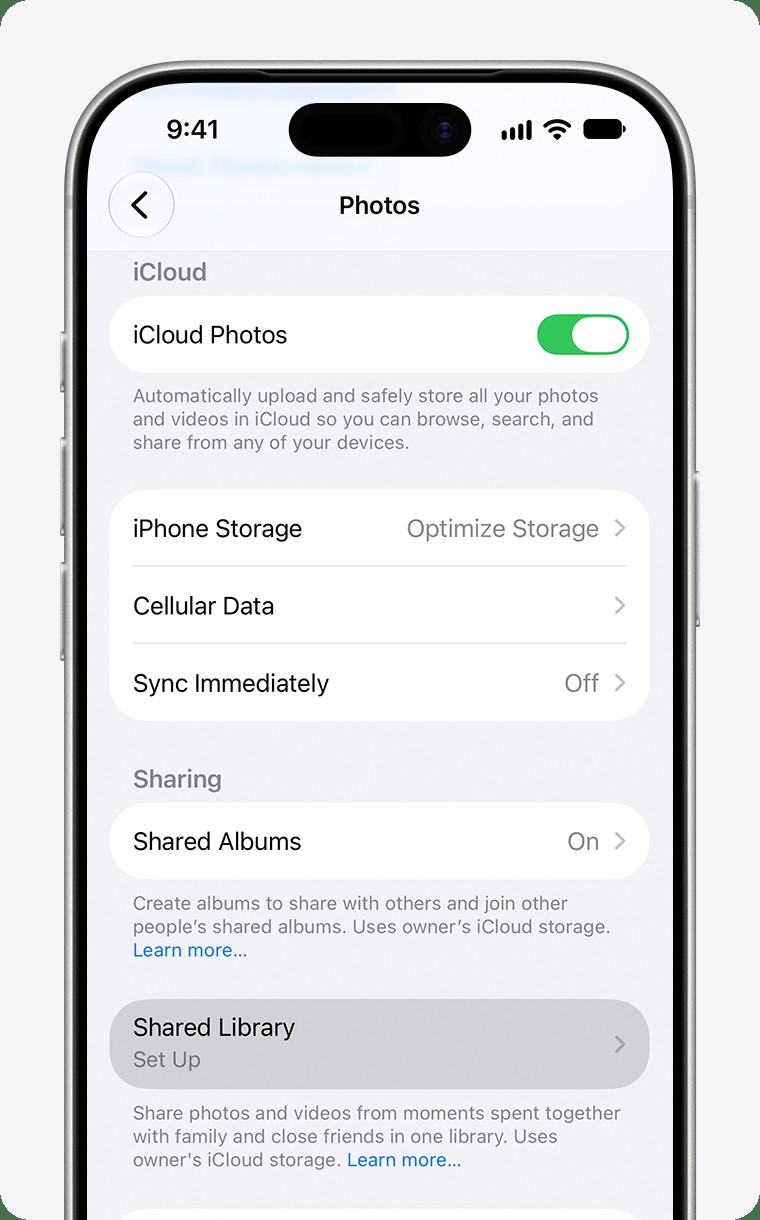
Photo: Apple
7. Hidden album and Show Hidden Album
Long-press a photo, tap Hide. It leaves Library, albums, and the Photos widget. Open Collections > Utilities > Hidden, unlock, then Unhide when needed. Settings > Apps > Photos can turn off Show Hidden Album so the album itself disappears from the list.
We covered the short path in hide photos in the Hidden album. Face ID for Hidden and Recently Deleted can be relaxed under the same Photos settings page.
8. iCloud Shared Photo Library
Settings > Apps > Photos > Shared Library. Invite up to five people. Shots you add leave your Personal Library and move into the Shared Library. The creator’s iCloud plan holds the storage for everyone else.
Apple’s walkthrough is How to use iCloud Shared Photo Library. Camera can auto-share when participants are nearby, or when you are at home. Library View switches Personal, Shared, or Both.
9. Shared Albums, separate from Shared Library
Still under iCloud > Photos, turn on Shared Albums. In Photos > Collections, open Shared Albums, tap Add, name the album, pick photos, then Sharing Options. On iOS 27 you can share a link, require approval, or make a temporary album.
Shared Albums are collaboration albums. They are not the same family library as Shared Photo Library. Full steps are in How to use Shared Albums.
10. Share sheet iCloud Link, and the storage pair
Open a photo, tap Share, then Options. Turn on iCloud Link to send a URL instead of attaching every file. Apple says the link stays available for 30 days. Turn Location off there if you do not want map data attached.
Device space and iCloud space are still two meters. For the broader Settings > General > iPhone Storage list, see 10 iPhone storage settings. Camera capture habits that fill the library fast sit in 10 iPhone Camera settings.
Photo: Apple
Source: Apple Support (iCloud Photos, delete photos, Shared Photo Library, Shared Albums), Apple Newsroom, X