A local model on the Mac answers fine for a few turns. Then it loses the start of the chat. Or a coding agent drops half of a pasted file. Often the cause is context length, not the model. Ollama's Context length page defines it as the maximum number of tokens that the model has access to in memory.
This tip is for the Ollama app on Apple silicon. New to it? Our Ollama setup guide for Apple silicon covers the install.
Default context in Ollama, from 4k to 256k
The docs list the default by VRAM. Under 24 GiB VRAM, 4k context. Between 24 and 48 GiB, 32k. At 48 GiB and above, 256k. Cloud models are set to their maximum context length by default.
The Ollama FAQ on the same site still says the default window is 4096 tokens. So do not guess which one your Mac got. Check it with ollama ps, last section below.
The docs also give a floor. Tasks which need large context, like web search, agents and coding tools, should be set to at least 64000 tokens. That includes setups like Claude Code on a local Ollama model. A bigger window also needs more memory to run the model. On Apple silicon that is the Mac's unified memory.
Context length slider in the Ollama app
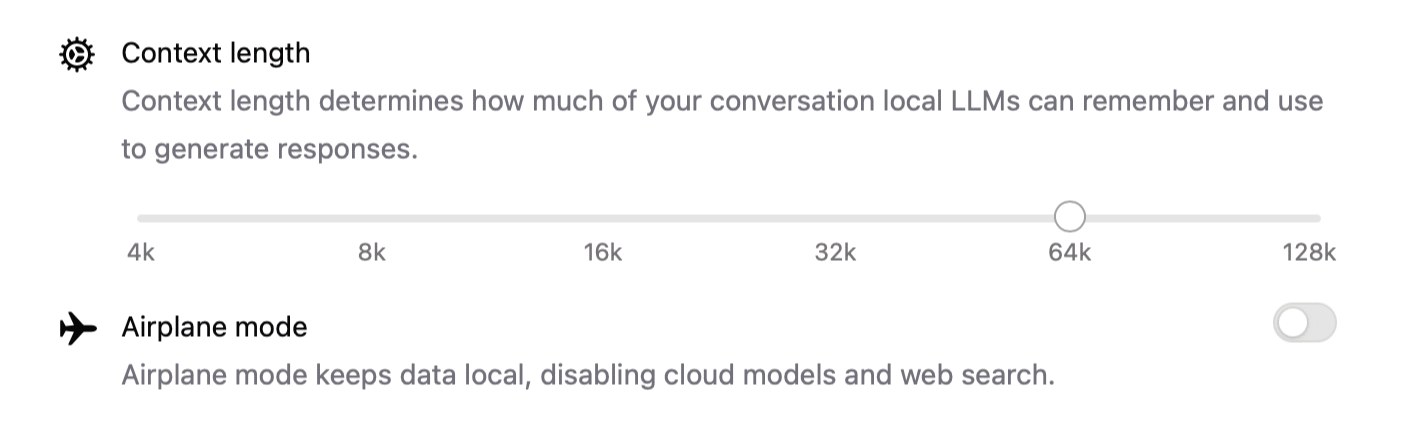
Open Settings in the Ollama app. The Context length row has a short note: context length determines how much of your conversation local LLMs can remember and use to generate responses. The slider stops are 4k, 8k, 16k, 32k, 64k and 128k. For coding tools, move it to 64k.
Airplane mode is just below on the same screen. It keeps data local and disables cloud models and web search. Our note on turning off Ollama cloud models goes through that switch.
OLLAMA_CONTEXT_LENGTH for the server default
From Terminal, the docs put the variable in front of the server command:
OLLAMA_CONTEXT_LENGTH=64000 ollama serveThe Mac app is different. The FAQ says when Ollama runs as a macOS application, environment variables are set with launchctl. Call launchctl setenv for each one, then restart the Ollama application.
launchctl setenv OLLAMA_CONTEXT_LENGTH 64000num_ctx per chat, per request or in a Modelfile
Not every model needs the big window. Set it only where needed.
Inside an ollama run session, type:
/set parameter num_ctx 8192Over the local API, send it in options. This is the FAQ example:
curl http://localhost:11434/api/generate -d '{
  "model": "llama3.2",
  "prompt": "Why is the sky blue?",
  "options": {
    "num_ctx": 4096
  }
}'
To bake it into a custom model, the Modelfile reference uses the line PARAMETER num_ctx 4096. Build it with ollama create.
CONTEXT and PROCESSOR columns in ollama ps
Load the model, then run ollama ps. The sample in the docs shows gemma4:latest at 9.6 GB, 100% GPU, CONTEXT 131072. CONTEXT is the allocated window. PROCESSOR tells where the model sits. 100% GPU means it loaded entirely on the GPU. A split such as 48%/52% CPU/GPU means part of it is in system memory.
Ollama's advice for best performance is to use the maximum context length for a model and avoid offloading the model to CPU. If 64k pushes the split off 100% GPU, step the slider down one notch or pull a smaller model. Our ollama ps and ollama stop guide shows how to unload the old one.
Photo: Apple (MacBook Air with M5); Ollama docs (app Settings)
Source: Ollama docs (Context length, FAQ, Modelfile reference); Apple Newsroom (MacBook Air with M5, March 3, 2026)