One X post pushed battery health back into the timeline this week. "Maximum battery capacity on my iPhone 17 Pro Max is 91% after only one year," user @horsepower wrote on November 23. By November 24 the post had 10,836 views, 141 likes and 44 replies, and X's story feed was rounding up similar screenshots under "iPhone 17 Pro Max Battery Health Drops Spark User Concerns." Before treating a reading like that as a confirmed defect, read what Apple's Battery Health screens and warranty pages actually say. The short version: 91 percent is a measurement, not a verdict. Apple has published no rule that calls a battery at 91 percent failing.
What Maximum Capacity measures, in Apple's words
Apple's iPhone battery and performance page (101575, published June 1, 2026) defines the number plainly: "Maximum battery capacity measures the device battery capacity relative to when it was new." The same page says capacity "might show as slightly less than 100 percent" depending on how long the phone sat between manufacture and activation, and that "With all models, the exact capacity percentage depends on how the devices are regularly used and charged." Apple has published no verdict that 91 percent after one year is defective. It has published no verdict that 91 percent after one year is normal, either. Nobody in the X thread posted a verified cycle count next to the screenshot, and that count matters more than the percentage alone.
Apple's cycle math: 500 cycles on iPhone 14, 1,000 from iPhone 15 on
Apple's About the battery and performance of iPhone 11 and later page (106348, published October 22, 2026) states it directly. Batteries of iPhone 14 models and earlier are designed to retain 80 percent of original capacity at 500 complete charge cycles under ideal conditions. "Batteries of iPhone 15 models and later are designed to retain 80 percent of their original capacity at 1000 complete charge cycles under ideal conditions." iPhone 17 Pro Max is a later model, so that design language covers it. The June 2026 page 101575 still writes "iPhone 15 models" in the same sentence, without "and later." One complete charge cycle means using an amount equal to 100 percent of the battery's capacity, and Apple normalizes cycles "between 80 percent and 100 percent of original capacity to account for expected diminishing battery capacity over time." A percentage without its cycle count is half the picture.
Where to check on the phone: Settings > Battery > Battery Health
On iPhone 15 or later with iOS 17.4 or later, open Settings, tap Battery, then tap Battery Health. According to 106348, that screen shows battery health, maximum capacity, whether a battery replacement is recommended, the cycle count, the manufacture date and the first-use date. iPhone 11 through iPhone 14 use Settings > Battery > Battery Health & Charging instead. iPhone Duo shows separate entries for each of its two batteries, and the two counts can differ slightly with normal use.
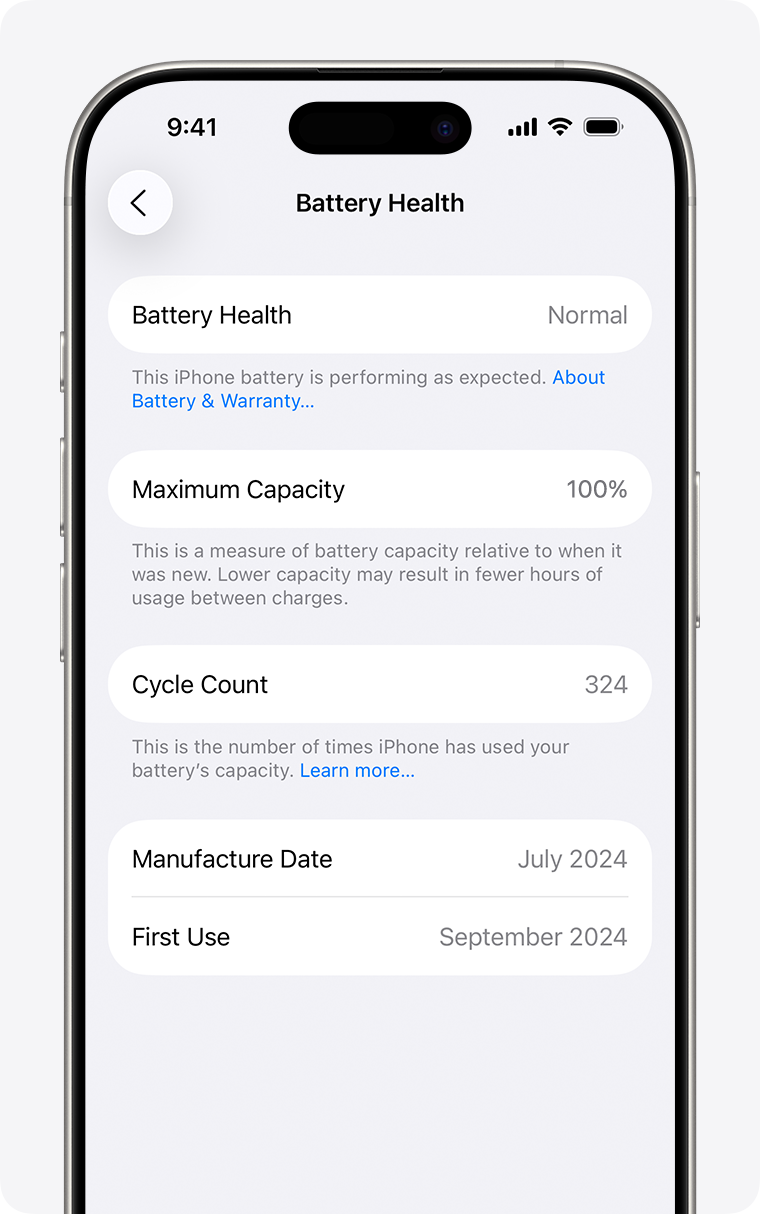
Also read the Peak Performance Capability line under the number. Apple lists three possible messages. Normal is "Your battery is currently supporting normal peak performance." After an unexpected shutdown you may see that performance management "has been applied to help prevent this from happening again." If health has degraded significantly: "Your battery's health is significantly degraded. An Apple Authorized Service Provider can replace the battery to restore full performance and capacity." Apple adds that this message "doesn't indicate a safety issue. You can still use your battery." The company publishes no percentage that triggers it. And if the screen says "Unable to verify this iPhone has a genuine Apple battery," the health numbers might not be accurate. Apple says to get the battery checked. That one applies to iPhone XS and later.
Warranty and AppleCare: the 80 percent replacement line
Apple's battery replacement page draws the boundary. The Apple Limited Warranty covers manufacturing issues for one year from the purchase date and "doesn't cover accidental damage or batteries that wear down from normal use." Defective batteries inside that year get service coverage, on top of local consumer-law rights. With an AppleCare plan the rule is a number: "We'll replace the battery for no extra charge if the capacity drops below 80%." Out of warranty and without AppleCare, Apple offers battery service for a charge after inspecting the device, at a Genius Bar, an Apple Authorized Service Provider, or by mail with a prepaid shipping box. A 91 percent reading alone does not cross any of these lines.
If the complaint is runtime, check Charge Limit first
A separate X post in the same window reported an "80 percent charging warning" on a recent AppleCare replacement. Apple's pages do not name that warning, so check the charging settings before assuming a failed battery. On iPhone 15 and later, Settings > Battery > Charging sets a Charge Limit between 80 and 100 percent in 5 percent increments. iOS may recommend one, for example "Based on your iPhone habits, a charge limit of 95% is recommended to help preserve your battery." Optimized Battery Charging, available when the limit is 100 percent, delays charging past 80 percent in certain situations and needs at least 14 days plus 9 charges of 5 hours or more in one location before it engages, according to Apple's Charge Limit and Optimized Battery Charging page.
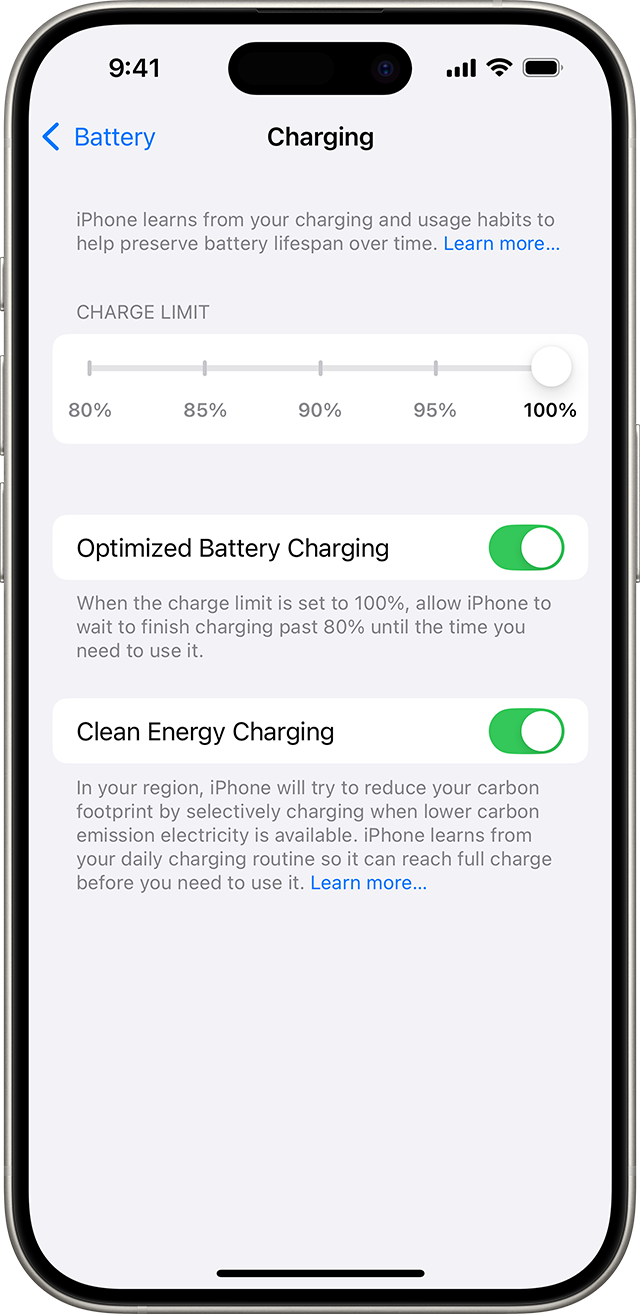
One quirk worth knowing: if Charge Limit sits below 100 percent, the iPhone still charges to 100 percent occasionally to keep its battery estimates accurate. That is the system working, not the battery failing. For more settings to check before booking service, read our earlier pass on iOS 27.2.1 battery drain checks, the Battery Insights screen, and the battery settings to change before a paid swap.
The 91 percent screenshot stays an anecdote until its cycle count is on the table. If Battery Health says a replacement is recommended, or capacity drops below 80 percent under AppleCare, book service. If neither is true, the number by itself is not a repair order.
Photo: Apple (iPhone 17 Pro), Apple Support (Battery Health, Charging screens)
Source: Apple support 101575 / 106348 / 108055, Apple battery replacement, X