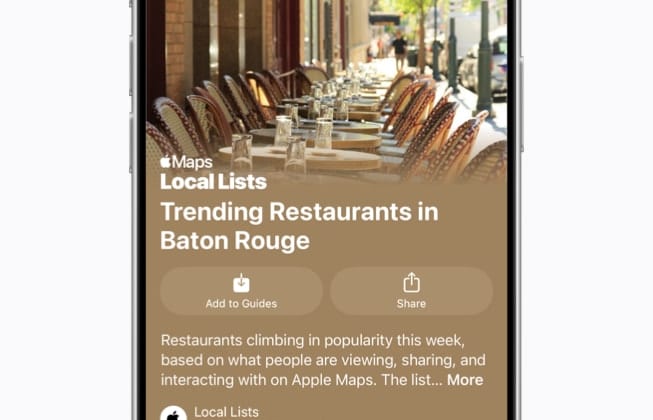
Local Lists is the weekly trend list inside Maps on iOS 27, and it stays hidden. Ryan Christoffel at 9to5Mac wrote on November 13, 2026 that he only found it after months on iOS 27. The official path takes four taps. Open Maps, tap the search field, enter “Local Lists,” tap Guides, then tap a collection, such as restaurants or kid-friendly spots. That path is documented on the iPhone User Guide page for finding nearby attractions, restaurants, and services.
The ranking is not personal. Apple says the suggestions “are based on what people view, share, and interact with most on Apple Maps,” and the June 9, 2026 services announcement adds that all insights are “derived with privacy in mind and never tied to individual users.” So no, the list is not built from your own Apple ID history.

Local Lists is U.S. only, and only in select cities
Two Apple pages word the availability differently, so keep both straight. What’s new in iOS 27 calls Local Lists “available in the U.S. only.” The User Guide says “select U.S. cities.” A U.S. address alone does not guarantee a list, and Apple publishes no city list. If typing “Local Lists” returns nothing, your area is likely outside the coverage. There is no Settings switch either. The entry point is the search field in Maps, not Settings > Apps > Maps.
The Trending Restaurants row can hide behind the keyboard
9to5Mac describes a second way in. Tap the search field and scroll down. A Trending Restaurants section sits below it, but on Christoffel’s iPhone 18 Pro the keyboard covered the section by default, so he had to scroll and dismiss the keyboard first. The search screen shows only a handful of entries. Tap through to open the full ranked list.
Two numbers from that report need care. 9to5Mac says entries are ranked 1 to 20, and it counts 1,021 lists in the full Local Lists collection. Those are the publication’s own observations, not Apple figures. The one official count on record is the Apple Maps example list Trending Restaurants in Manhattan, labeled “Local Lists” and showing “20 places.” From an open list, 9to5Mac says you can tap the Apple logo and “Local Lists” near the last-updated text to browse every collection.

Local Lists is not Guides We Love or Find Nearby
Three features share the Maps search screen and people mix them up. The differences:
| Feature | What it is | Where it opens | How entries are chosen |
|---|---|---|---|
| Local Lists | Weekly trend collections, such as trending restaurants and kid-friendly spots | Search field → “Local Lists” → Guides | What people view, share, and interact with most on Apple Maps |
| Guides We Love | Editorial and publisher guides | Maps → scroll down → Guides We Love | Editors and publishers; guides are automatically updated when new places are added |
| Find Nearby | Ordinary category and keyword searches | Search field → a category chip, or type “playgrounds” and tap Search Nearby | Whatever sits near the map area; not available in all countries or regions |
Guides We Love is the editorial shelf. Open Maps, scroll down, tap Guides We Love, then browse by City, Interest, or Publisher. That is curation, not the weekly Local Lists trend signal. Find Nearby is plainer: tap a category like Grocery Stores or Restaurants below Find Nearby, drag the map to change the area, or ask Siri “Find coffee near me.” Same screen, three different features.
Save the place now, because the list updates weekly
The Manhattan list states it in its own header: “The list updates weekly, so save any places you want to revisit.” A restaurant that trends this week can drop off after seven days. From the place card, tap More, then Add to Guides, and choose a guide. Or add the place to Places from the bottom of the card. Saved guides live under Places > Guides. 9to5Mac also notes a + button next to each listing on the Trending Restaurants list. That control is not in the User Guide steps, so check your own build before relying on it.
Two last boundaries. Local Lists is an iOS 27 feature in the current User Guide and in What’s new in iOS 27, not a 27.3 beta item, and it does not require an iPhone 18 Pro or Siri AI. Meeting friends from a trending spot? Pair it with custom-duration location sharing in Find My, or download the area first with our iOS tip: download Offline Maps before you lose signal. For the wider Maps changes in this update, see our preview of the top 10 new Apple Maps features in iOS 27.
Photo: Apple (Apple Maps Local Lists, Apple Newsroom; Trending Restaurants in Manhattan and Maps app, Apple). Source: Apple iPhone User Guide, Apple Newsroom, 9to5Mac.