iDownloadBlog pushed the same tutorial again on X today. The complaint behind it is familiar. The iPhone feels slower in the afternoon, apps take a beat longer, and the first guess is iOS. On a lot of phones the real cause is Adaptive Power, a battery mode that quietly trims performance. Apple updated its support page for the mode on October 20, and it documents a switch most owners never open.
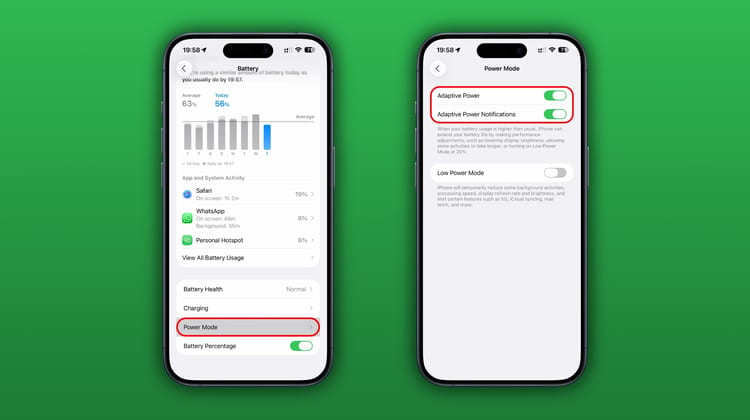
Adaptive Power Notifications sit in Settings > Battery > Power Mode
Open Settings, tap Battery, then Power Mode. Two switches live in that menu. Adaptive Power runs the mode. Adaptive Power Notifications sends the alert.
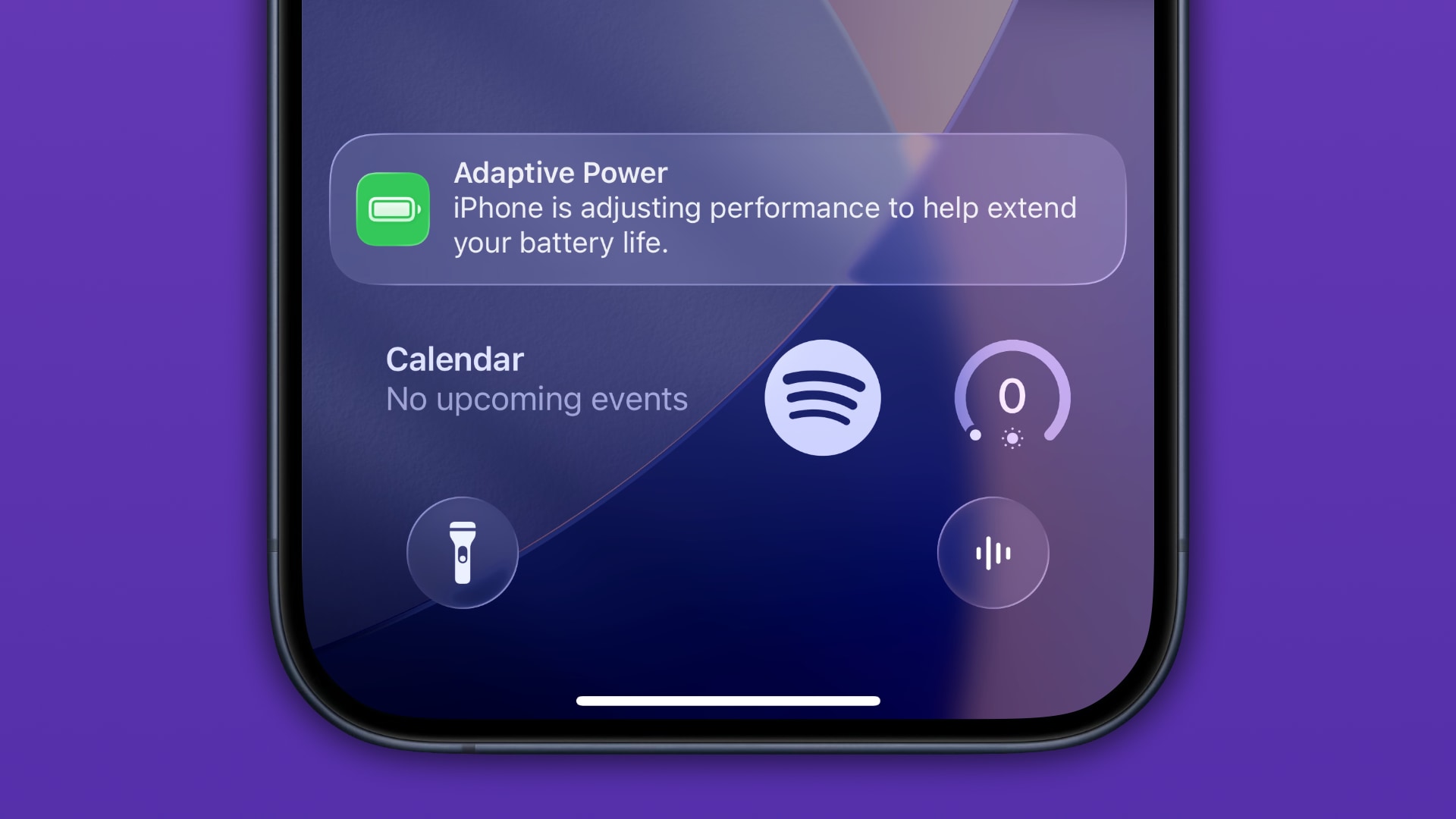
When the mode engages during the day, the phone posts a notification reading “iPhone is adjusting performance to help extend your battery life,” iDownloadBlog writes in its walkthrough. It appears on the Lock Screen while the phone is locked, and on screen during active use.
The timing is not accidental. iOS 27.2 with build 24B119 went public today, so plenty of phones are sitting in Battery settings this week checking what changed. The Power Modes menu is also covered in Apple’s iPhone user guide entry on saving battery.
What the mode adjusts, and what it leaves alone
Apple describes Adaptive Power as on-device intelligence that predicts from recent usage patterns when extra battery will be needed that day, then adjusts. It can make performance adjustments, lower screen brightness by a small amount, limit background activity, and switch Low Power Mode on when the battery hits 20 percent.
Apple’s wording for brightness is “a small amount.” iDownloadBlog puts the figure at about 3 percent.
Two exemptions matter. The mode does not manage performance while the camera is open, or while a game runs with Game Mode on. And it is gentler than Low Power Mode. Background App Refresh, mail fetch, Always-On display, iCloud syncing, 5G and ProMotion keep running under Adaptive Power, where Low Power Mode would cut into them, per iDownloadBlog.
Adaptive Power also appears in our earlier list of battery settings to check before booking a $99 battery swap, alongside the rest of the Battery menu.
iPhone 15 Pro and iPhone 16 models ship with it off
Adaptive Power requires Apple Intelligence, so the supported list starts at iPhone 15 Pro.
Default on: iPhone Duo, iPhone 18 Pro Max, iPhone 18 Pro, iPhone 17 Pro Max, iPhone 17 Pro, iPhone Air, iPhone 17, iPhone 17e.
Default off: iPhone 16, iPhone 16 Plus, iPhone 16 Pro, iPhone 16 Pro Max, iPhone 16e, iPhone 15 Pro, iPhone 15 Pro Max.
No Power Mode menu at all means the model is not supported. iPhone Duo sits on the default-on list, and its EU battery label came in at 4,883 mAh in our earlier report.
Seven days of learning, then one alert at a time
Apple’s footnote on the page: Adaptive Power needs at least 7 days to learn charging habits, so it will not engage before then. A phone set up this weekend shows no notification this week.
After that, the first engagement produces the alert. Later alerts come only on days the battery drains faster than usual, not on schedule.
The common mistake is treating the two switches as one control. Turning Adaptive Power Notifications off stops the alerts. The mode keeps working. Apple states it directly: if you turn off notifications, Adaptive Power continues to help extend your battery life.
Photo: iDownloadBlog / Apple
Source: Apple Support, iDownloadBlog