Apple opened a research study on November 15 that lets people in the U.S. ask everyday health questions in a study app, with answers grounded in peer-reviewed citations. The Apple Health AI Usage Study is this week's hook, but most of its building blocks, heart rate, ECG, sleep, medications, medical records, are already on your devices. Here are 10 Apple Health features worth trying today, and what each one needs to work. If you have ten minutes, start with items 6 and 7.
1. See if you can join Apple's Health AI Usage Study in the U.S.
The study is open to up to 200,000 eligible participants age 21 and older across the United States. You need an Apple Intelligence-enabled iPhone (iPhone 15 Pro or later) running iOS 26 or later, then download the study app and choose to enroll. Participants ask everyday health questions and see linked, peer-reviewed clinical citations, from sources such as The New England Journal of Medicine, JAMA, and Nature. Apple's footnote is blunt: the study app is not meant to diagnose or treat any condition, or replace the advice of medical professionals. We covered the launch in more detail when the Health AI Usage Study opened to 200,000 U.S. iPhone users.
2. Optionally share HealthKit heart rate, activity, sleep, or lab data with the study
Sharing is a choice, not a condition of joining. Participants can share HealthKit data types such as resting heart rate, activity, sleep, or lab results, to see how personal data changes answer relevance. Apple says study data will not be used to train AI models, and the app has guardrails that detect some concerning questions and suggest contacting a healthcare provider. You are not signing up to upload your whole Health library.
3. Open the Apple Health app to keep medications, sleep, and activity in one place
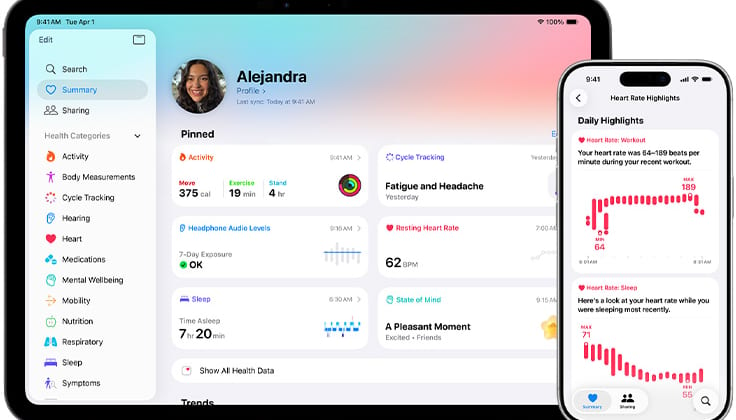
The Health app collects data from iPhone, iPad, Apple Watch, and apps you already use. It counts steps and walking or running distance on its own, tracks Activity automatically when you wear an Apple Watch, and accepts manual entries. Set a Health Profile (birth date, blood type) from Summary, and pin the categories you check most. On-device health data is encrypted and locked behind your passcode, Touch ID, or Face ID. With two-factor authentication on, health data synced to iCloud is end-to-end encrypted, so even Apple cannot read it. Apple's health page still lists the redesigned Health app for late 2026; our iOS 27.3 beta preview covers the redesign for when it ships.
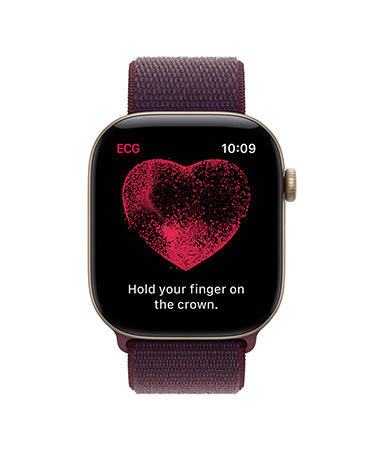
4. Check heart rate, take an ECG, and set up hypertension notifications on Apple Watch
The ECG app records an electrocardiogram on Apple Watch Series 4 or later and every Apple Watch Ultra, for users 22 and older in countries where it is available. Set it up in the Health app: Browse > Heart > Electrocardiograms (ECG) > Set Up ECG App. For a reading, wear the band snugly, open ECG app, and rest a finger from the other hand on the Digital Crown for about 30 seconds. You get a classification, like sinus rhythm or AFib, and can export a PDF for your doctor. Hypertension notifications need Apple Watch Series 9 or Apple Watch Ultra 2 or later. Apple says the feature cannot detect a heart attack or every instance of high blood pressure, and it is not for people already diagnosed with hypertension. Apple's ECG support document walks through the setup and the results.
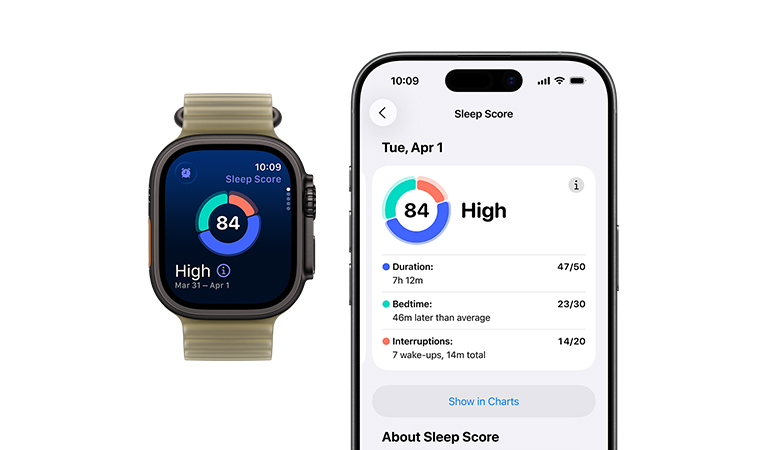
5. Set a sleep schedule and check your Sleep Score with Apple Watch
Set a sleep goal, bedtime, wake-up time, and Sleep Focus in the Health app, then turn on Track Sleep with Apple Watch. Charge the watch to at least 30% before bed and wear it at least an hour overnight, or the charts show gaps. Each morning brings a Sleep Score from 0 to 100: sleep duration counts 50 points, bedtime consistency 30 (based on your last 13 nights), interruptions 20. Browse > Sleep breaks the night into Awake, REM, Core, and Deep stages. The score does not apply to watches set up with Apple Watch For Your Kids. Apple's sleep tracking guide has the full setup.
6. Add medications in the Health app and turn on dose reminders
Browse > Medications > Add a Medication starts a list of drugs, vitamins, and supplements. In the U.S. you can add a medication with the iPhone camera; elsewhere tap Add and search. Set the form, dose, schedule (days, times, repeats), and start or end dates. In Browse > Medications > Options, turn on Dose Reminders; a follow-up reminder fires 30 minutes later if you have not logged a dose. Drug interactions appear after adding medications in the U.S. only. When your doctor wants the list, More > Export PDF. Apple's medications guide covers logging Taken or Skipped on iPhone and Apple Watch.
7. Set up Medical ID so first responders can see it from the Lock screen
Open Health app > Summary > your profile picture > Medical ID, and turn on Show When Locked. Allergies, conditions, medications, and emergency contacts become visible without a passcode. Turn on Share During Emergency Call and the Medical ID goes to emergency services when you call or text for help from iPhone or Apple Watch. Apple says it cannot read your Medical ID when it is shared. One trap: if Emergency Calls & SOS is off (Settings > Privacy & Security > Location Services > System Services), the Medical ID is not shared at all.
8. Share selected Health data with a family member or caregiver
Health app > Sharing > Share with Someone sends health alerts and trends to a contact who is already in your Contacts list. They can see notifications too, including high heart rate, irregular rhythm, and notable trend alerts like a sharp drop in activity. Pick topics with See Suggested Topics or Set Up Manually. To stop, open the person's name and tap Stop Sharing or Remove Account. Deleting the person from Contacts does not stop sharing, a common mistake. This path is separate from the study's optional HealthKit sharing.
9. Download health records and pin lab results in the Health app
Summary > your profile > Health Records > Get Started connects a clinic or hospital with its patient portal login, and new records arrive automatically. Not every institution is on the list, though Apple keeps adding them. In Lab Results, swipe left or touch and hold a result, then tap Pin this Lab to keep it at the top of the list. When the iPhone is locked, everything in the Health app except your Medical ID stays encrypted. Downloading records is not the same as sharing lab results with the research study.
10. Log your state of mind and take a mental health assessment
Browse > Mental Wellbeing > State of Mind logs how you feel right now, or how you felt overall today, on a slider with optional context words. Charts and Associations can show how mood moves with exercise, sleep, and mindfulness minutes. Anxiety Risk and Depression Risk questionnaires (GAD-7 and PHQ-9) are for ages 13 and up, and results export as a PDF for your doctor. Apple is explicit that these are not medical diagnoses, and the questions are not part of the new health AI study. If you are worried about your mental health, talk to a clinician.
Start with items 6 and 7 if you have not set them up. Dose reminders and Medical ID are the two that matter most on the day something goes wrong.
Photo: Apple.
Source: Apple Newsroom; Apple Support (ECG app 120278, sleep tracking 108906, medications 105064, Medical ID 105072, Health Records and State of Mind guides).