Apple has additionally supported the iPhone PWM dimming settings for the new iPhone 17 series. This new feature will be expected to greatly improve the viewing experience for users who use iPhone phone screens for a long time and are prone to feeling the symptoms of eye pressure, headache or dizziness caused by flickering.
What is PWM dimming? How does it work?
The full name of PWM pulse width modulation is Pulse Width Modulation. It is a common electronic signal regulation technology, mainly used to regulate voltage or current output, thereby controlling power. In display technology, PWM dimming is widely used in the control of screen backlight brightness.
PWM dimming technology does not dim the screen by reducing current, but controls the backlight pixels through extremely high frequency fast switching operations. By changing the time ratio of the light source to turn on and off, it simulates different brightness levels. This PWM operation speed is extremely fast, often reaching a range of kHz or even MHz levels. The screen backlight is flickering for the naked eye of ordinary users.
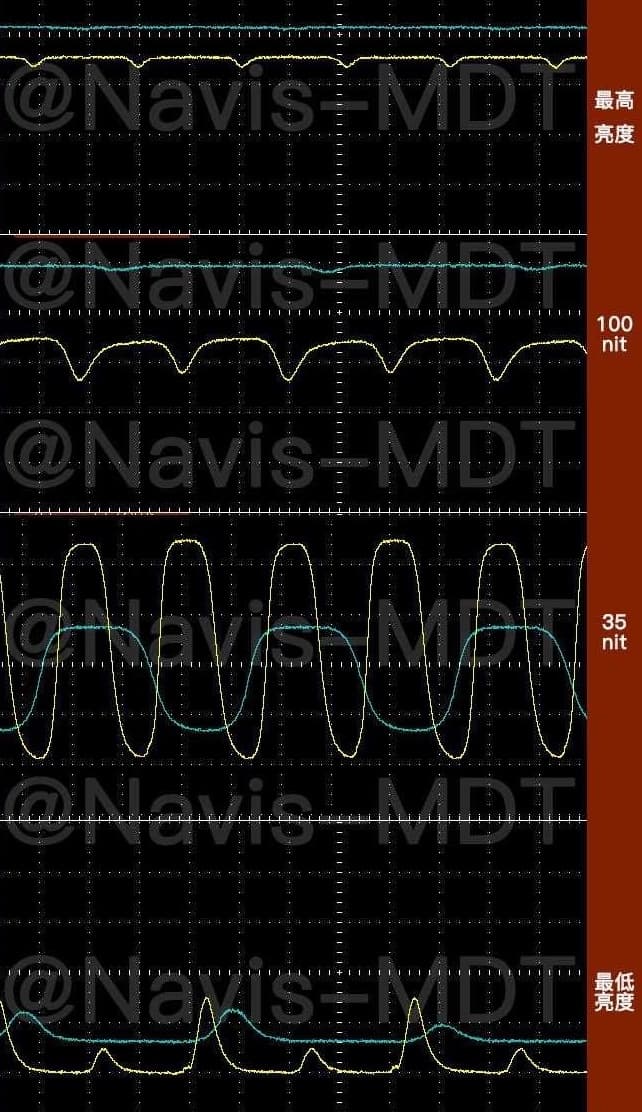
In other words, PWM dimming does not continuously reduce the brightness, but creates different light and dark effects through high frequency flickering. However, some users who are more sensitive to light changes may feel discomfort at low frequency PWM, such as eye fatigue or headache.
Why are anyone sensitive to iPhone PWM dimming?
Although in theory, the light dimmed by mobile phone screen PWM will not be noticed by human eyes, some users are still particularly sensitive to low-frequency PWM. When the screen brightness drops to certain stages, the frequency of PWM may be insufficient to cause the OLED mobile phone screen to “hide” and flicker, which is prone to ripples of oblique movement, causing eye soreness, headaches, and even visual fatigue.
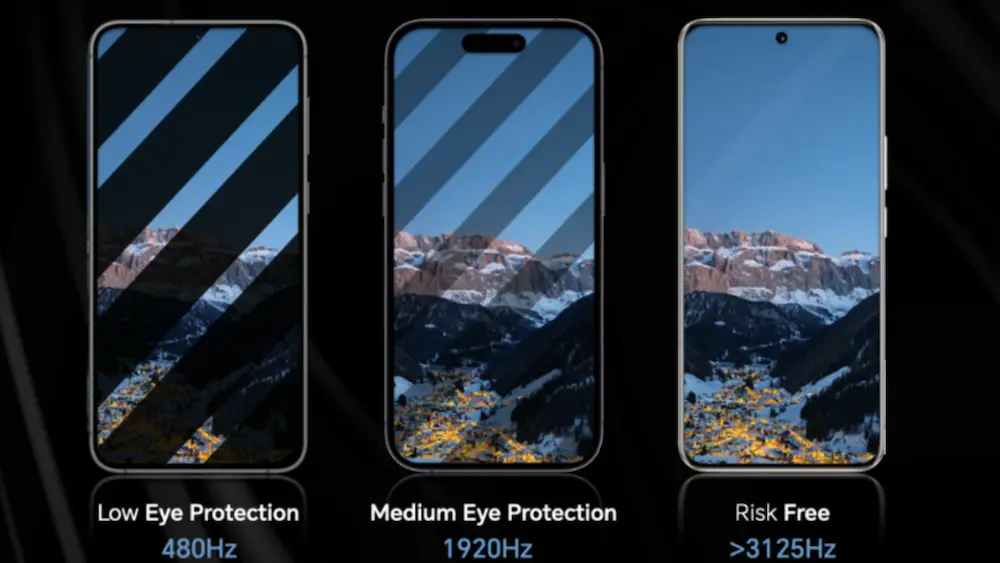
This is also why many manufacturers later tried to use DC dimming (directly controlling the current strength), or specifically marked the dimming method and frequency in the specification table, emphasizing the “high-frequency PWM” or “no PWM” design. Some mobile phone manufacturers even began to add PWM switches to let users decide at their own discretion to reduce the impact on sensitive groups.
Further reading: Will iPhone PWM strobe damage your eyes? Comprehensive and in-depth understanding of the reasons and 7 solutions
How to set up iPhone 17 PWM dimming?
According to developer Aaron Perris, Apple will soon add the “PWM dimming” setting on the iPhone 17, allowing users to switch to the dimming mode that is less irritating to their eyes. This function is currently known to be used in both the iPhone 17 Pro series, as well as the iPhone 17 basic model and iPhone Air.
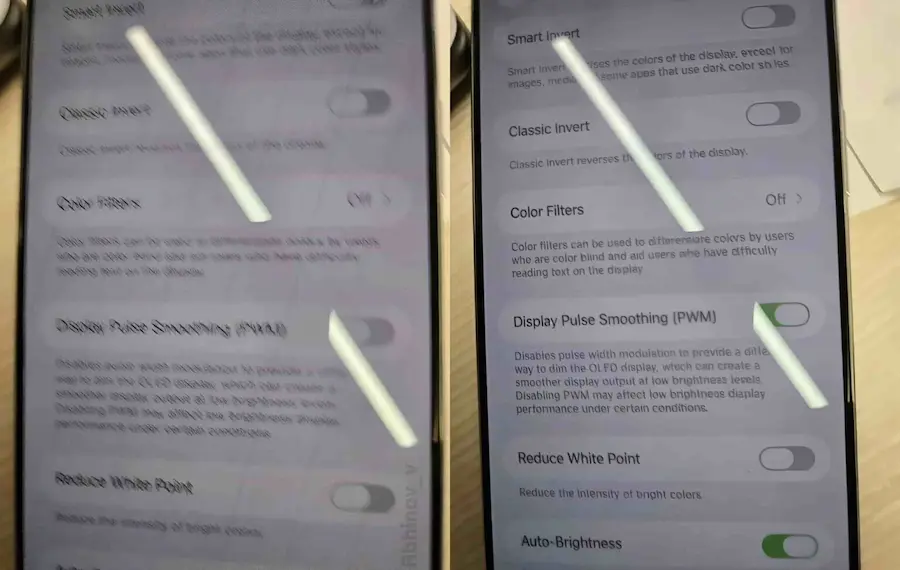
Some foreign users also found from the new iPhone 17 series that the PWM dimming settings have been integrated into the “Assisted Use” menu of iOS 26 system. If you want to set the iPhone 17 PWM dimming function steps are as follows:
- Open iOS 26 to build a custom app
- Select “Assisted Use”
- Click “Show and Text Size”
- You can customize the “Diaplay Pulse Smoothing (PWM)” dimming switch
Why does Apple limit the iPhone 17 to PWM dimming?
Regarding why Apple only limits the iPhone 17 series to control the PWM dimming function, however, it may be related to the improvement of the display control capabilities of the A19 and A19 Pro chips, and can support more advanced dimming methods.
What is the effect of turning off the iPhone 17 PWM dimming screen display?
Apple’s official description of the PWM dimming function of the iPhone 17 series clearly mentioned that when the iPhone PWM pulse width adjustment is turned off, the OLED display can be dimmed in another way, which can produce a smoother display effect under low brightness conditions. At the same time, turning off PWM will also cause low brightness display quality in some cases.
Simply put, if you feel that you have been watching the iPhone 17 screen for a long time and your eyes feel uncomfortable, it is that you are easily affected by PWM dimming. Usually, users like this recommend turning off the iPhone 17 PWM function, which will prevent the monitor from flashing easily, and can completely solve the problem of OLED screen discomfort for a few users over the years.
Apple Autumn Press Conference compiled
iPhone 17 Purchase Guide》
iPhone 17 specification analysis》
More recommendations for iPhone 17 series peripheral products
TORRAS Ostand iPhone 17 series mobile phone case, if you purchase Ostand mobile phone case on Zhixuanjia’s official website, enter the exclusive discount code for Mr. Crazy fans and enjoy a 15% discount on the original price!
- Event period: From now until 2025/10/31
- Official website purchase link:Click me to go
- Exclusive discount code: MRMAD17 (all capitalization), enter 15% off

If you want to know more about Apple information, iPhone teaching and 3C information skills, please follow us
Crazy FB Fan Group,
Subscribe to Mad Google News,
Telegram,
Instagramas well as
Subscribe to Madness YouTube.