Today, when passwords have become one of the biggest vulnerabilities in the security industry, Facebook has finally taken an important step towards the era of passwordlessness. Meta recently officially announced that it will launch a new “Passkey” login security mechanism for Facebook. In the future, users only need to use the FB pass key to log in safely and quickly through biometric identification or device PIN code, without remembering a long list of passwords.
What is the FB Passkey?
Passkey pass key is a new login method that replaces traditional passwords. It is a set of encryption keys stored in the user device. It does not require the Meta server to retain the plain text password, which greatly reduces the risk of hacker attacks. When logging into the FB account, you need to complete the login process through fingerprint identification, Face ID or device PIN verification.
The FB pass key is different from traditional account secrets. Passkey password keys are not easily stolen by phishing websites, nor can they be reused or shared, which is equivalent to creating an exclusive digital identity key for each user.

At the same time, Passkey pass keys have cross-platform features. If Apple iCloud Keychain or Google Password Manager is enabled, the same set of keys can be synchronized to multiple devices and services. It is not limited to Facebook, but can also be integrated into Meta Pay payment, Messenger backup and encryption functions in the future.
How to enable Facebook Pass Key feature?
The current FB pass key can only be set and established on iPhone or Android phones and cannot be enabled through the computer.
Step 1: Go to Meta Account Management Center
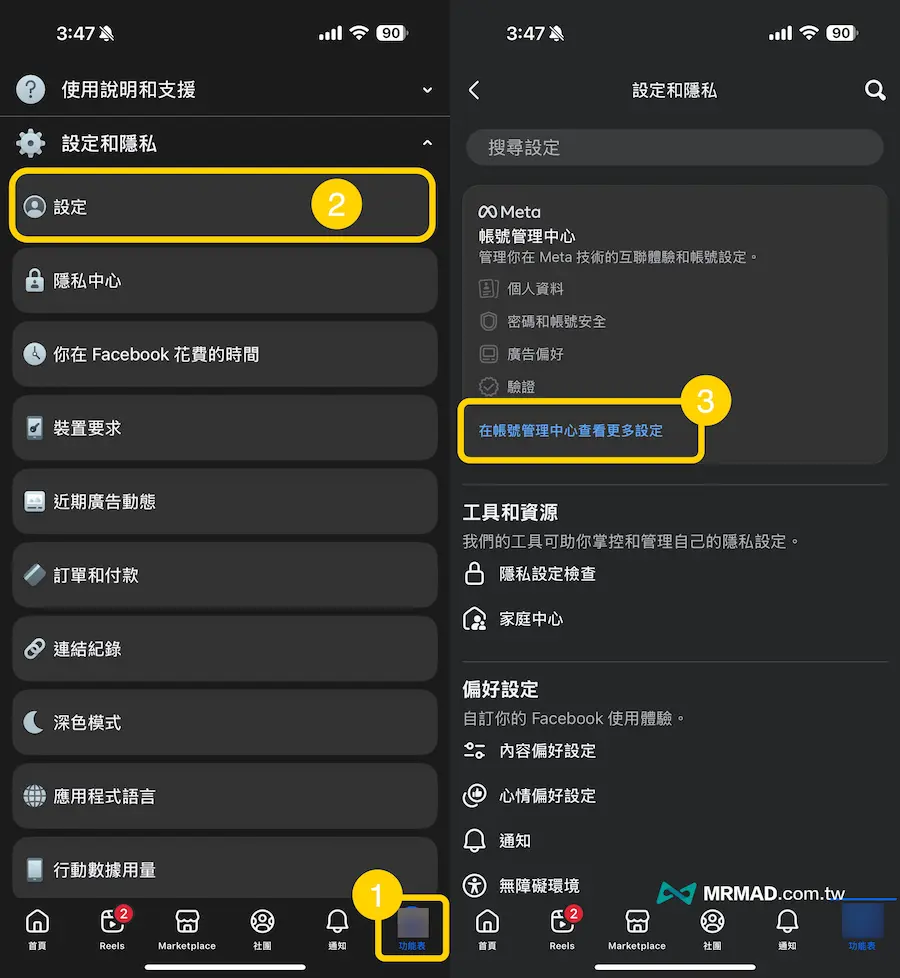
Open the Facebook App directly, click the “Menu” in the lower right corner, expand the “Settings and Privacy” menu, click “Settings”, and press “View more settings in the Account Management Center”.
Step 2: Password and Security
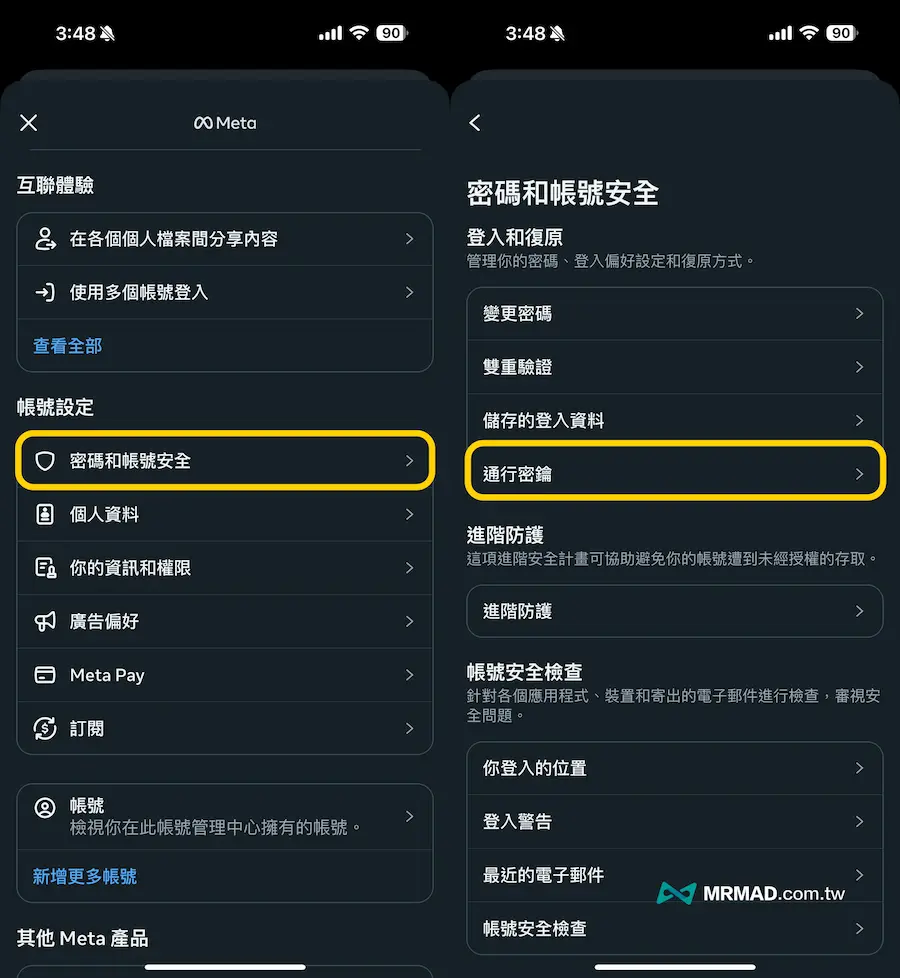
Click “Password and Account Security” under Account Settings Category, and then select “Pass Key”.
Step 3: Enable Pass Key Authentication
After the receiver clicks “Create Pass Key”, he will see the FB Pass Key function description and press “Create Pass Key” to continue.
⚠️ Reminder: If FB two-factor verification is enabled, you must turn it off before you can enable the pass key.
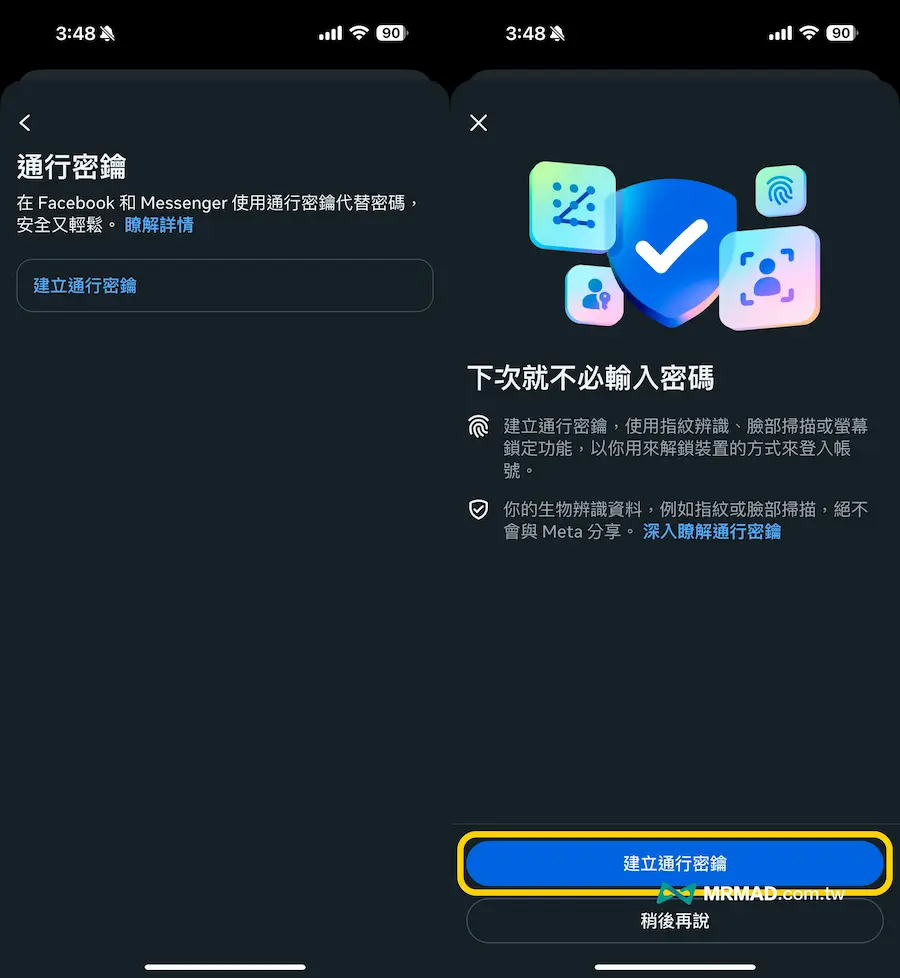
The process will require you to confirm your identity through Facebook password or text message before you will jump out of Passkey login verification. You can use your fingerprint, Face ID or device PIN to enable the key storage according to different devices.
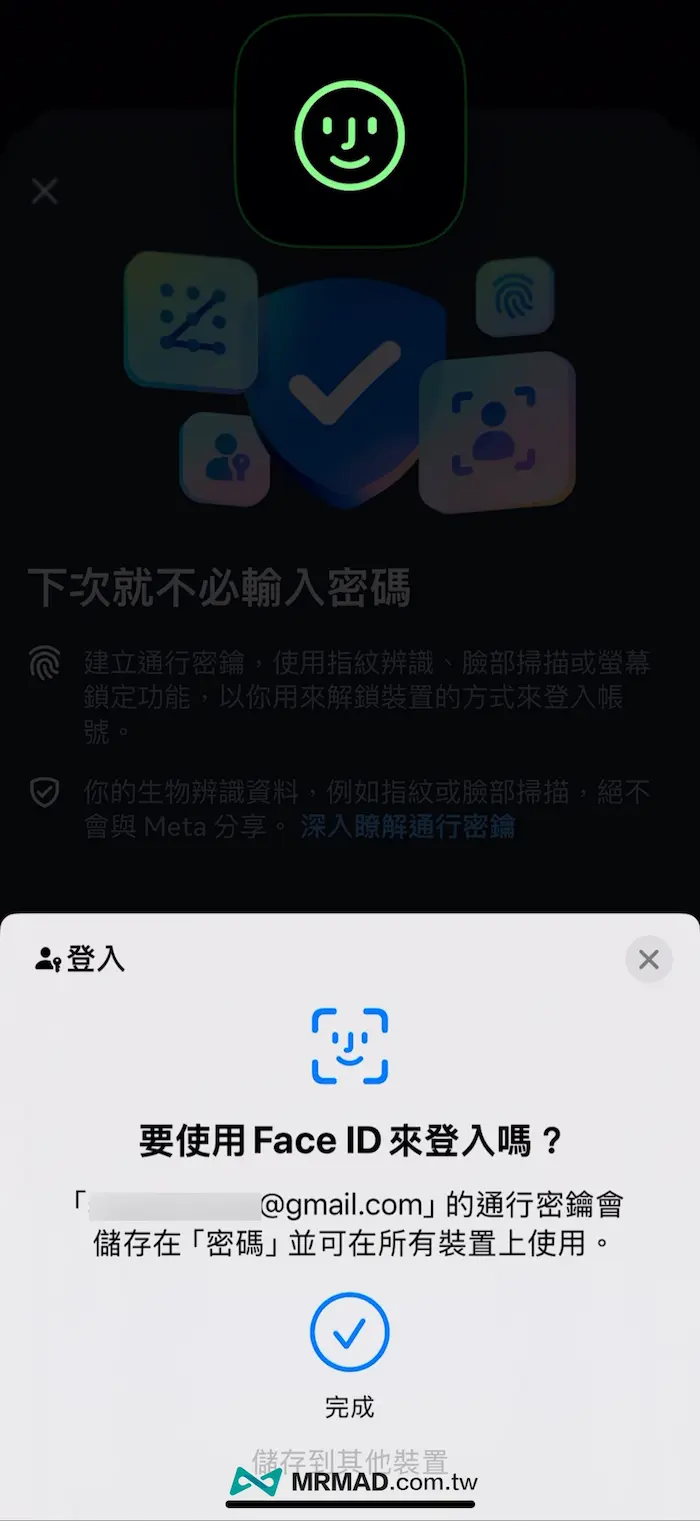
Step 4: Manage FB Pass Keys
After enabling Facebook’s Passkey password key function, the system will automatically create a set of passkeys and use your verified email address as the name. If you do not use email, it will be named after the bound mobile phone number.
The password keys for iPhone and Android devices are completely different. The iPhone is stored directly on Apple iCloud Keychain. If it is an Android device, it will be stored in Google Password Manager. If the device has been eliminated and is not used, you can manually click to remove it yourself.

How to deactivate and remove FB pass key?
Currently, Facebook’s pass key function only supports use on mobile devices. If you log in on a computer or other non-supported platform, you still need to use your account password as a verification method.
If you need to deactivate or remove the FB pass key, you can follow the following steps:
- Open Facebook App
- Go to “Settings and Privacy” > “Settings”
- Click “Account Management Center”> “Password and Account Security”
- Select the “Password Key” option
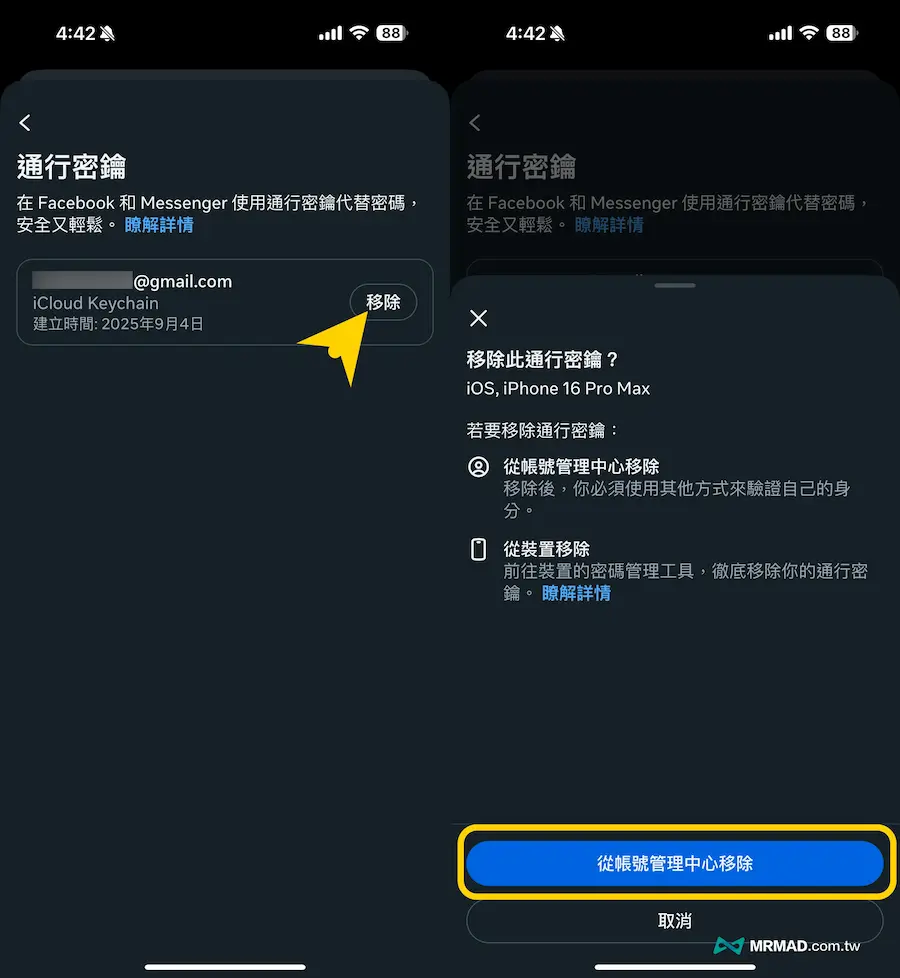
- Click the “Remove” button next to the pass key you want to remove
- And press “Remove from Account Management Center”
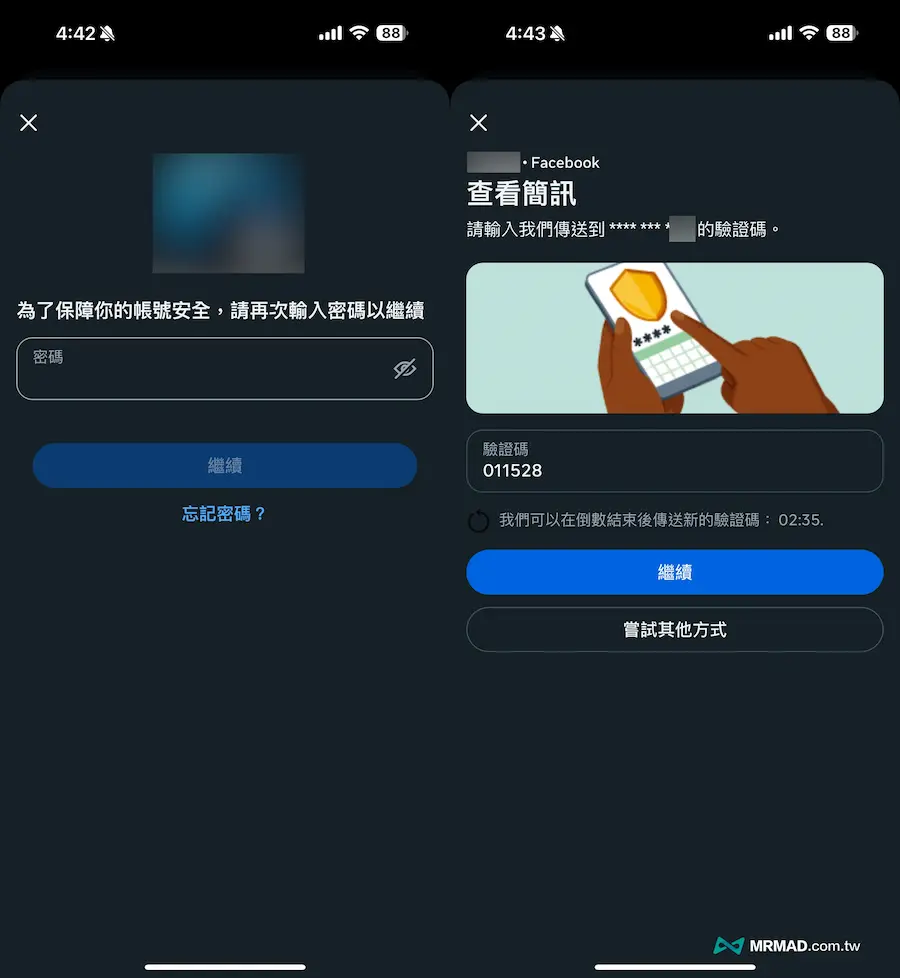
Finally, you will be asked to enter the Facebook password and text message verification code to confirm your identity. It will not be restored after deleting the pass key. In the future, logging into Facebook on the same device will also change the password or other verification methods to replace it.
Summarize
It is worth noting that although Facebook regards Passkey as the main identity verification mechanism to promote the future, it still retains more traditional account passwords and two-factor verification methods. If you are used to using Facebook on your mobile phone and pay more attention to security and convenience, it will be more convenient to enable FB pass keys now.
If you want to know more about Apple information, iPhone teaching and 3C information skills, please follow us
Crazy FB Fan Group,
Subscribe to Mad Google News,
Telegram,
Instagramas well as
Subscribe to Madness YouTube.