If information gets buried within group or open chats, important contacts may be missed.
Such situations can be fatal, especially when there are important information about work or events.
LINE’s “announcement function” is a convenient feature that allows you to display messages in a fixed way and ensure that important information is shared with participants.
In this article, we will explain in detail how to set up LINE announcements, specific examples of use, and points to be careful about.
What is a LINE Announcement?

LINE Announcements is a function that “makes specific information stand out” in chat.
Regular messages will be buried in other posts over time, but with the announcement feature, you can display important information in a group in a static way.
This reduces the risk of participants missing important information.
Each chat room can be set up to 5 units, so it can be used even when there are multiple important communications.
How to set up and cancel LINE Announcements

Below we will explain how to set up and cancel notifications for LINE Announcements.
How to set up a LINE Announcement
- Open talk, group chat, and open chat
- Long press the message you want to make an announcement
- Select “Announcement” from the menu that appears.
- It’s OK if the message is displayed as an announcement and is fixed at the top of the screen.
How to cancel LINE Announcement
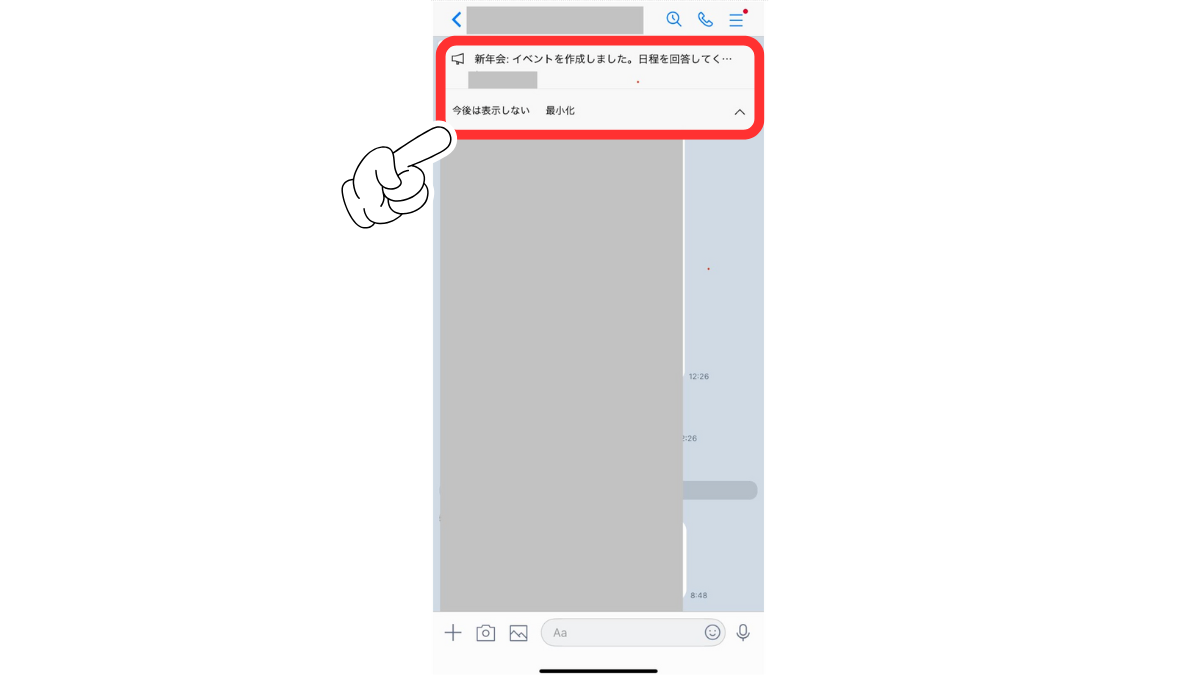
- For iPhone, swipe left on the announced message, or long press on Android.
- Selecting “Cancel Announcement” will remove the static display
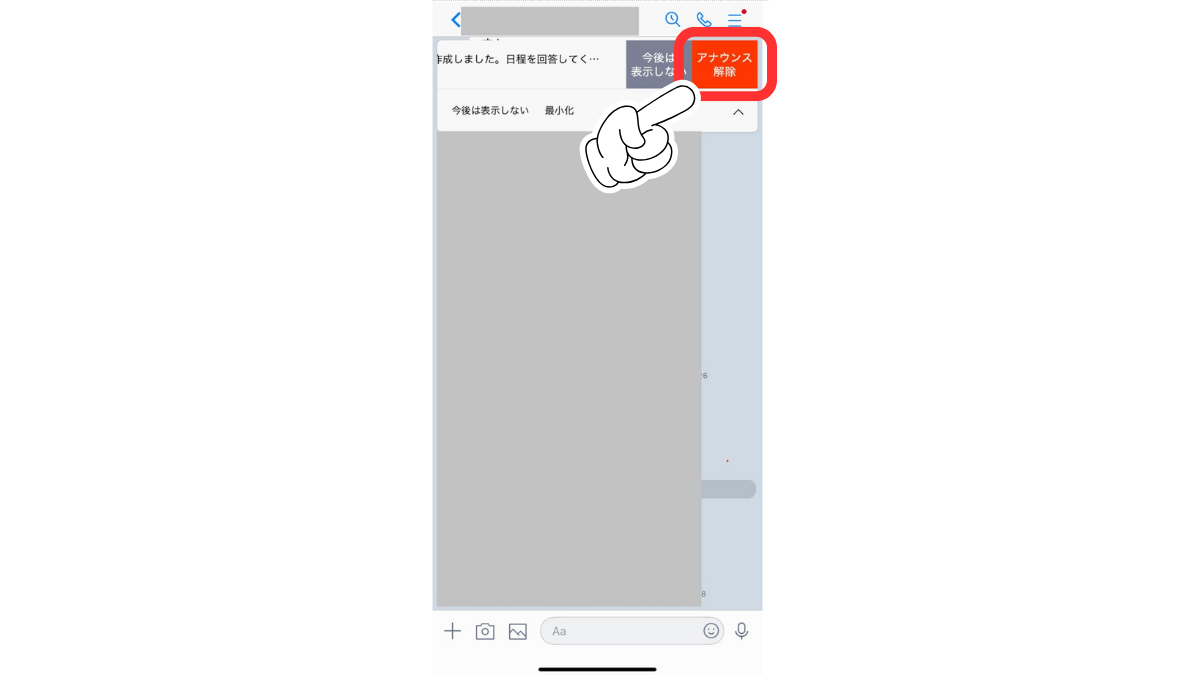
(If you want to cancel multiple announcements, perform the same operation with each message.)
Specific examples of using LINE Announcement Function

LINE’s announcement function can be used in a variety of ways depending on how it is done.
Notice of important notices
It is important to ensure that all important information, such as emergency notifications and event changes, are communicated to everyone.
For example, if an important document is closed or a sudden change in schedule, it may be buried in regular talk messages.
The announcement feature allows you to display these important information at the top of the group, allowing everyone to view it without missing it.
Event reminders
It can also be used to announce dates for meetings and events.
For example, if you pin a message such as “The next meeting will start at ○/○ on/off, on/off, the busy members can quickly reconfirm their plans.
Additionally, the announcement function allows you to post a link, so if you want to post a map of the event location, an announcement with a link will make information sharing easier.
Disclosure of information regarding store management
Restaurant and retail staff communication groups can improve business efficiency by sharing campaign information and changes in staff shifts through the announcement function.
For example, by statically displaying a message such as “New menus will be introduced starting tomorrow! Please also check the cash register compatibility manual” to ensure that all staff members are informed.
You will also be able to save you the trouble of having a morning assembly at the store.
Information sharing within the home
It can also be used conveniently for group chats with family and relatives.
For example, each person can prepare smoothly by announcing important plans such as “○○-chan’s piano recital will be held on or off on a ○/○/○/○/○/○/○/○/○/○/○/○/○/○/○/○/○/○/○/○/○/○/○/○/○/○/○/○/○/○/○/○/○/○/○/○/○/○/○/○/○/○/○/○/○/○/
It will also be easier to prevent miscommunication between families.
Things to note when using the LINE Announcement function

Some posts can be announced and some cannot be announced
LINE announcements are very useful, but they do not apply to all posts.
The following posts can be announced:
- Talk
- vote
- Events with scheduling
- link
- album
On the other hand, the following posts cannot be announced:
- image
- movie
- stamp
- Notes
- Amidakuji
Avoid abuse of announcements
Setting announcements frequently makes it difficult to tell which ones are really important.
Make sure you only have information you really need.
Don’t forget to update the latest news
If the announcement remains outdated, it can be confusing.
When information is updated, please change the content as appropriate.
Frequently asked questions on LINE Announcements

Below we will answer frequently asked questions about LINE’s announcement function.
What is the difference between “unannouncement” and “not displaying it anytime soon” and “minimizing”?
I mentioned earlier how to cancel an announcement, and at the bottom of the tab, “Do not display it anytime soon” and “Minimize” will be displayed.
First of all, “Not going to display” means that the relevant announcements will only be displayed on your own talk screen.
Next, “minimization” is a function that can be used when an announcement is always displayed and feels intrusive, and literally displays it in a small size.
Press Minimize to display only the megaphone mark, so if you want to see the contents, tap the mark to view the contents.
Will the other person find out if they cancel the announcement?
Even if you cancel the announcement, no notification will be given.
However, the announcements will naturally disappear, so there is a possibility that other members will notice that the announcements within the group have disappeared.
summary
LINE Announcement is a useful feature that streamlines information sharing and prevents important messages from being missed.
This feature will make communication smoother, especially when a lot of information is flying around in groups or open chat.
Make appropriate use of this and improve the quality of information sharing.
Source: iPhone Mania