
 If you hold the iPhone sideways these days, not much happens. Except for a handful of apps, the so-called “Landscape” mode is no longer particularly supported by the smartphone. That was different, because on earlier models even the home screen could be brought to the horizontal. A feature that Apple unfortunately said goodbye to with the Face ID devices. A new draft brings landscape home screen mode back to iPhone, showing what we’re missing out on.
New mockup shows landscape view for home screen
Why Apple said goodbye to landscape mode in the wake of ever-growing iPhones is still a mystery to this day. After all, the large displays of modern iPhone models are ideal for being used in landscape format. Some iOS apps still support landscape view here and there, e.g. B. Mail, Notes, Safari and Settings. Since the iPhone X and Face ID, however, the home screen can no longer be brought into the horizontal position.
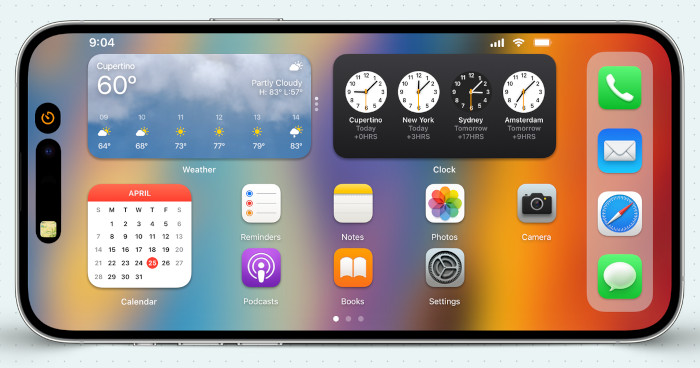
Even if most people are likely to use their iPhone in portrait format, landscape format still has its advantages, as designer BasicAppleGuy proves in a new design. Once flipped sideways, app icons and widgets reorganize with the dock moving to the right edge of the screen.
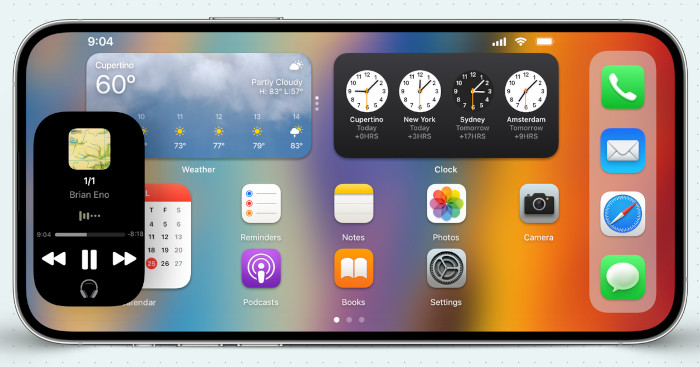
The live activities of the Dynamic Island can be conveniently displayed and used in a lower window, as shown in the image below.
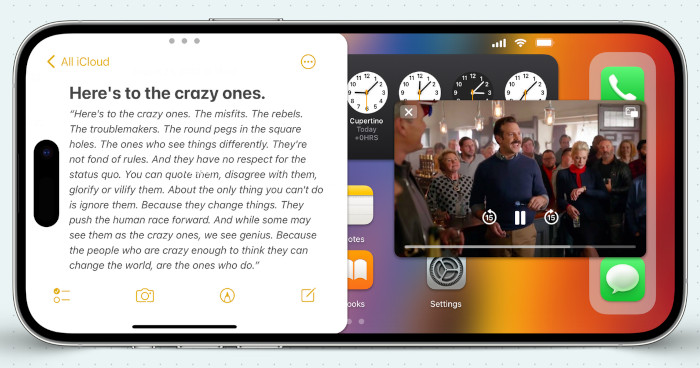
And when it comes to multitasking, the landscape view on the home screen would be an asset. As on the iPad, different apps could share the start screen in a split-screen mode and be used conveniently side by side.
Whether Apple will revive landscape mode with the upcoming iPhone 15 is not known. However, it cannot be ruled out that Apple will be inspired by such drafts when it comes to design issues and will take up the feature again. There are at least good reasons for this, as the mockup impressively shows.
Source: iPhone Tricks