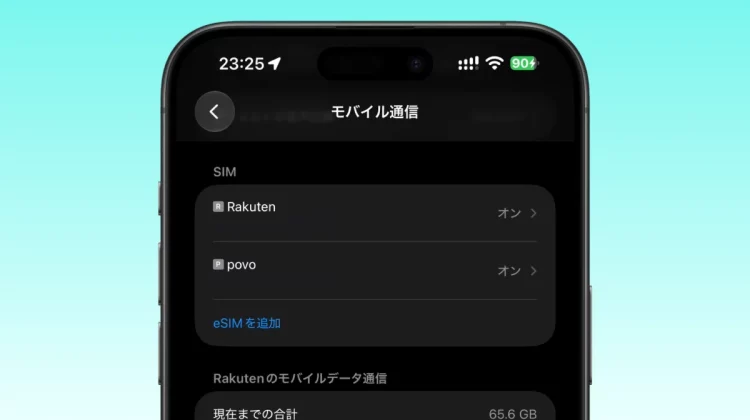
The operation style that combines Rakuten Mobile and au’s online-only brand “povo2.0” using the iPhone’s “dual SIM” is attracting a lot of attention, and the author actually uses it.
We will introduce you to the most powerful dual SIM usage method for iPhone x Rakuten Mobile x povo, which can reduce communication costs and perfectly prevent problems such as communication failures.
Why “Rakuten Mobile x povo” is the best
This combination is chosen because it perfectly compensates for the disadvantages of both.
| merit | Disadvantages | |
|---|---|---|
| rakuten mobile | ・Unlimited data for 3,278 yen per month (tax included) ・Domestic calls are free with the “Rakuten Link” app |
Radio waves may become unstable underground or indoors. |
| povo2.0 | ・You can maintain your line for a basic fee of 0 yen ・Easy to connect all over Japan with reliable au line |
You need to regularly purchase paid toppings. |
While focusing on Rakuten Mobile, which has unlimited usage and no call charges, its biggest strength is that by switching to povo, which has a basic fee of 0 yen, in areas where radio waves are difficult to reach or when there is a problem, it provides an overwhelming sense of security without increasing monthly costs.
Furthermore, povo recently became compatible with 5G SA, enabling higher-speed and larger-capacity communication.
4 techniques to utilize dual SIM on iPhone
Basic line assignment
- Main line (Rakuten Mobile): Designated as “mobile data communication” and “default voice line”. I mainly use it for data communication and making calls.
- Secondary line (povo): Operates as a backup for emergency data communication and for incoming calls only.
If you are out of range or have a communication failure, switch at the control center.
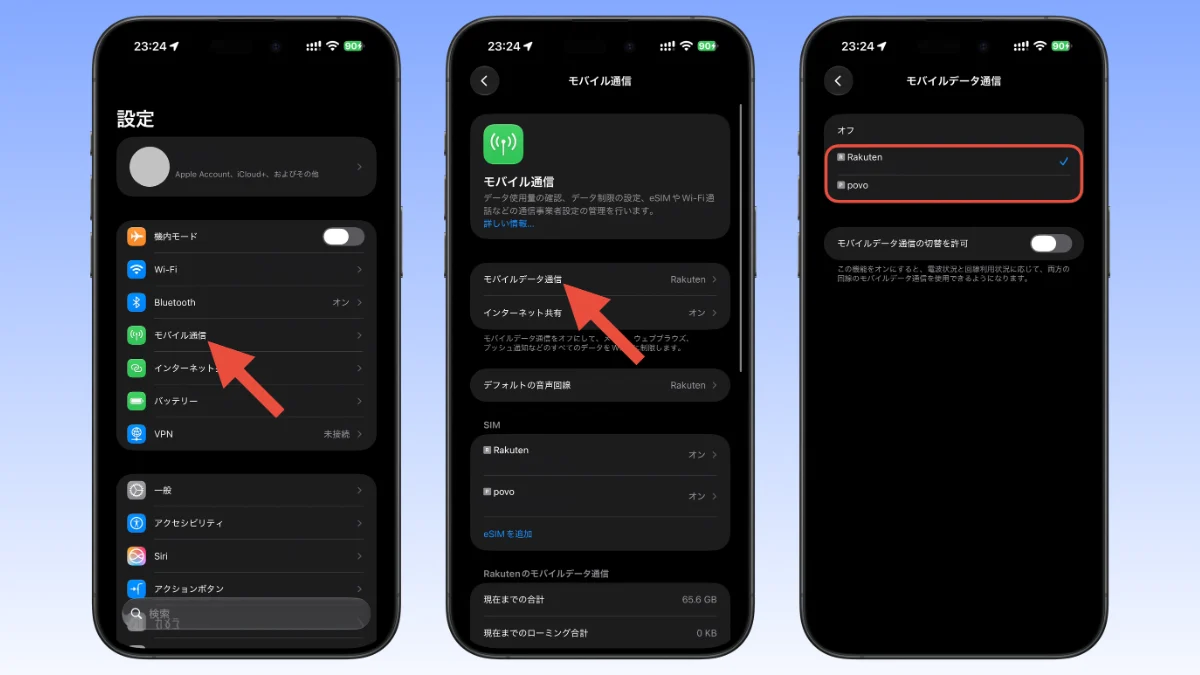
If Rakuten Mobile’s radio waves become weak or the Internet becomes unusable underground, indoors, at an event venue, etc., you can switch to povo (au line) from iPhone Settings → Mobile Communication → Mobile Data Communication.
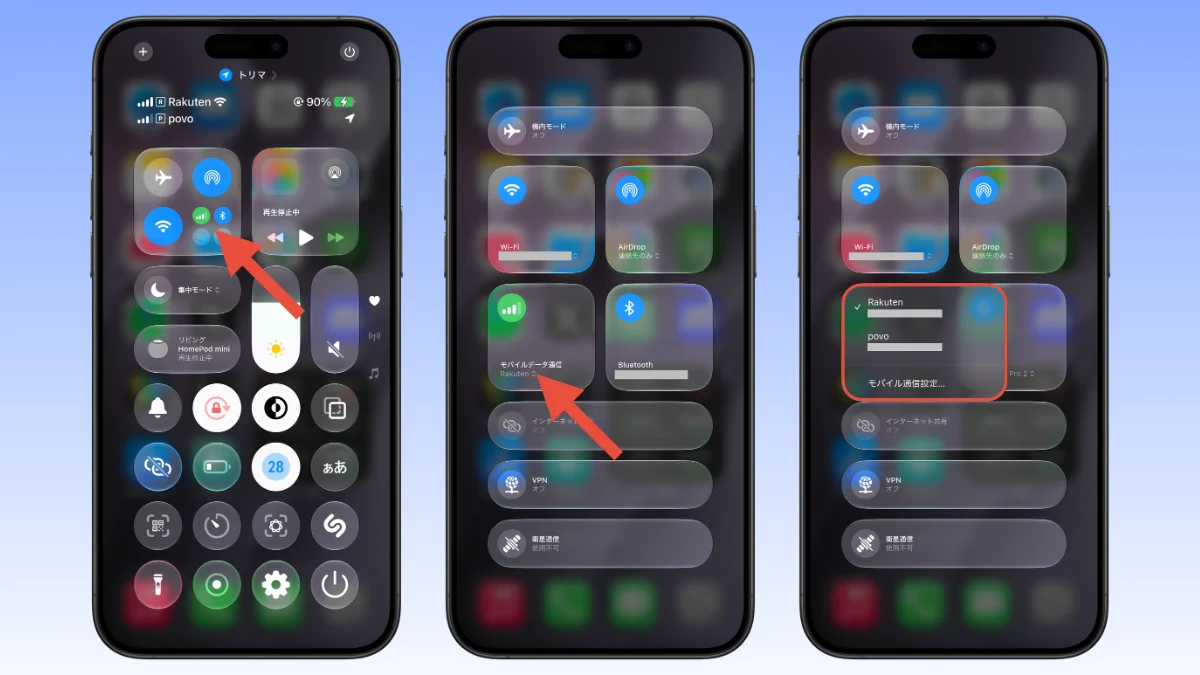
Furthermore, you can open the connectivity panel from the control center that is displayed by swiping down from the top right, and tap on mobile data communication to instantly switch.
JAPAN roaming started in April 2026, but it is expected that it will take some time before roaming is actually possible, so dual SIMs that can be used immediately by switching on the iPhone are very convenient.
Use povo’s “unlimited toppings” wisely in spots
When you temporarily need high-speed and stable communication, such as when traveling, business trips, or days when a web conference is long, purchase povo’s “unlimited data” for 24 hours (330 yen) or 6 hours (250 yen). With iPhone, you can usually leave it at 0 yen and charge only when you want to use it.
Don’t forget to follow the 180 day rule
The basic fee for povo is 0 yen, but there are terms and conditions that will result in suspension of use or contract cancellation if paid toppings are not purchased for more than 180 days. Once every six months, buy the cheapest toppings for a few hundred yen to maintain your line.
Installation steps on iPhone
iPhone XS/XR, iPhone SE (2nd generation) and later are compatible with dual SIM.
- Contract style: Contract with Rakuten Mobile with “eSIM” and POVO with “eSIM” or “physical SIM” (for iPhone 13 or later, a combination of two eSIMs is also possible).
- Activation and settings: Insert Rakuten Mobile and povo SIM or activate eSIM.
- Renaming: Renaming each line to “Rakuten” or “povo” from iPhone Settings → Mobile Communication will make management easier.
Points to note when operating Rakuten Mobile and povo with dual SIM
Rakuten Link app uses internet connection
With Rakuten Mobile, domestic calls are free by using the “Rakuten Link” app. However, like LINE calls, this app uses the Internet to make calls.
If the internet environment is poor, it may be difficult to hear your voice or the other person’s voice. Be careful when talking on the phone while driving, etc.
On the other hand, there is also the advantage that you can make calls using Wi-Fi connection or povo data communication even if you are out of Rakuten Mobile’s radio waves.
If you want high-quality calls, you can subscribe to the “15-minute (standard) unlimited calls” option for 1,100 yen per month (tax included) and use regular voice calls.
Mobile communication with another SIM cannot be used during a voice call.
Due to iPhone specifications, mobile communications other than the SIM used for the call cannot be used during a voice call.
For example, if you start a voice call using povo while using Rakuten Mobile as your mobile data communication, you will no longer be able to use your data communication. The same applies if you start a voice call with Rakuten Mobile while your mobile data communication is povo.
There is no problem with Rakuten Link or LINE calls as they use data communication.
Achieving both communication cost reduction and risk diversification
If you are concerned about cost, you can keep Rakuten Mobile at 1,078 yen (tax included) per month for less than 3GB, and if you use Povo as a backup, you can have two lines for about 1,000 yen per month.
If you are a heavy user, you can use Rakuten Mobile unlimitedly for 3,278 yen (tax included) per month, no matter how much you use it, and reduce risks by adding povo as a countermeasure in case of communication failure or out of service area.
If you want to optimize your smartphone charges, please give this dual SIM operation, which allows you to get both “cheap and unlimited” and “safe au area” on one iPhone, to optimize your smartphone charges.
Source: iPhone Mania