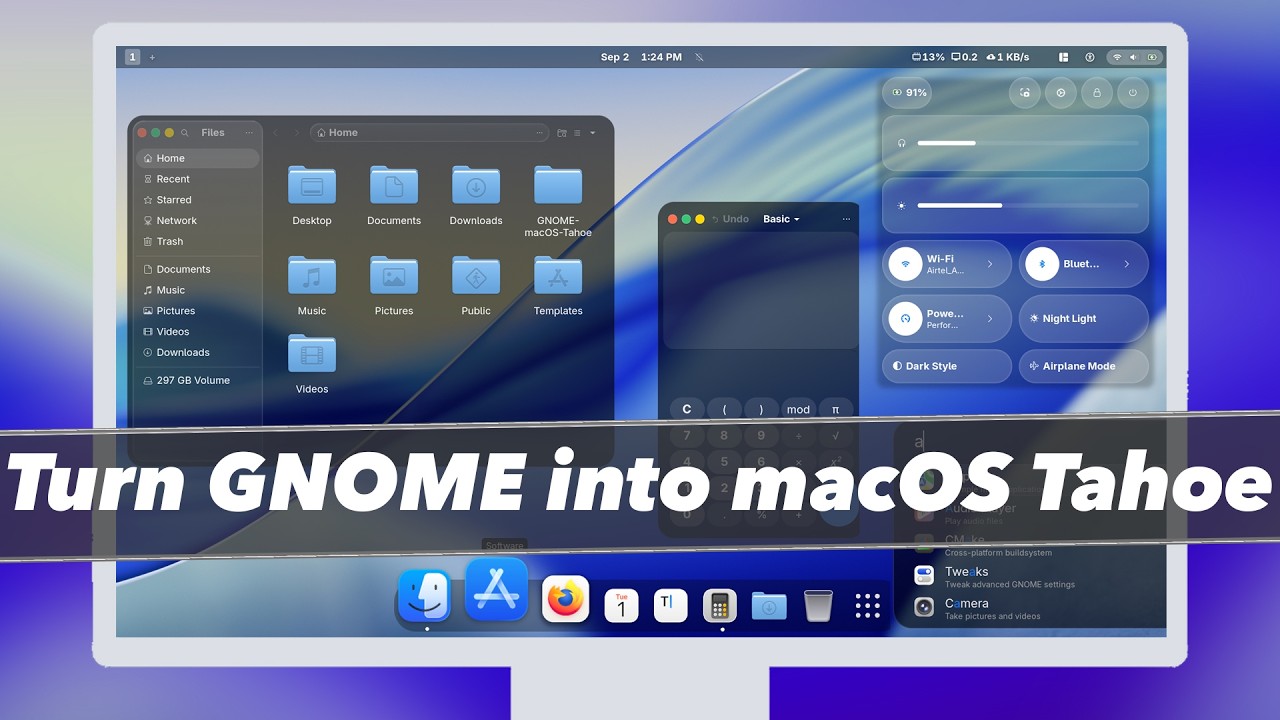
How to Make GNOME Look Like MacOS Tahoe. In this video I am going to show how to theme your GNOME desktop to look like MacOS Tahoe. For demonstration I will be using Fedora that comes with GNOME 49 Desktop that allows Customizing gnome shell to look like macOS Tahoe. This is a step-by-step guide to transforming the gnome desktop environment. You can also use this guide with other GNOME based distributions like Arch & more.
*Ubuntu Users watch this video*
https://www.youtube.com/watch?v=cavlr-mZkoY
_*TimeStamps*_
00:00 Introduction
01:21 Update the System
01:31 Make System Backup
02:14 Install Gnome Tweaks, Git & Extensions Manager
02:56 Adjust Bulit-in Settings & Install Extensions
04:05 Customize Dash 2 Dock Animated
05:00 Install Icon Pack
05:32 Setup Tahoe theme
09:16 Configuring W/ GNOME Tweaks
11:08 Removing MacOS Theme
_*Commands List*_
For Debian : *sudo apt install gcc make cmake git curl wget wmctrl sassc gnome-tweaks*
For Arch: *sudo pacman -S gcc make cmake git curl wget wmctrl sassc gnome-tweaks*
For Fedora: *sudo dnf install gcc make cmake git curl wget wmctrl sassc gnome-tweaks*
*Fix GTK Theme for FlatPak Based Applications*
_*sudo flatpak override –filesystem=xdg-config/gtk-3.0 && sudo flatpak override –filesystem=xdg-config/gtk-4.0*_
_*Useful Links*_
*MacOS Tahoe Theme* – https://github.com/vinceliuice/MacTahoe-gtk-theme
*Tahoe Icon Pack* – https://github.com/vinceliuice/MacTahoe-icon-theme
*My System Specs*
HP Pavilion Gaming Laptop
(CPU) AMD 5600H 6 Core 12 Threads @4.2GHZ Max With AMD Radeon Graphics (iGPU)
(RAM) 24GB CL22 DDR4 @3200MHZ
(SSD) 500GB Samsung EVO NVME
(GPU) NVIDIA RTX 3050 4GB DDR5 VRAM
*Relevant Tech Videos*
How to install windows 11 on Apple Silicon Mac: https://www.youtube.com/watch?v=zPL63pCYJz8
How to install Bazzite Linux – https://www.youtube.com/watch?v=_DPoRDyMNNQ
RASPBERRY Pi 5 – How to SetUp PLEX Media Server in 10 Minutes (2024) – https://www.youtube.com/watch?v=X0CvlNfIv9U
Raspberry Pi 5 – How To Build POWERFUL Home Server in 10 Minutes With CasaOS (2024) – https://www.youtube.com/watch?v=n3RzsdMozIs
Install Kali Linux On M1 / M2 / M3 Macs Using UTM in 5 MINUTES (NEW METHOD) – https://www.youtube.com/watch?v=znUvqWNPNLg
KDE Plasma 6 is Brilliant – TOP 6 NEW FEATURES – https://www.youtube.com/watch?v=_KrLiGhvd6Y
Install UBUNTU 23.10 On M1 M2 Macs NATIVELY || RUN New Ubuntu On Bare Metal On Apple silicon MAC – https://www.youtube.com/watch?v=Hvy07C1pPFA
FEDORA ASAHI REMIX + HYPRLAND Setup For M1 & M2 Macs 🔥 https://www.youtube.com/watch?v=Nfm3oyJx_Hk
Dual Boot popOS & windows 11 – https://www.youtube.com/watch?v=qYqPBrTudUY
*Support Me*
~ *MY Website* – https://www.kskroyal.com
~ *Buy Me A Coffee* – http://buymeacoffee.com/kskroyal
~ *Connect On Instagram* – @KSKROYALTECH
~ *For Business Enquires ONLY* – business.ksktech@yahoo.com
#GNOME #macOSTheme #TahoeTheme #Gnome #Customization
*© KSK ROYAL*
*MereSai*
Note: Ksk Royal is the original author of this video, we just embed it, if you have any questions please contact him via Youtube.