When HUAWEI phones run various Android applications through GBox, they may occasionally encounter compatibility issues such as Google Maps displaying a white screen or YouTube playback continuing to freeze. In fact, the GBox system has built-in very complete “question quick check” and “question feedback” mechanisms. This article will demonstrate in detail how to make good use of the FAQ area within GBox to quickly troubleshoot common App running problems, and how to submit feedback to the official technical team and continue to follow up on progress when encountering abnormal situations that cannot be solved by oneself.
When using GBox to run various applications on HUAWEI mobile phones, you may occasionally encounter some settings or compatibility issues. In order to allow users to troubleshoot problems more quickly, GBox has a built-in specific help area. As long as you open GBox and enter the relevant page, you can find the “Help and Feedback” option. Here are answers to common troubleshooting issues, such as solving the problem of Google Maps prompting that Google Play services need to be updated or a white screen appearing, as well as solving the problem of stuck and continuous loading during YouTube playback. Users only need to click and read according to the situation they encounter, and then they can try to fix it by themselves according to the instructions, saving time searching for solutions online.
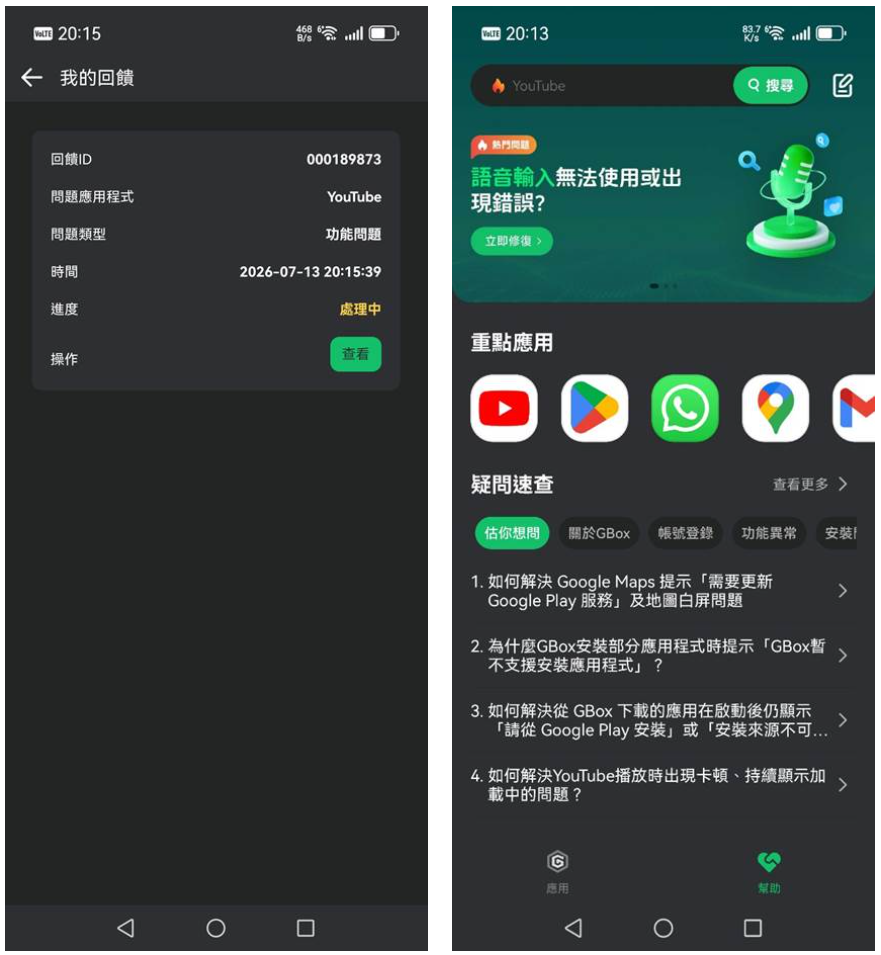
If the corresponding answer cannot be found in the FAQ area, users can directly report App issues through the system’s built-in mechanism. After submitting the specific situation, the system will generate a unique feedback ID and clearly list the name of the application experiencing the problem, the type of problem and the time of submission. Users can then follow up on the progress of the matter at any time on the “Submit Feedback” page. When the status is displayed as Processing, it means that GBox’s technical team is following up and will respond to your situation. This support process ensures that users can receive appropriate technical assistance when encountering abnormal situations when using various applications.
If you want to know more tips on using HUAWEI mobile phones, you can browse the articles in[HUAWEI Practical Classroom]: