Apple uses a 48-megapixel wide-angle camera lens for the entire iPhone 15 series. It also supports HEIF Max and ProRAW formats for the iPhone 15 Pro and iPhone 15 Pro Max. If the iPhone 15 Pro camera is not turned on manually, the camera defaults will be 24 million pixel resolution record.
If you want to use iPhone 15 Pro or 15 Pro Max to record photos with 48 million pixels, you need to manually turn on the default professional format to shoot in HEIF Max (48MP) or ProRAW Max (48MP) professional format. How to set the iPhone 15 Pro camera to enable 48-megapixel photography? Use this iPhone shooting tips and settings to tell you how to operate.
Things to note when taking photos with iPhone 15 Pro camera with 48 million pixels
The 48-megapixel camera shooting mode of the iPhone 15 Pro series is somewhat different from that of the basic iPhone 15 model. You also need to manually turn on the ProRAW and resolution control items before you can choose to shoot in HEIF Max, ProRAW Max and ProRAW formats. When using the iPhone Before taking 48MP high-resolution photos on 15 Pro and iPhone 15 Pro Max, you need to understand the relevant limitations and precautions:
1. iPhone 15 Pro camera is divided into three professional formats
If you want to take high-resolution photos through the 48-megapixel main lens of the iPhone 15 Pro series, you can choose from three professional formats, namely “HEIF Max, ProRAW Max, and ProRAW 12MP”. Only HEIF Max and ProRAW Max can capture 48-megapixel photos. Pixel high-resolution recording.
👉What is Apple ProRAW?How to enable, how much capacity and editing tips
2. ProRAW shutter time is longer than HEIF
When taking pictures with the 48 million pixels of the iPhone 15 Pro, you have to wait about 1 second each time you press the shutter button in the ProRAW format to complete the shot. If you choose the HEIF format, you have to wait about 0.5 seconds. This is mainly to allow the iPhone camera to automatically process High-resolution image quality, so it is less suitable to use the continuous shooting function in professional formats.
3. ProRAW is 10 times larger than HEIF format
Since the ProRAW format supported by the iPhone 15 Pro series uses the Digital Negative (DNG) file format, it can retain more details of 48-megapixel images. Just a ProRAW Max photo taken with 48 million pixels is about 75MB. With HEIF Max taking up a maximum of about 6MB, ProRAW files are 10 to 12 times larger than HEIF, which can easily lead to a large amount of iPhone storage space being occupied by photos.
If the storage space of the iPhone 15 Pro is not large enough, it is recommended to shoot with the camera default of 24MP unless necessary. Unless you want to shoot pictures and landscapes worth recording, it is necessary to turn on the ProRAW or HEIF Max format.
| iPhone 15 Pro photo formats | Occupied size |
|---|---|
| ProRAW Max (48MP) | 75MB |
| ProRAW(12MP) | 25MB |
| HEIF Max (48MP) | 5MB~6MB |
4. Professional 48MP only supports wide-angle main camera focal length
Apple provides a total of five options for the iPhone 15 Pro camera focal length presets: “0.5x”, “1x”, “2x”, “3x” and the iPhone 15 Pro Max’s telephoto “5x”. If you want to shoot with the iPhone 15 Pro series 48-megapixel photos can only be taken using the “1x” default wide-angle lens. If you select the ultra-wide-angle or telephoto lens, it will automatically record at 12-megapixels.
If you are forced to use the ProRAW Max format to record, you can also record in the ProRAW 12MP format when shooting with a non-main lens on the iPhone 15 Pro.
5. Only normal photo mode can be used
If you want to take pictures with the 48-megapixel lens of the iPhone 15 Pro series, you can only record 48MP photos in the “1x” main camera shooting mode or original photo. If you use night mode, flash shooting or macro mode, you will automatically record 48MP photos. 12 million image quality records stored.
How to set iPhone 15 Pro / 15 Pro Max 48-megapixel camera mode?
If you want to take 48-megapixel photos with iPhone 15 Pro or iPhone 15 Pro Max, if the “ProRAW and Resolution Control Project” function is not activated by default, the built-in camera will automatically use the basic 12MP or 24MP resolution to record and save, so it is recommended You must first manually turn on the ProRAW and resolution control options of the iPhone 15 Pro camera 48MP before you can record. The detailed instructions for setting the 48MP iPhone 15 Pro camera are as follows:
Step 1. Open the built-in “Settings” App of iPhone 15 Pro / 15 Pro Max, click on “Camera”, select the “Format” setting, and turn on the “ProRAW and Resolution Control Item” function.
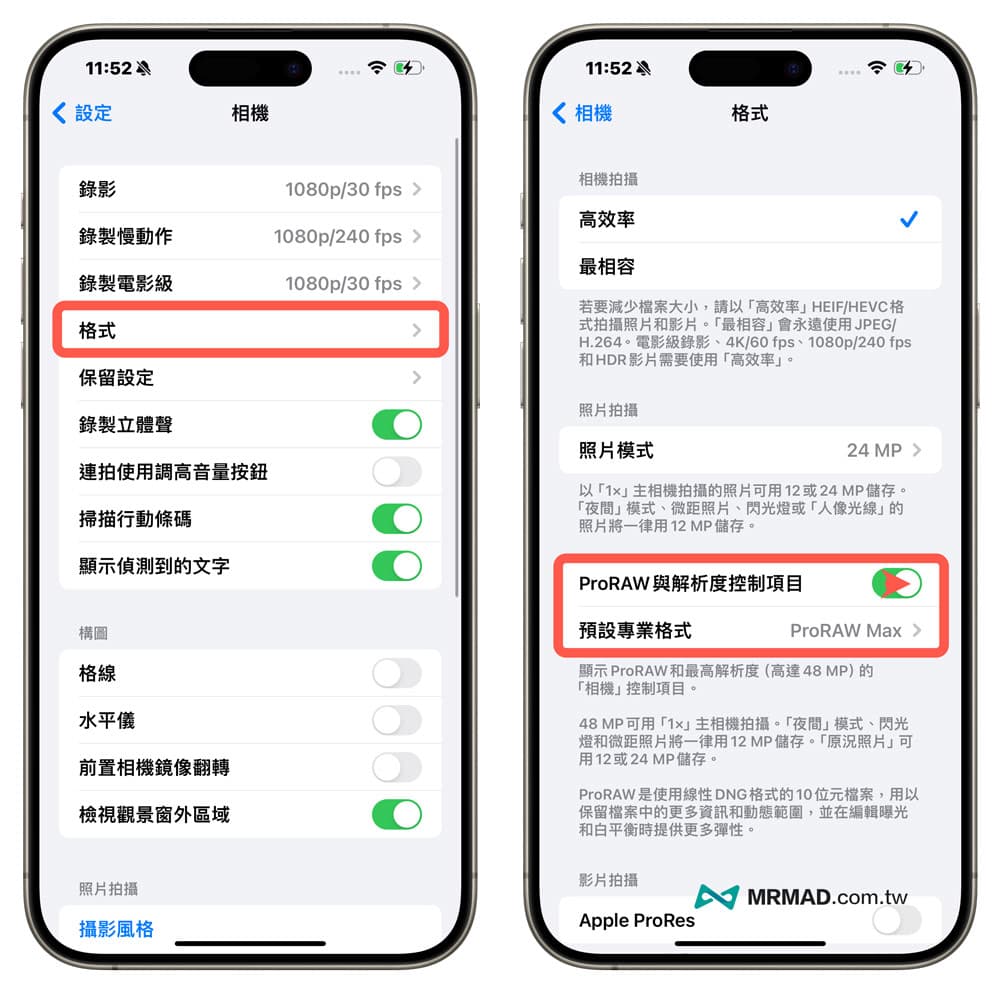
Step 2. Click “Default Professional Format”. It is recommended to change it to “HEIF Max (up to 48MP)” to enable the iPhone 15 Pro’s default professional format to record at the lowest HEIF capacity.
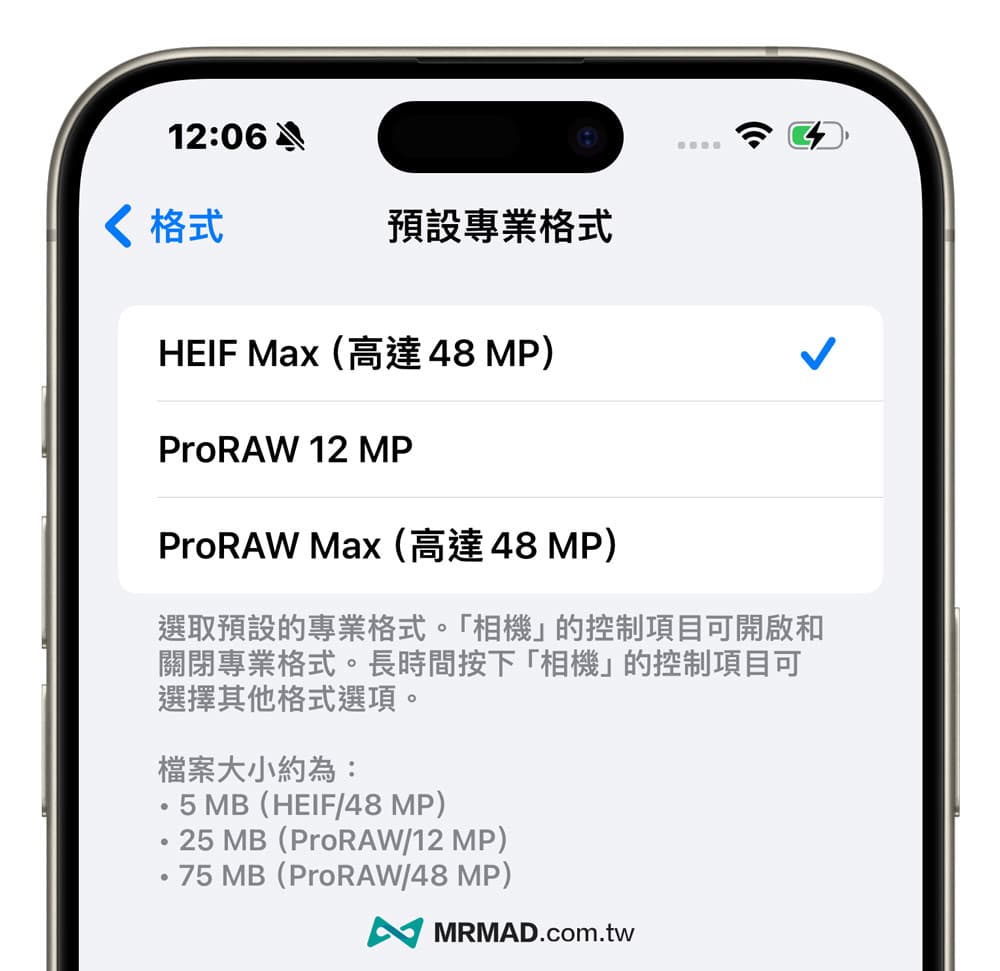
How does the iPhone 15 Pro use the 48-megapixel camera to record?
Open the built-in camera app of iPhone 15 Pro, click on the “HEIF Highest” or “RAW Highest” function in the upper right corner (the slash is turned off by default), then press the camera shutter button to see through the 48-megapixel main lens Take high-quality photos.
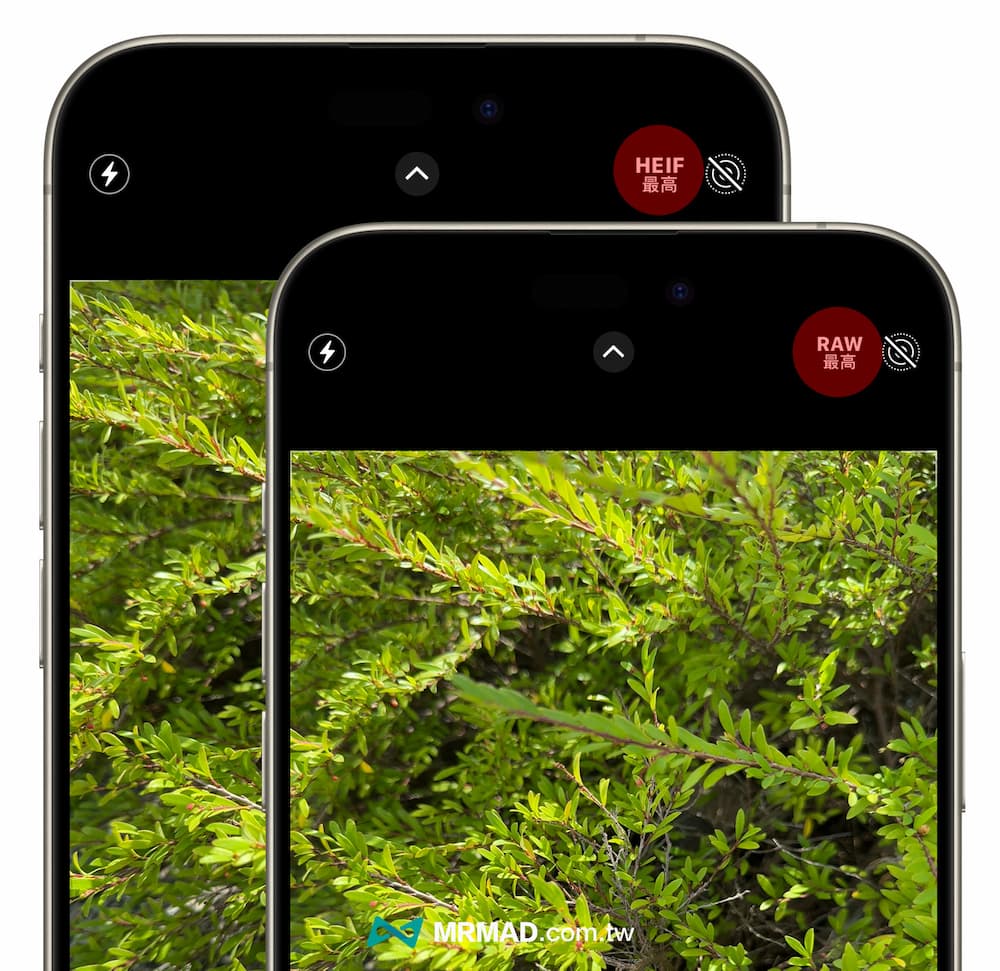
If you want to switch between shooting in ProRAW or HEIF format on iPhone 15, you need to long press the resolution control item icon in the upper right corner to enter the photo resolution menu, from which you can customize the highest HEIF, 12 million pixel ProRAW (RAW 12MP) or There are three formats: ProRAW (the highest RAW) with 48 million pixels.
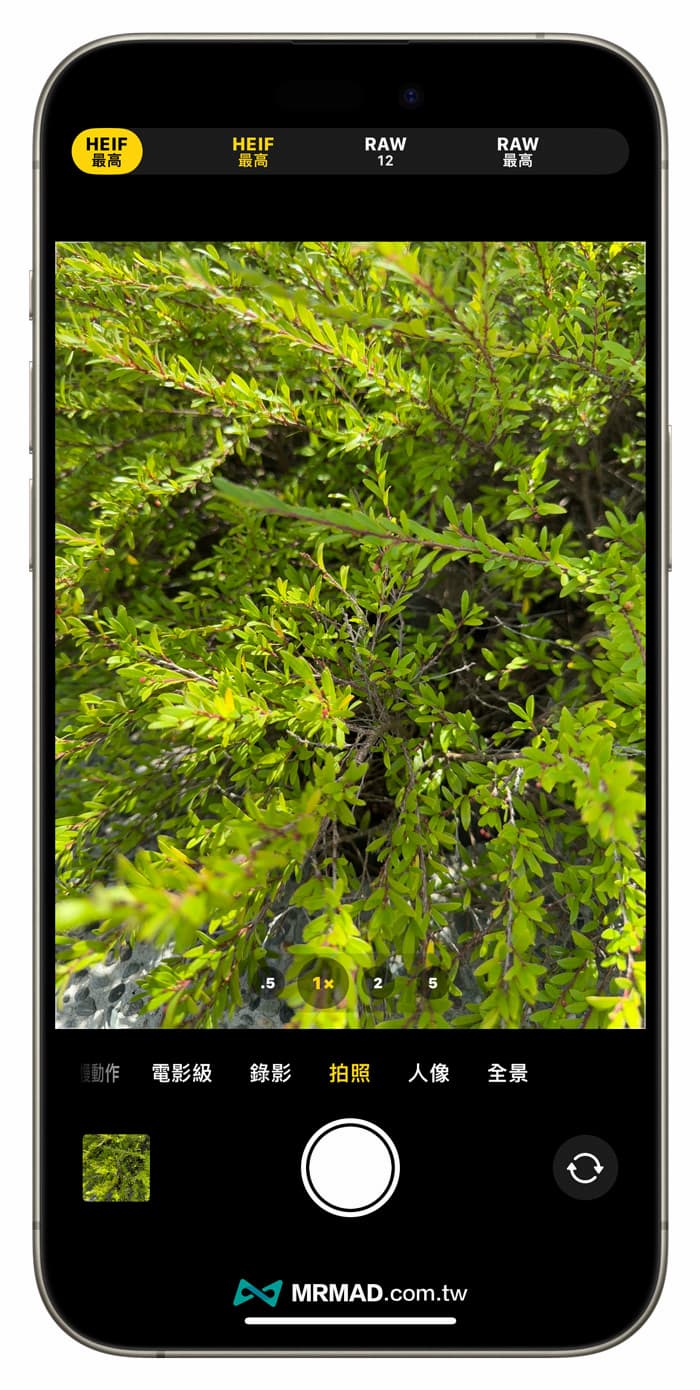
The main lens of the new iPhone 15 Pro or iPhone 15 Pro Max is 48 million pixels with an aperture of ƒ/1.78. They are also equipped with the second-generation sensor-shift optical image stabilization function and 100% Focus Pixels, even in low-light indoor environments. , can also shoot and store records in 48MP high-resolution format. Unlike the iPhone 14 Pro series, which shoots 48MP ProRAW photos, successful recording requires sufficient light sources.
How to check whether iPhone 15 Pro photos were taken in 48MP or ProRAW format?
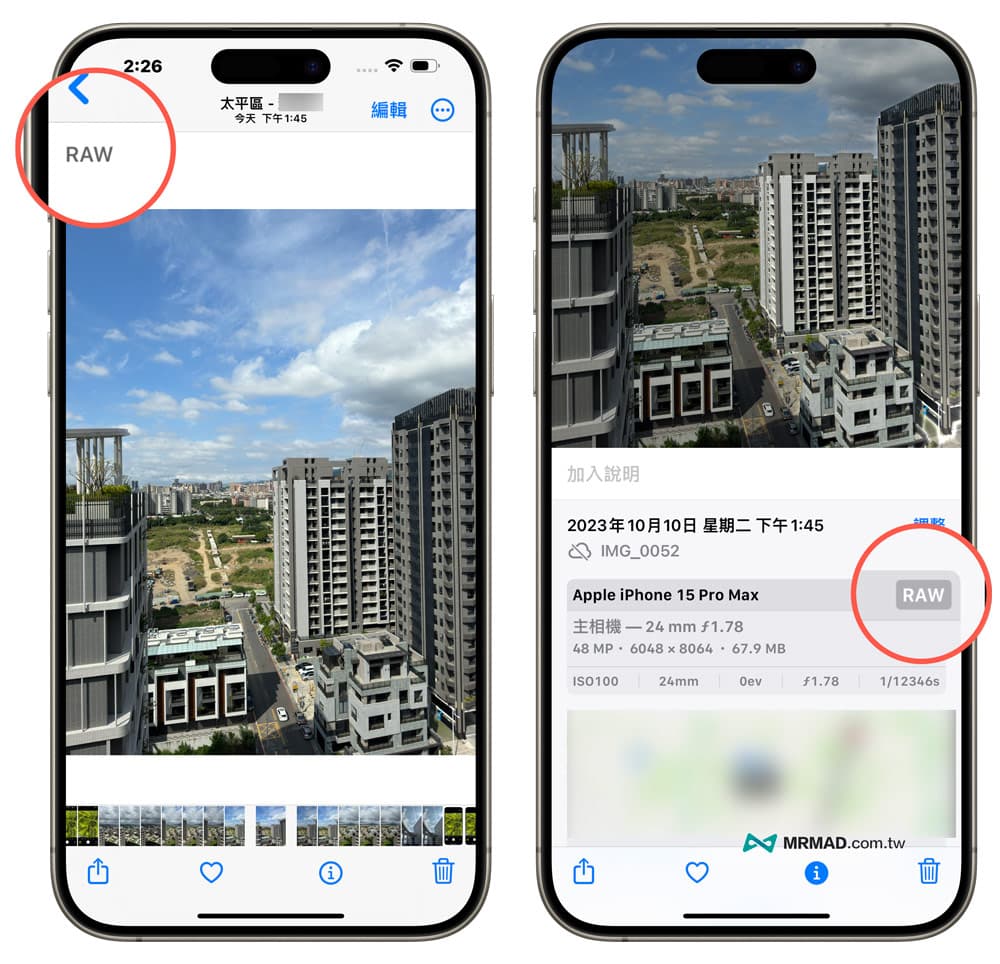
If you want to confirm whether the photos taken with iPhone 15 Pro have 48MP high-resolution recording, you can browse the photos from the Photos App and click the “i” icon below to view the photo EXIF information. “48MP” will be displayed below the main camera information. This means that this photo is a high-resolution 48-megapixel photo.
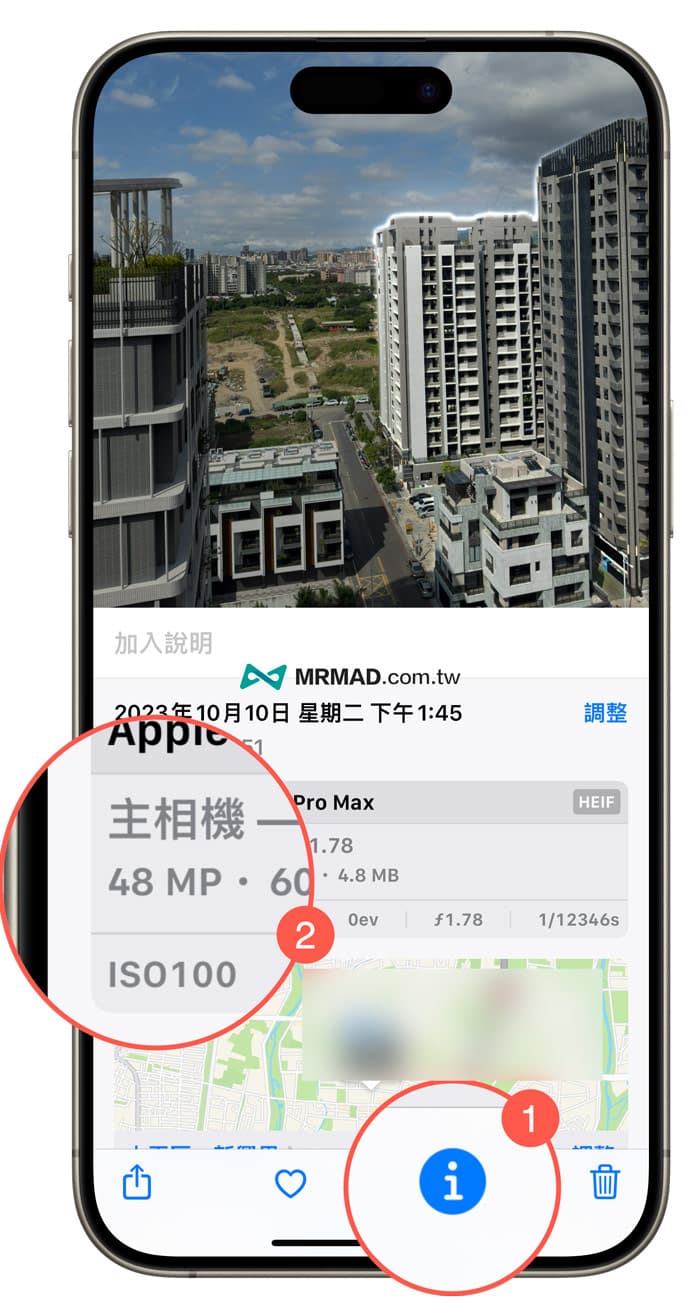
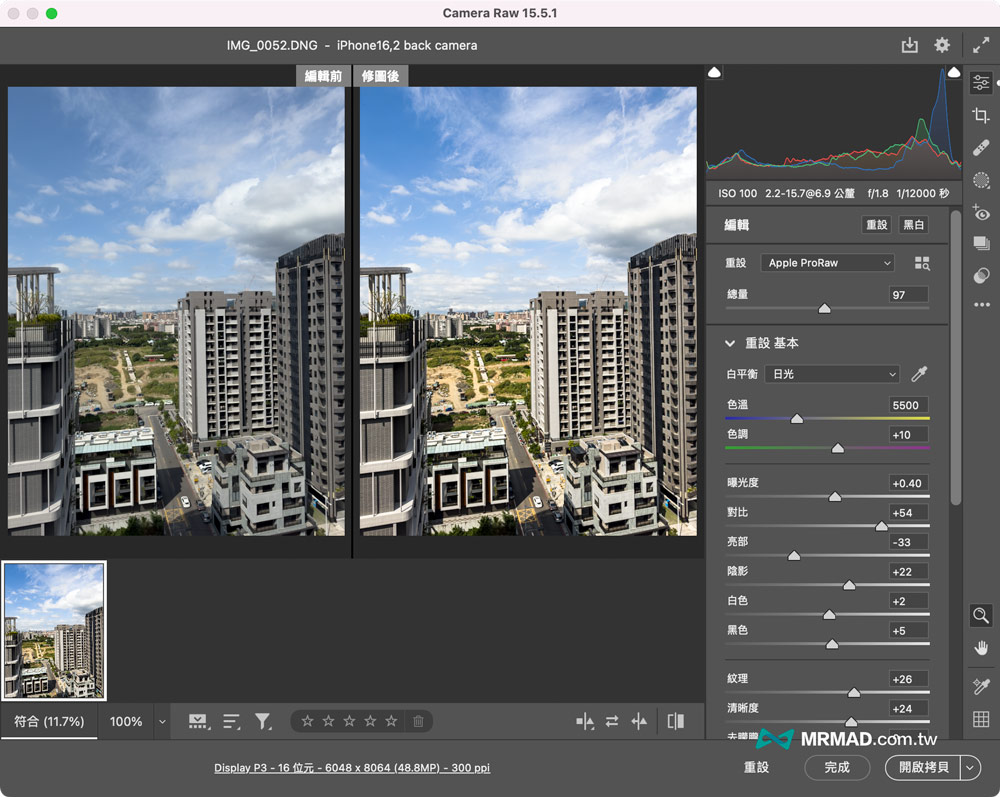
If you want to confirm whether to record in Apple ProRAW format, “RAW” will be displayed in the upper left corner of the photo browse, and the photo EXIF information will also display “RAW”. You can use the built-in photo editor to adjust values such as details, contrast, and exposure, as well. Can be exported to computer for post-production using Lightingroom or Photoshop.
What is the difference between ProRAW Max and HEIF Max on iPhone 15 Pro?
So what is the difference between ProRAW Max and HEIF Max taken with the iPhone 15 Pro series? Regarding this issue, let’s first understand the differences between HEIF and ProRAW:
HEIF is a high-efficiency image file format currently recorded by iPhone by default. It is a new image format developed by the Motion Picture Experts Group (MPEG). It will be recorded in the heic format and can maintain high image quality compared to JPEG photo compression. Less, and Apple added the HEIF Max format to the iPhone 15 series, which can record 48MP images without taking up too much capacity.
ProRAW uses a 10-bit file record in the linear DNG format, which can preserve the dynamic range of the photo and record more information. The advantage is that it has more room for adjustment after the photo is produced, and can modify the exposure, white balance, contrast, etc. ProRAW Max means that it can record at the highest resolution of 48MP, and Apple also provides additional ProRAW 12MP format recording.
Therefore, apart from the difference in file size, the difference between the HEIF Max and ProRAW Max formats of the iPhone 15 Pro series is that the former HEIF Max can mainly record the details of 48MP high-definition photos, which is more suitable for ordinary users who do not need post-production, but want to be able to record more Photo details can be used for outputting large posters, printing or enlarging and cutting.
ProRAW Max format recording is suitable for photography players, photographers and users who like to edit pictures. The advantage is that you can edit photos through post-production software, such as using Lightingroom or Photoshop to adjust the color and modify the exposure value, contrast, and white color of the photos. Balanced with more details.
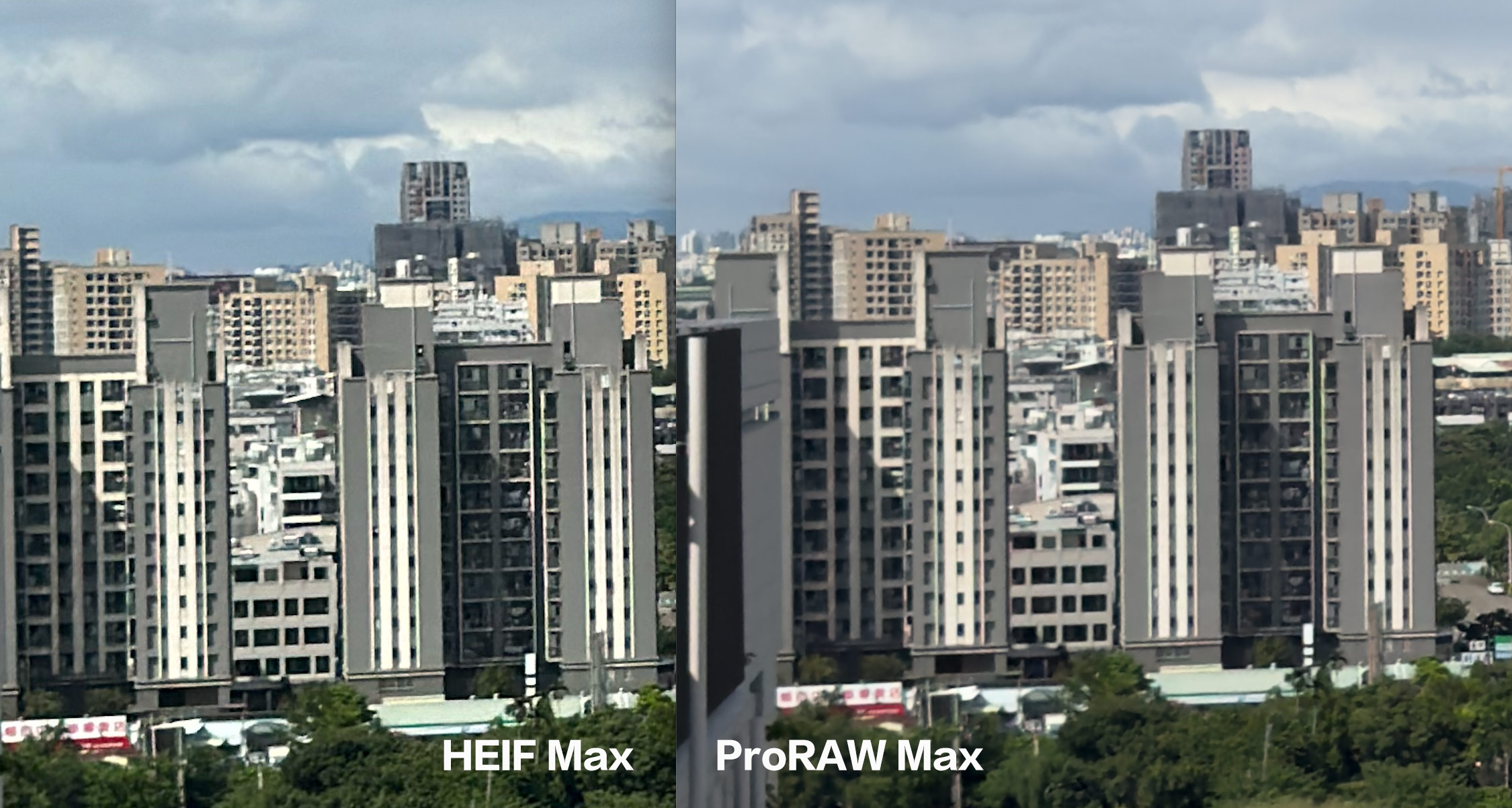
It’s a bit strange. On the contrary, even if ProRAW Max of iPhone 15 Pro is recorded in DNG format, after enlarging the photo and comparing it with HEIF Max, the details of HEIF Max are clearer and sharper, but the ProRAW Max is slightly blurry. I am not sure whether Apple will follow up. This issue is fixed with the iOS 17 update.
When do I need to turn on the iPhone 15 Pro series to take pictures in ProRAW format?
It is not recommended to use the 48-megapixel format of the iPhone 15 Pro series for simple daily records. After all, the photo files are too large and will only take up too much unnecessary storage space. Unless you are traveling or traveling abroad and want to record special scenery. , or special buildings, street scenes, landscapes, Milky Way, night shots or starry skies, etc., you can also take advantage of the ProRAW format to shoot. Even the night shot mode can be recorded in the ProRAW 12MP format.
If you think this article is helpful to you, please feel free to share it with your relatives and friends who are using the iPhone 15 Pro series, so that they can understand the camera settings and avoid buying a high-end new phone that only uses the 24MP default Format record.