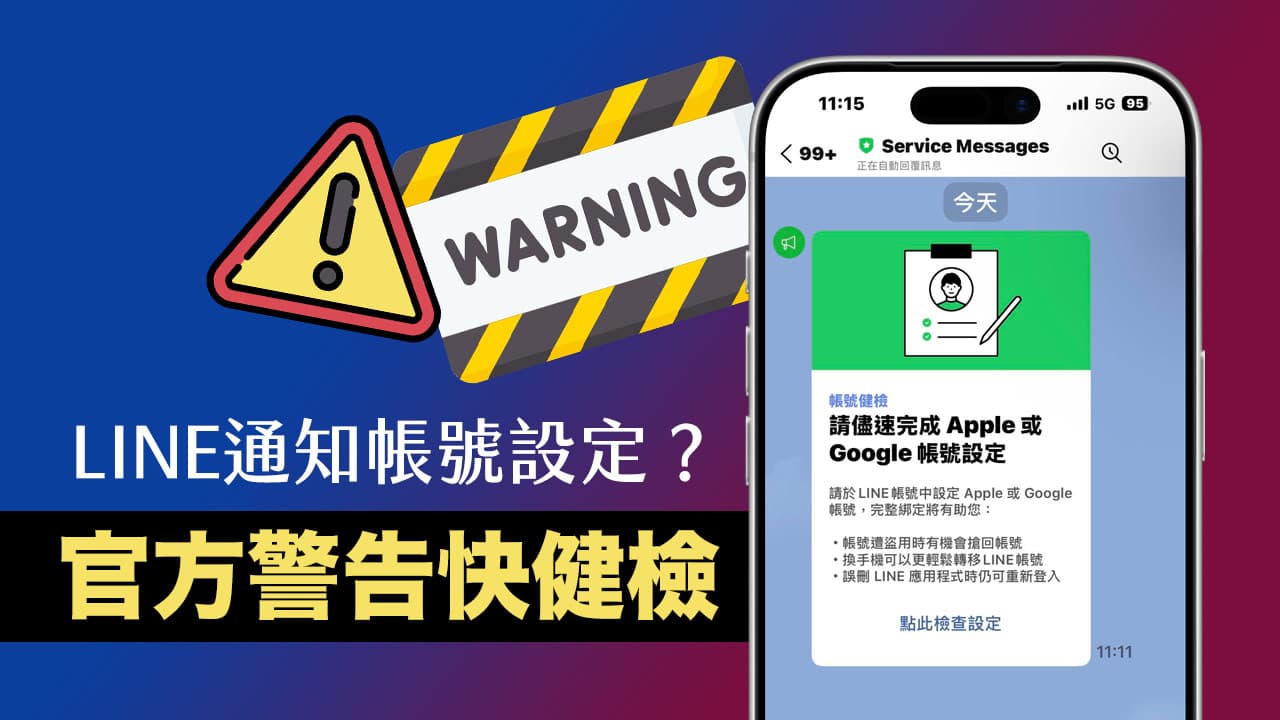
Recently, many netizens have discovered that an authentication prompt suddenly popped up in the LINE chat room, asking LINE users to “please complete the Apple or Google account settings as soon as possible.” The content also included a link asking them to click to perform an account health check. Nowadays, with scam text messages flying all over the place, everyone is on high alert. Are they worried that this is a phishing website? Will my account be stolen if I click on it? First of all, don’t panic when you see this message. This is truly an official message from LINE.
Is the LINE verification binding setting message a scam?
This account health check message was pushed by LINE officials to strengthen user account security. According to LINE’s official blog on November 19, 2025Announcements releasedthis is a new “LINE Account Health Check” security activity. The official will also push reminders through the Service Messages account from time to time that the account binding has not been completed, asking users to improve account security.
However, be aware that many fraudulent accounts may also imitate LINE’s official avatar, but there is one thing they absolutely cannot imitate, and that is the “shield color” officially given by LINE.
Please check the name of the “Service Messages” account that sent the message:
- ✅ Green Shield: Represents LINE’s official certified account (absolutely safe and users cannot block this account).
- ⚠️Gray Shield/No Shield: General account or unverified account (if you receive a similar security warning, it is most likely a scam).
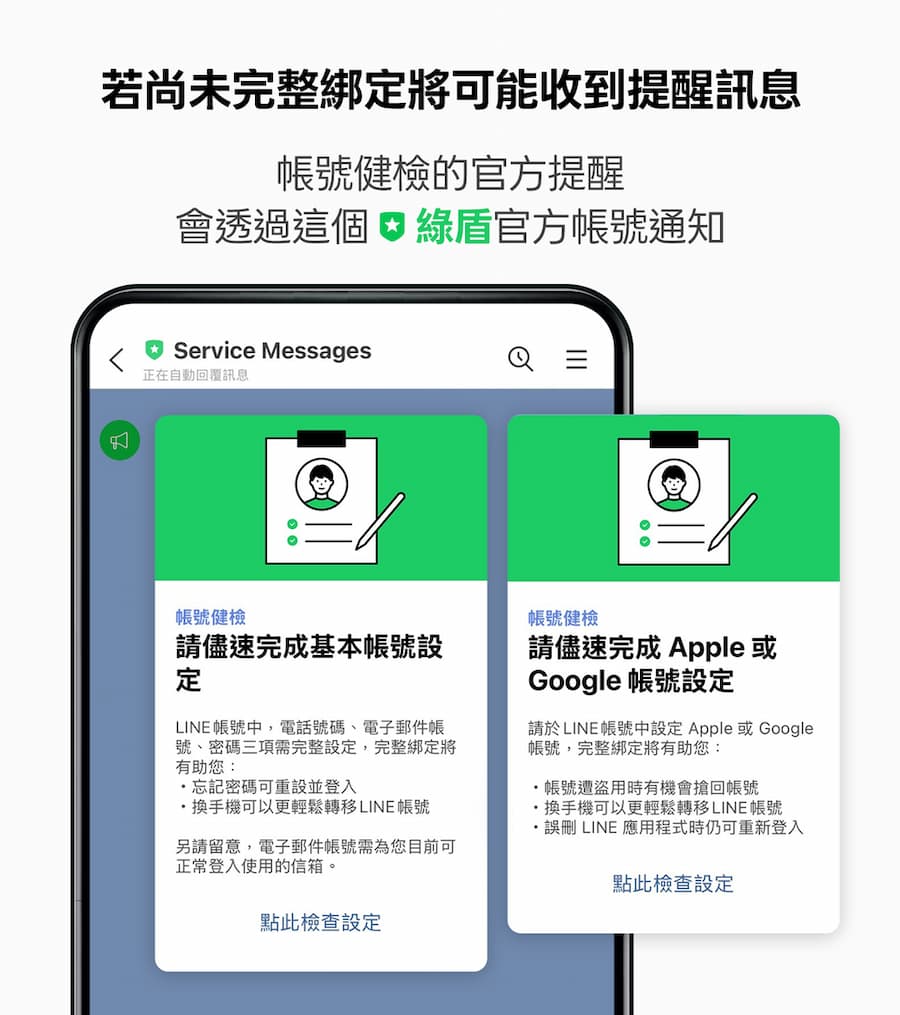
To put it simply, if you see a “green shield” appearing on the LINE message terminal, you can rest assured that this is a dedicated account used by LINE to notify important system messages.
Differences between official LINE account and phishing account
| feature | Service Messages (Official genuine) |
Scam/fake account |
| shield color | green shield | Gray shield or no shield |
| Blocking function | Unable to block (System mandatory notification) |
Can be blocked |
| Message content | Reminder binding, system maintenance notification | Threats of account deactivation, lottery winning notifications, unknown links |
| Link URL | Point to line.me official domain | Weird short or garbled URLs |
Why does LINE account health check require binding Apple/Google account information?
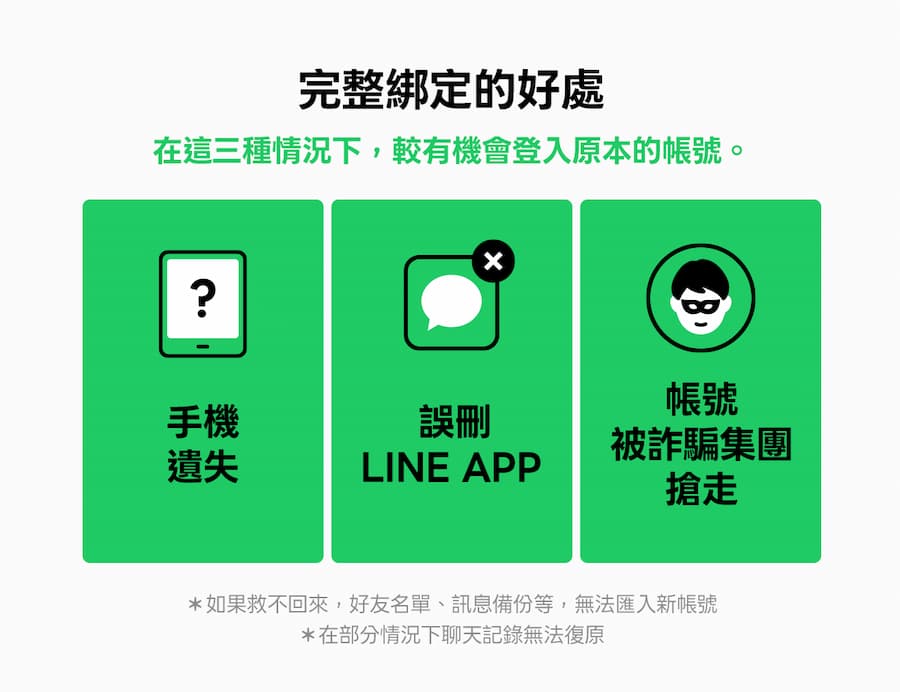
Many people may think that LINE can only bind a phone number? Why do we have to tie it to Apple or Google? In fact, adding this layer of binding has three major life-saving advantages:
- The account can be recovered if it is stolen: In case the phone number is stolen by a fraud group, binding a third-party account can greatly increase the success rate of making an official appeal to retrieve the account.
- Switching between devices is more painless: Many people have recently switched to iPhone 17. If an Apple ID is bound, data transfer across devices will be smoother and the risk of losing conversation records will be reduced.
- There is a solution for accidentally deleting the app: If you accidentally delete the LINE App, you can quickly log in with your Apple/Google account after re-downloading it to retrieve the original data.
How to bind a LINE account with a click-free link?
Although we have confirmed that these official messages from LINE are genuine, some people are worried about being deceived and want to know if it is possible to bind Apple and Google accounts without clicking on any links in the messages?
If you don’t want to click on the link provided by LINE’s official Service Messages, you can actually complete the binding manually through the built-in settings page of the LINE App. This is also the safest and absolutely problem-free operation method.
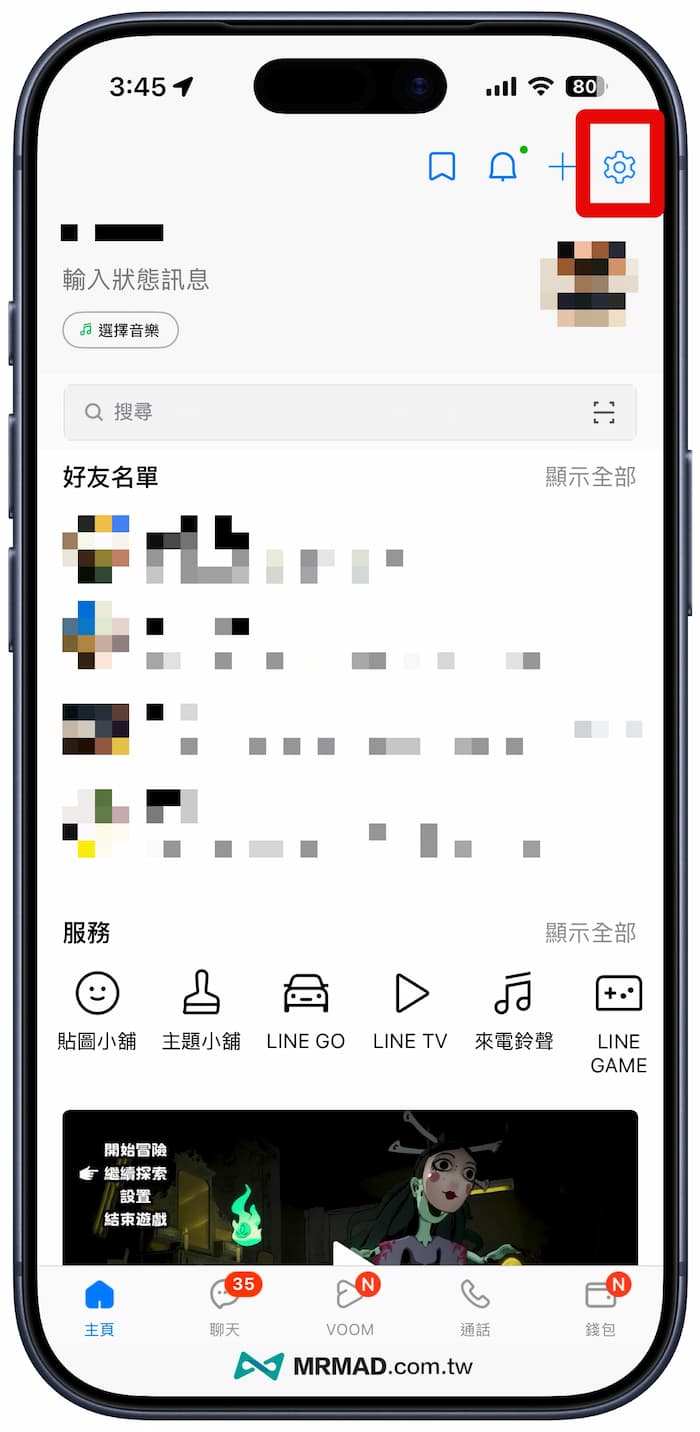
Step 1: Enter the settings page
Open the LINE App, click “Home” in the lower left corner, and then click the “gear icon” (Settings) in the upper right corner.
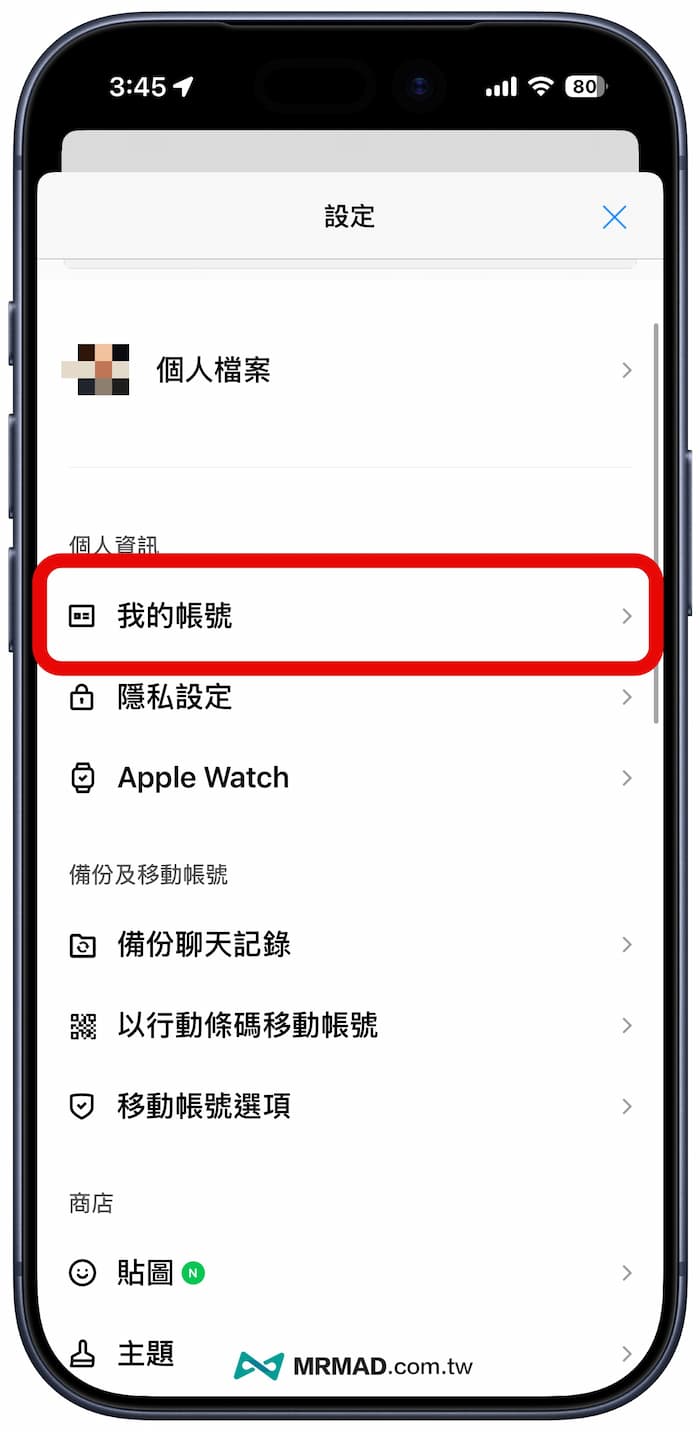
Step 2: Select my account
In the settings menu, find and click “My Account”.
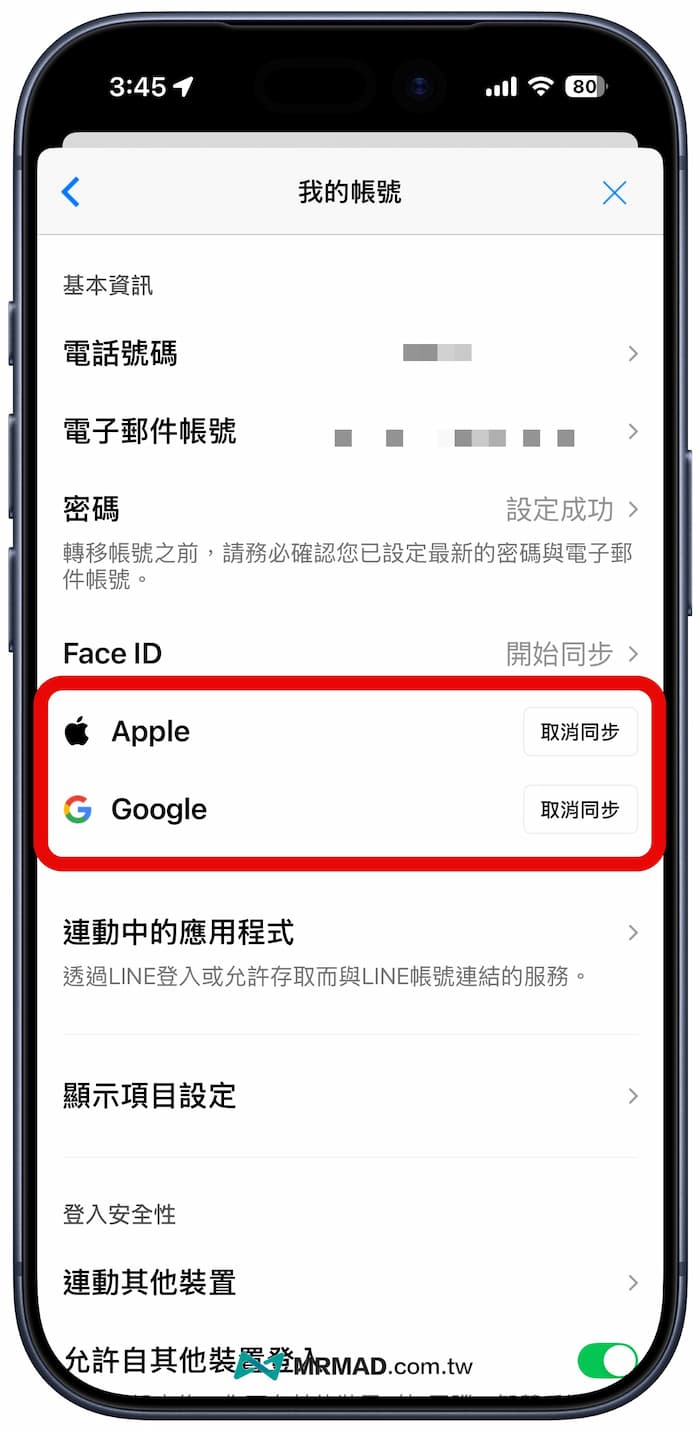
Step 3: Sync Apple or Google account
Scroll below and you will see the option to sync “Apple” and “Google”:
- Unbound state: “Start synchronization” will be displayed.
- Bound status: “Cancel synchronization” will be displayed in red.
Just click “Start Sync” and follow the instructions to log in to your Apple ID or Google account. When the screen changes to “Cancel Sync”, it means the binding is successful!
Compilation of frequently asked questions about LINE binding and verification accounts
Why can’t I authenticate my LINE account when I just got a new iPhone?
This is LINE’s security mechanism. If you have just changed your mobile account (for example, you just switched to iPhone 17), in order to prevent the account from being quickly tampered with after being stolen, the system usually has a 24-hour cooling time. Please wait 24 hours before trying to bind again.
Will my Google/Apple information be leaked to LINE after binding?
Won’t. This is just a connection (OAuth) for login credentials. LINE can only confirm that you are the owner of this account and cannot read your Google Drive files or Apple photos and other private information.
Summarize
If your relatives and friends also receive official notifications from LINE Service reminding you to set up your Apple or Google account, this is not a scam. It is mainly a friendly reminder from the official to protect the security of your account.
For the safety of your LINE account, it is also recommended to spend 1 minute checking the following two:
- Whenever you receive official messages from LINE, you must check whether there is a green shield.
- Go to “Settings” > “My Account” to manually complete Apple or Google binding.
If this article is helpful to you, please share it with your relatives and friends who are panicking after receiving the LINE account verification message!
If you want to know more Apple information, iPhone teaching and 3C information skills, please follow us
Crazy Mr. FB fan group,
Subscribe to Mr. Crazy Google News,
Telegram,
Instagramas well as
Subscribe to Mr. Crazy YouTube.