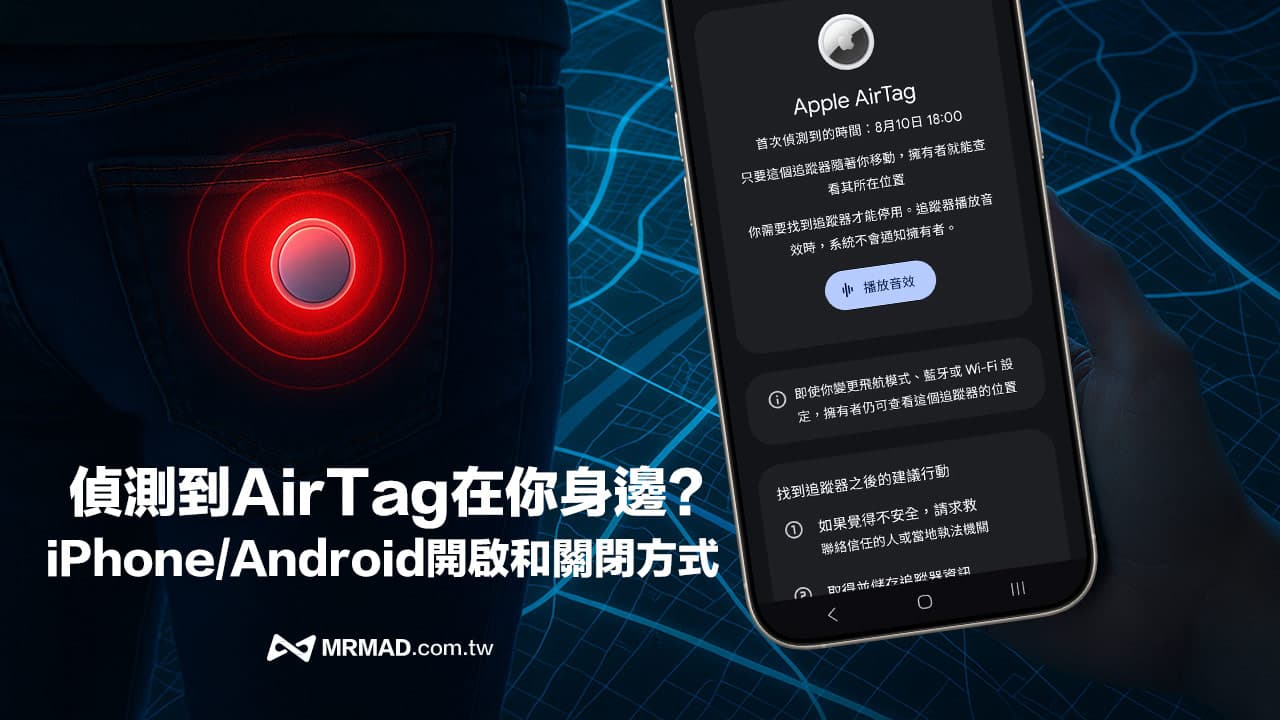
With the popularity of Apple AirTag, this technology originally used to track personal items has begun to be improperly used to track other people’s behavior. If an “unfamiliar AirTag tracking notification” suddenly appears on iPhone or Android phone, it means that someone may be trying to monitor your location. This article will share how to deal with detecting AirTag warnings around you, and provide a complete teaching on setting the iPhone and Android systems.
How the AirTag anti-tracking mechanism works
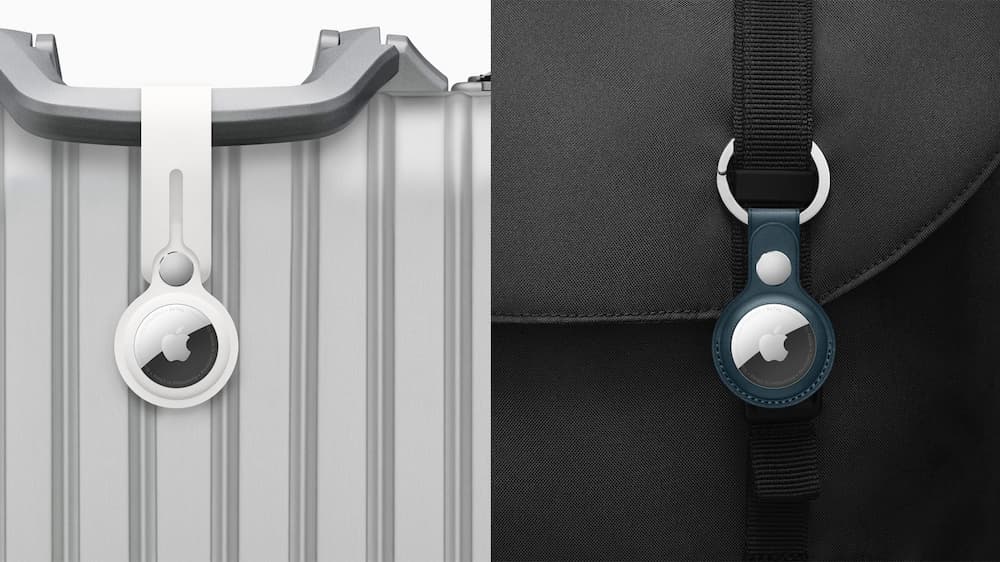
Originally, Apple launched AirTag mainly to track personal items and avoid losing keys, suitcases, backpacks and other important items, but they are abused by people with ulterior motives and are used to track specific people or cars. In fact, these are illegal activities.
In order to avoid this kind of situation, Apple and Google have also worked together to launch an unknown tracker warning. As long as the following conditions are met, the warning prompt will be automatically triggered. Below is the operating principle of the AirTag anti-tracking mechanism:
- 10-minute quick warning: When the strange AirTag follows you for 10 minutes, the iPhone will immediately jump out of the warning prompt.
- 8-24-hour sound alarm: If the AirTag is separated from the owner for more than 8 hours, an alarm sound will be automatically issued.
What is Google Unidentified Tracker Alert?
In addition to the ability of Apple iPhone to identify unidentified AirTag anti-tracking notifications, Google also launched the “Unidentified Tracker Alert” function for potentially illegal Bluetooth tracker devices.
When your Android phone detects that there is a Bluetooth tracker device that is not your own, and the device moves with you for a long time, such as starting from your residence, moving on a ride, etc., the Android phone will automatically jump out of an unknown tracker notification to help you find out whether there are unfamiliar devices tracking you.
Currently, Google’s unknown tracker alert function only supports Apple’s AirTag, but Google officially stated that it will continue to cooperate with more Bluetooth positioning device manufacturers in the future to expand support targets to other brands including Samsung SmartTag, so that Android users can more fully resist privacy threats.
How to enable Android unknown tracker warning?
Android phone detection unknown tracker function does not require additional app installation. As long as the Android device system is 6.0 or above, it can be enabled through the Android system construction. The opening method is as follows:
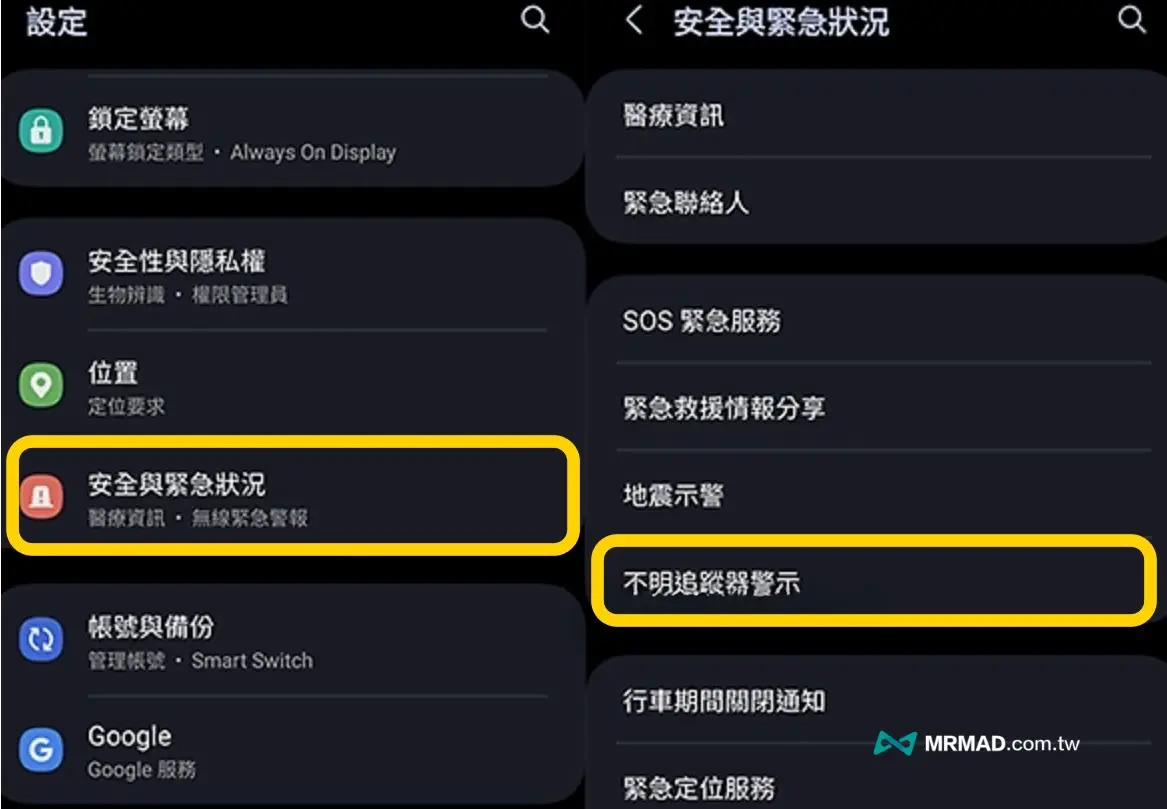
Step 1. Enter the built-in “Settings” of the Android system, click “Safety and Emergency” and find the “Unknown Tracker Alert” option.
Step 2. Confirm that the “Unknown Tracker Display” function is enabled. Just turn on “Allow Display Alert” to automatically detect AirTags or unknown trackers around you at any time.
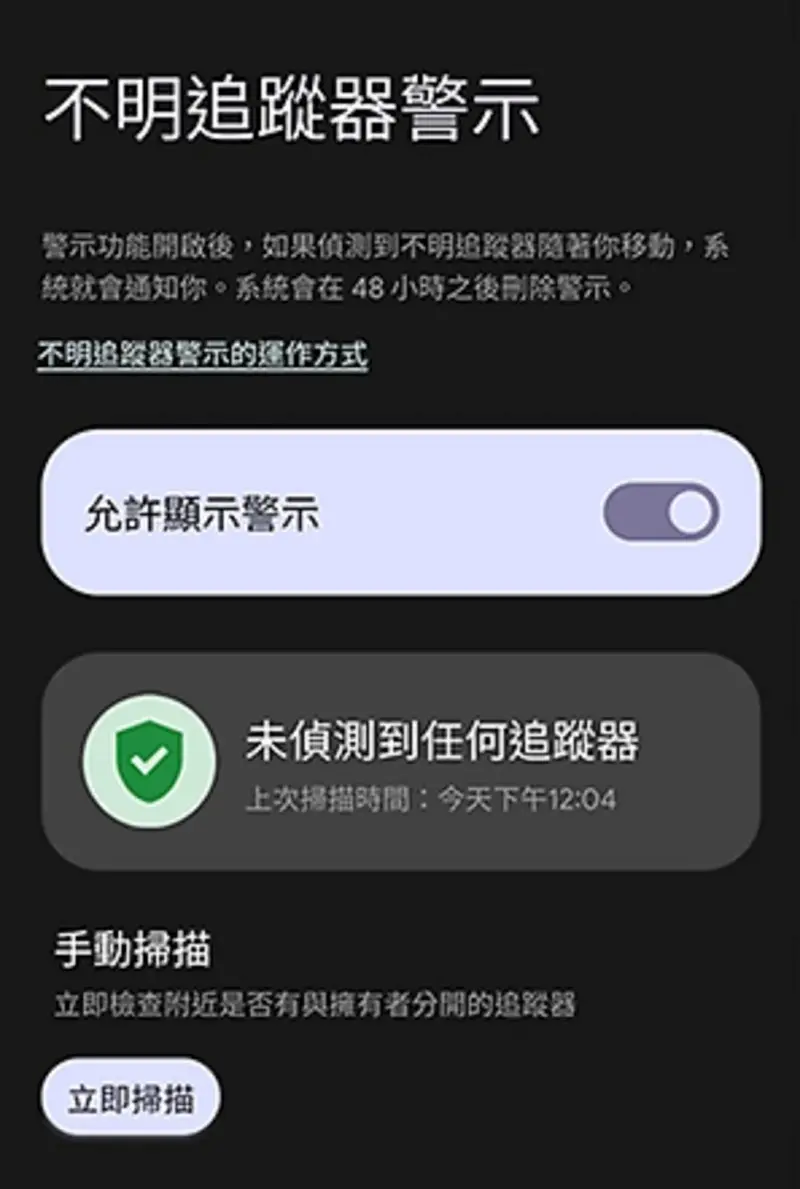
Step 3. Of course, you can also choose “Manual Scan” to instantly check whether there are unfamiliar Bluetooth tracking devices nearby. Android phones will automatically check whether there are unauthorized Bluetooth trackers nearby. The entire process takes about 10 seconds and there is no need to install additional applications.
How to set up iPhone AirTag anti-tracking notifications?
If you want to ensure that the iPhone at hand has complete AirTag detection capabilities, you need to check the following settings:
Step 1: Enable Location Service
Go to the built-in “Settings” app on iOS, go to “Privacy and Security” > “Location Services”, and confirm whether “Location Services” is enabled.
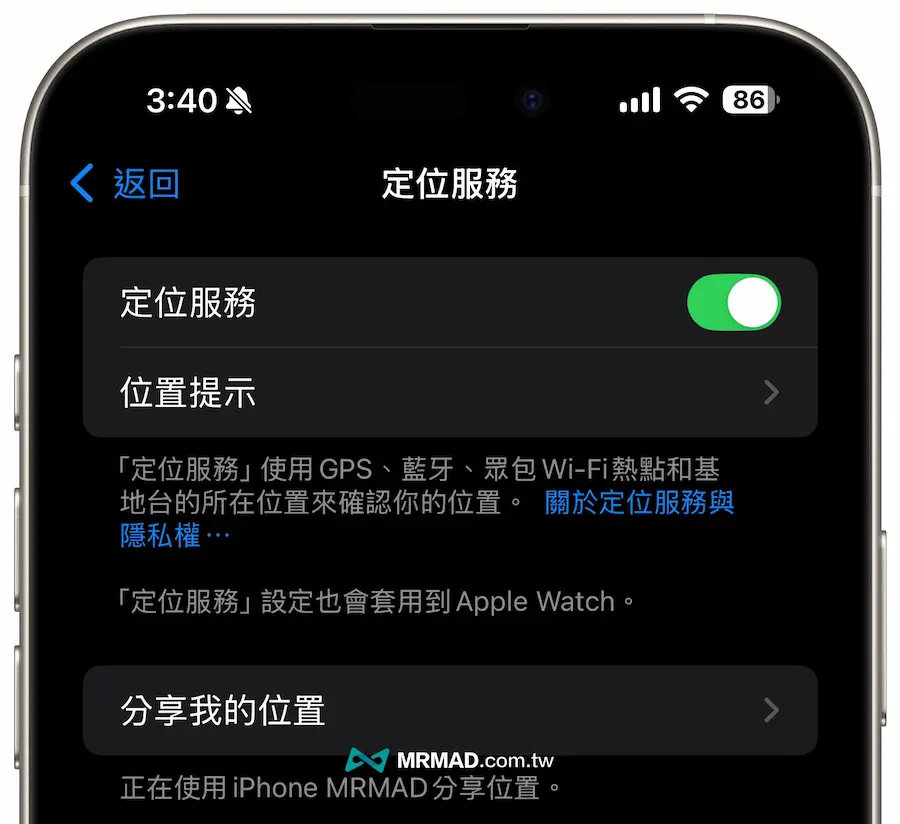
Step 2: Turn on the search service
Also, from iOS “Settings”, through “Privacy and Security” > “Location Service”, directly find the “Search” setting to determine whether there is an enabled location to access, and set it to “During the App Use” and turn on “Accurate Location”.
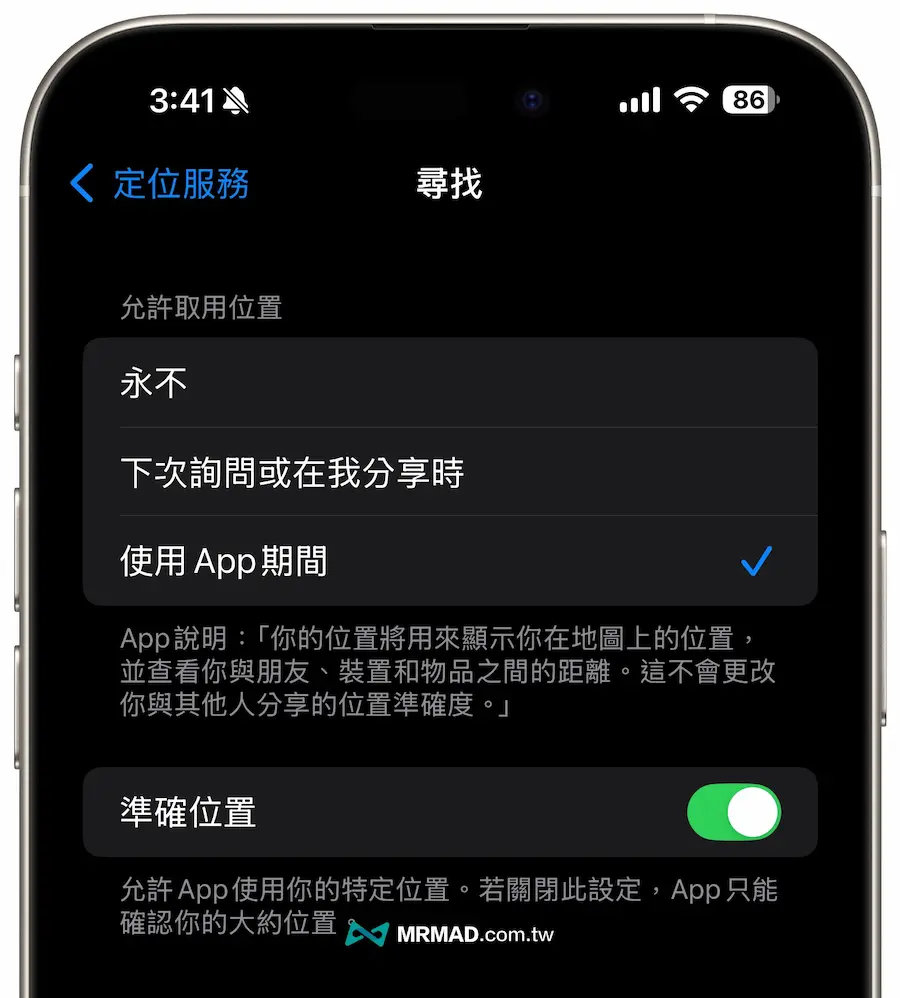
Step 3: AirTag anti-tracking notification
After all the above settings are completed, as long as there is an unknown AirTag tracker next to you, after more than 10 minutes, the security prompt screen of “AirTag detected near you” will pop up on the iPhone, as well as the map warning record. If it is an Android phone, it will also make the AirTag sound warning. Use the NFC phone to check whether the AIrTag is enabled. If you want to force the AirTag to turn off the AirTag, you should directly turn on the metal lid and remove the battery.
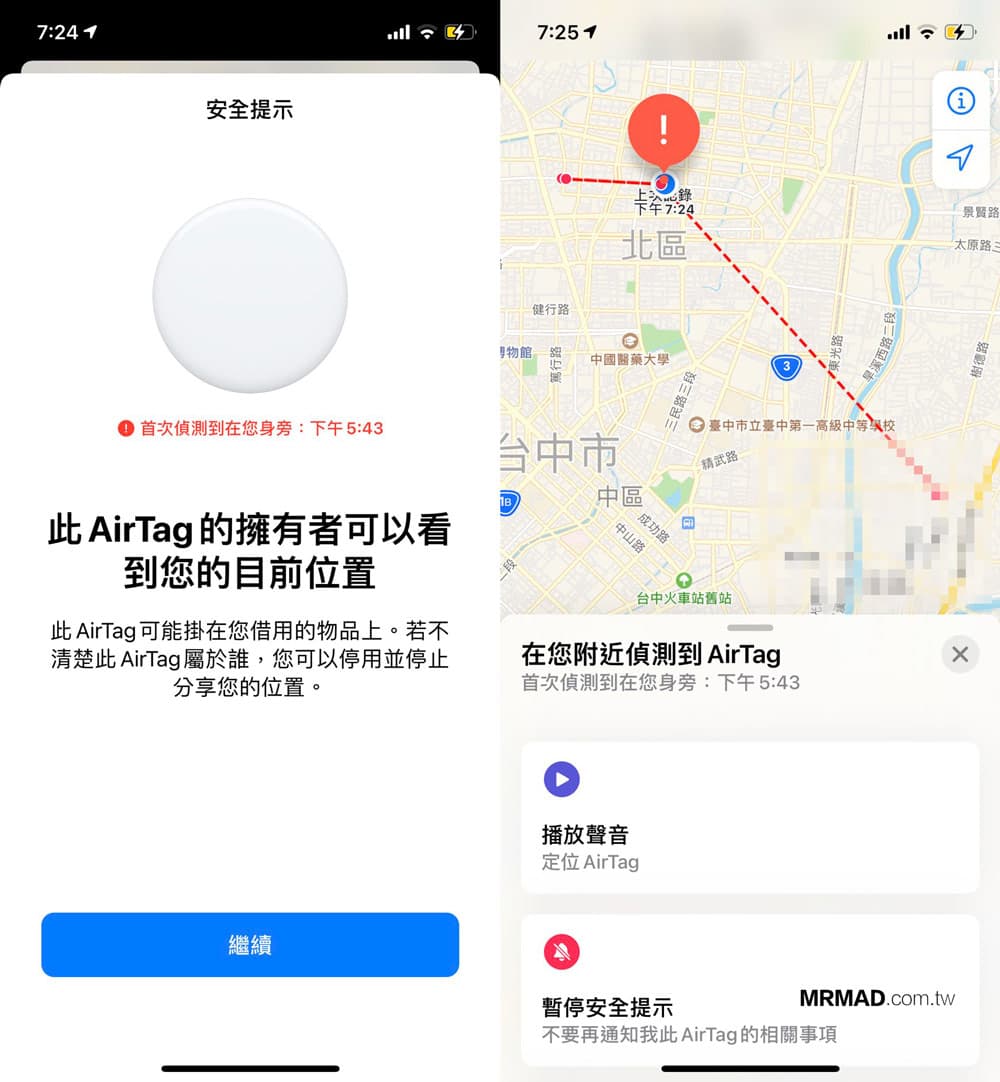
How to turn off AirTag anti-tracking notifications through iPhone?
If you take a bus with your friend, or take the same passenger or train, the AirTag will not be triggered because you are by your side, and your friend will not receive AirTag safety warnings.
The “Discover the AirTag that is following you” function triggers:
- AirTag left the owner
- AirTag continues to move on non-owners
If you borrow AirTag from someone else, you can only use the playback sound to retrieve it, or use the pause security prompt to stop issuing warnings on the same day. If you bind AirTag to family members, you can also use “Open a day” or select “Permanently Close Warning”.
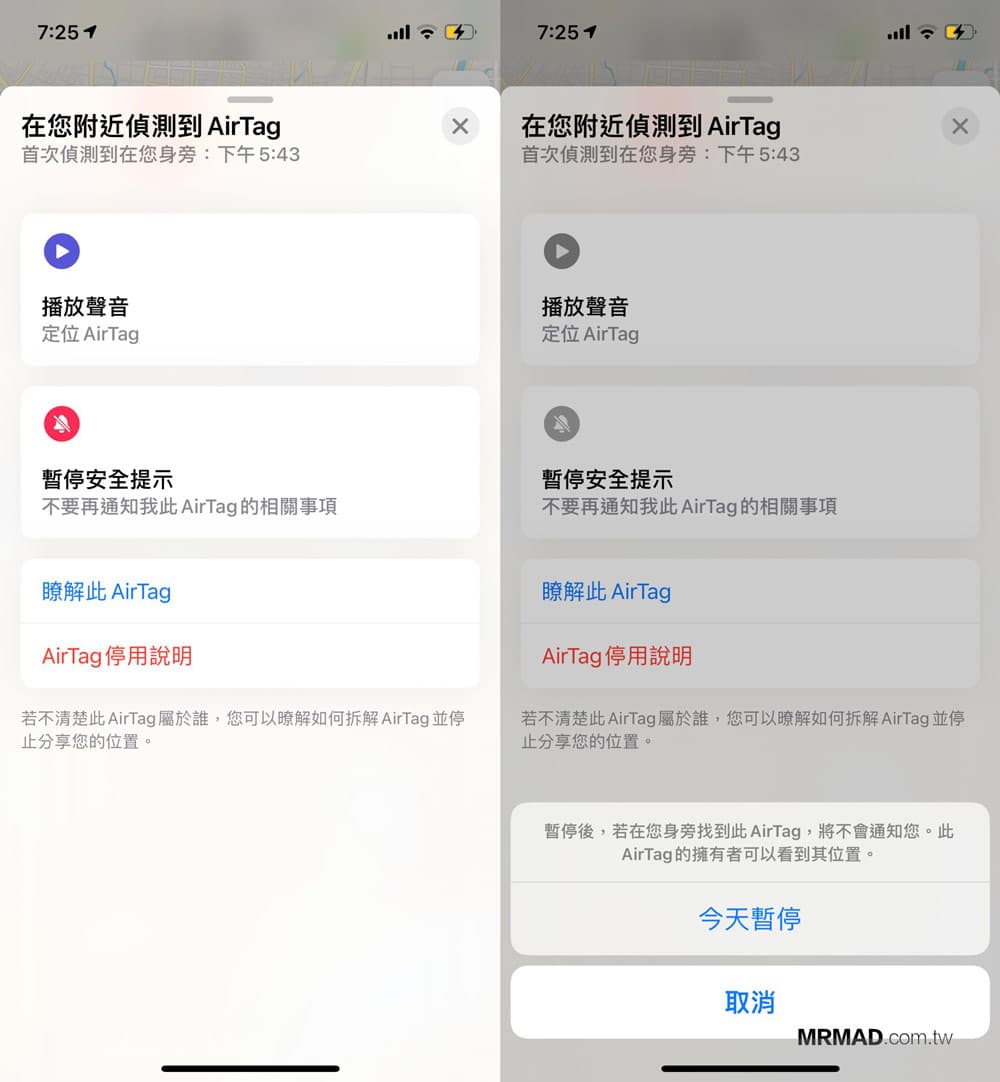
What should I do if my phone jumps out and detects that the AirTag is by your side?
If you find that the phone has an unknown AirTag tracker prompt, you can first follow the following method:
- Click to open the notification: First look at the detection track points and time on the map, and evaluate whether AirTag continues to follow you.
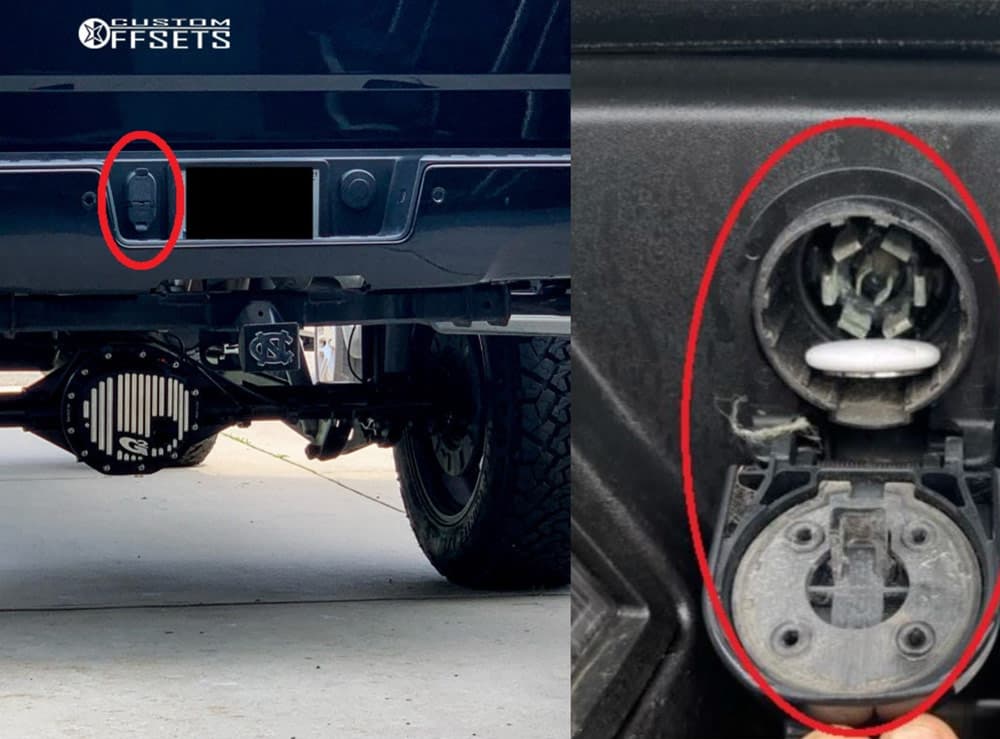
- Click “Play sound” or “Play sound effect”: It can make the AirTag sound sound, and carefully find where you are hiding next to you according to the sound. It is usually not easy to detect places such as bag mezzanine, coat bag, luggage, inside the car (spare tire well, inside the bumper, under the seat).
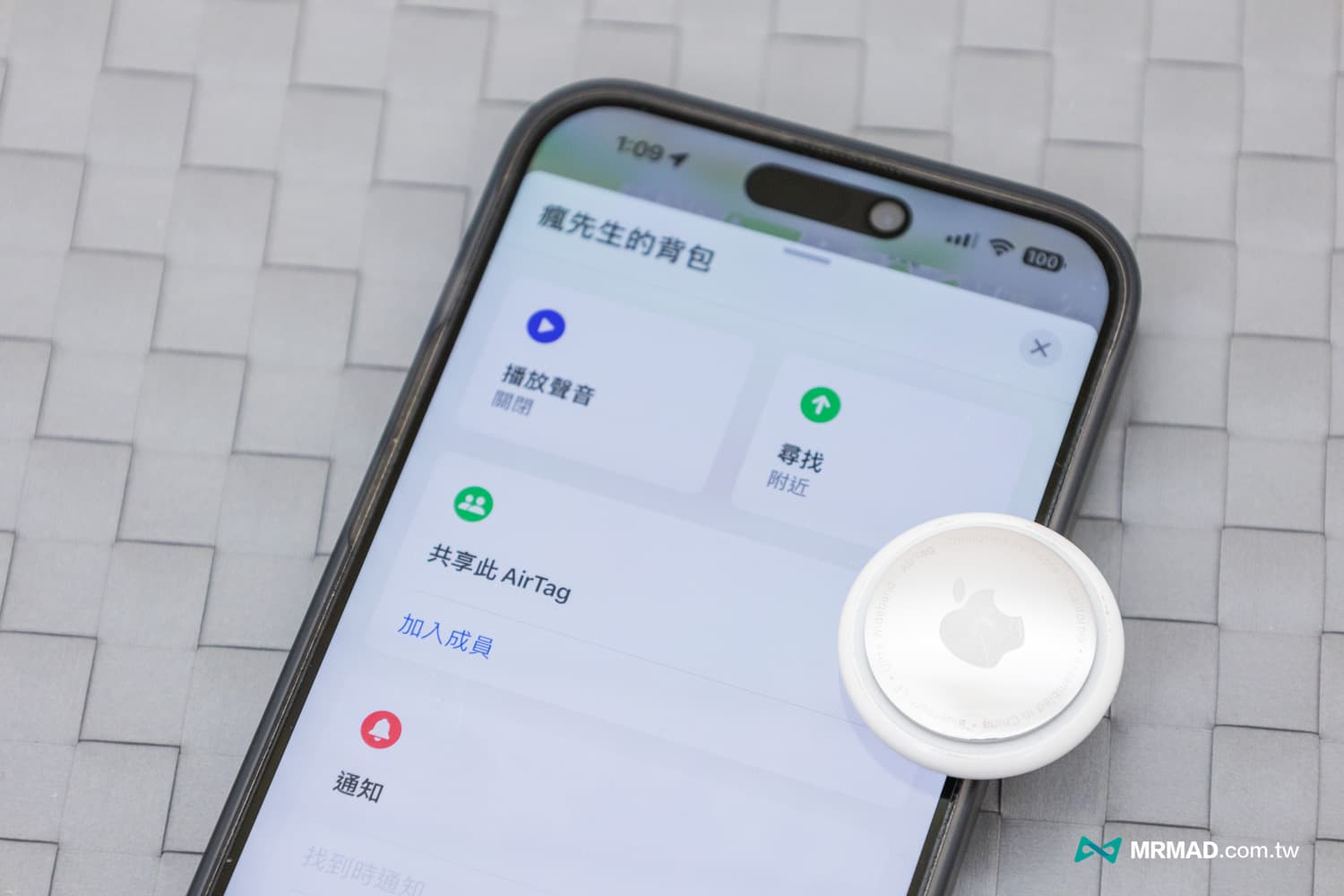
- Check information by turning the tracker device close to the mobile phone: Use your iPhone to the top of the AirTag (or any Android phone with NFC close to), open the device information page, and take a screenshot to save the “Serial Number” and “Binder’s Last 4-code Phone/Mask Email”. If it is in lost mode, contact information may be displayed.
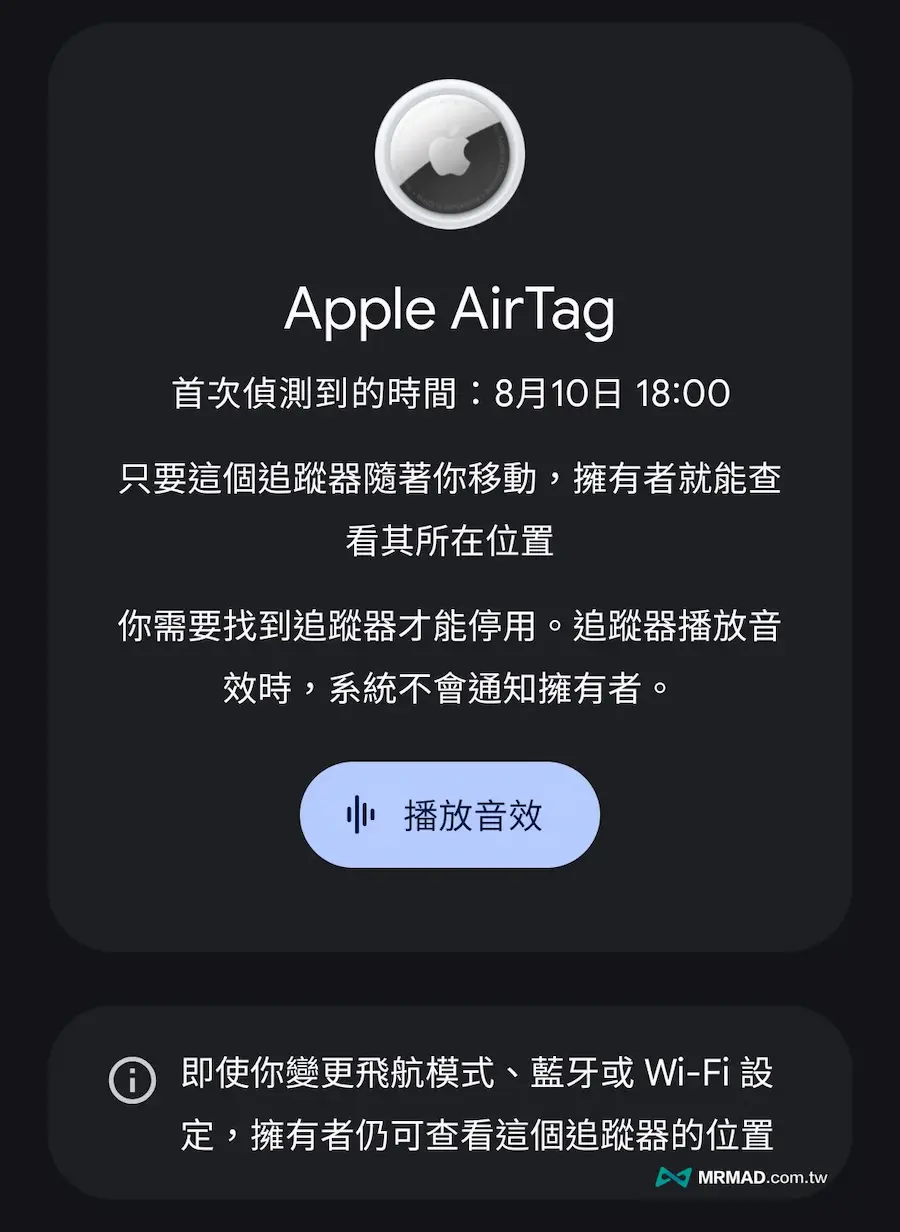
Unidentified tracker calls the police directly and leaves it to the police for tracking.
If you finally determine that the AirTag or unknown tracker is deliberately tracking, it will usually be hidden in a hidden location, and the information on the inspection equipment is not owned by someone you know, you must keep the evidence and report it directly to the police station recently.
After handing over the unknown tracker AirTag to the police, remember to provide mobile phone screenshots, map track screenshots, and device query serial numbers, and clearly describe the time, place and process, so that the police can know the entire process.
In the future, the police will be able to ask Apple to provide information about AirTag pairing accounts and trace the original holder.
Is it illegal to use AirTag to track other people?
Whether it is a couple, spouse or friend, as long as it is installed with AirTag or tracker without the consent of others, it may involve the “crime of obstructing secrets” and the personal data protection law. If the circumstances are in line with it, it may also fall into the act of punishment of the “Stalking, Harassment and Prevention Law”.
Article 315 of the Criminal Law 1: Crime of Obstructing Secrets: “Theft of the Record of Unpublic Activity, Speech, Talk or Electromagnetic Records of Others” without consent is a crime. The position track is continuously recorded with the GPS/tracker. Even if the video is not recorded, it is also a “stealing electromagnetic record”. The maximum sentence is not to be fixed-term imprisonment of less than 3 years, a fine of less than 300,000 yuan or a fine of less than 300,000 yuan.
Personal Data Protection Law: Whereabouts are “social activities” materials that can identify individuals. Collect, process and use without the consent of the parties involved may constitute illegal collection of personal funds. The up to 5 years of imprisonment and a fine of 5 years (depending on the facts of the case).
The method of tracking and harassment prevention: Those who repeatedly or continuously, violate their wishes, follow-up and approach to a specific person, which is sufficient to make them terrify and affect their lives through tools, equipment or electronic communications, shall be sentenced to fixed-term imprisonment of not more than one year, a fine of not more than RMB 100,000 for criminal detention or a symptom of not more than RMB 100,000 for the symptom of the subject or the symptom of the subject or the symptom of the subject or the symptom of the subject or the symptom of the subject or the symptom of the subject or the symptom of the subject or the symptom of the subject or the symptom of the subject or the symptom of the subject or the symptom of the subject or the symptom of the subject or the symptom of the subject or the symptom of the subject or the symptom of the subject or the symptom of the subject or the symptom of the subject shall be sentenced to fixed-term imprisonment of not more than one year, a fine of not more than RMB 100,000 for criminal detention or a symptom of the subject shall be sentenced to fixed-term imprisonment of not more than one year, a fine of not more than RMB 100,000 for criminal detention or a symptom of the subject shall be sentenced to fixed-term imprisonment of not more than one year, a fine of not more than RMB 100,000 for criminal detention or a symptom of the subject shall be sentenced to fixed-term imprisonment of not more than one year.
Find My Device network is delayed and waiting for privacy specifications to be implemented simultaneously with Apple
In addition to the tracker warning function, the Find My Device network, which was originally scheduled to be launched recently, has also announced that it will be postponed. The reason is not technical issues, but to wait for Apple to implement peer-to-peer unauthorized tracking protection mechanism on iOS to achieve the unified standards of cross-platform privacy protection.
According to Google, the “Unauthorized Tracking Tips Specifications” currently formulated with Apple is expected to be officially implemented until the end of 2025, and the two parties will jointly open their positioning network. This means that Android’s Find My Device network will be officially enabled only after the cross-platform privacy standards are improved, avoiding the occurrence of iOS users becoming vulnerabilities.
If you want to know more about Apple information, iPhone teaching and 3C information skills, please follow us
Crazy FB Fan Group,
Subscribe to Mad Google News,
Telegram,
Instagramas well as
Subscribe to Madness YouTube.