Many people who use LINE have probably wanted to separate personal and business use for different purposes, or use multiple accounts differently.
This time, we will explain in detail how to manage multiple LINE accounts on your own and the benefits.
Is it possible to create multiple accounts via LINE?

In conclusion, it is possible to create multiple accounts.
However, since it is generally assumed that each person will only have one account, you will need to prepare a phone number that is not registered with LINE.
The reason is that when you create a LINE account, you will always be required to authenticate your phone number.
It is not possible to skip this, so if you want to have multiple accounts, make sure to have as many phone numbers as you have for that account.
To have multiple phone numbers, you can either use your home landline number or sign up for a cheap SIM card.
How to manage multiple LINE accounts on your own

From here, we will explain how to use multiple accounts individually.
Duplicate a LINE app
Some smartphone models include the “twin app” and “dual messenger” that allow you to download the same app to another device, allowing you to operate it with a different account.
By using these models, you can effectively have two LINE apps, so you can use different accounts for each one.
Furthermore, even if it is not a compatible model, you may be able to duplicate apps by using apps such as “Parallel Space” on Android and “App Cloner” on iPhone.
However, this method does not guarantee security, so it is safer to avoid it if you are worried.
Used on multiple devices
Another option is to use two smartphones.
With this method, you can easily operate multiple apps as long as you have two phone numbers.
You can also install a LINE account on your tablet as well as your smartphone.
Switching the login status of your LINE account
If you are using the PC version of LINE, you can switch the login status of your account.
The basic rule for LINE is to log in to one account, but for the PC version of LINE, you can log in to two accounts at the same time.
Using this will take some time to log in, but you can have multiple accounts.
How to simulate multiple LINE accounts

Operating multiple LINE accounts takes a little effort, such as using a clone app or having two mobile phones.
Another weakness is that it is not possible on all models.
Below, we will show you how to operate multiple accounts in a simulated way, rather than using multiple accounts.
Use the open chat feature
If you want to separate accounts by purpose, such as work, personal, or family, you can use the “Open Chat” function.
Open chat is a simpler version of a group that allows you to talk anonymously with an unspecified number of people, and you can change icons and names for each open chat, making it suitable for different uses for each scene.
Here’s how to create an open chat:
- Open the LINE chat screen and select the speech bubble icon in the top right corner.
- Tap the open chat button at the bottom center
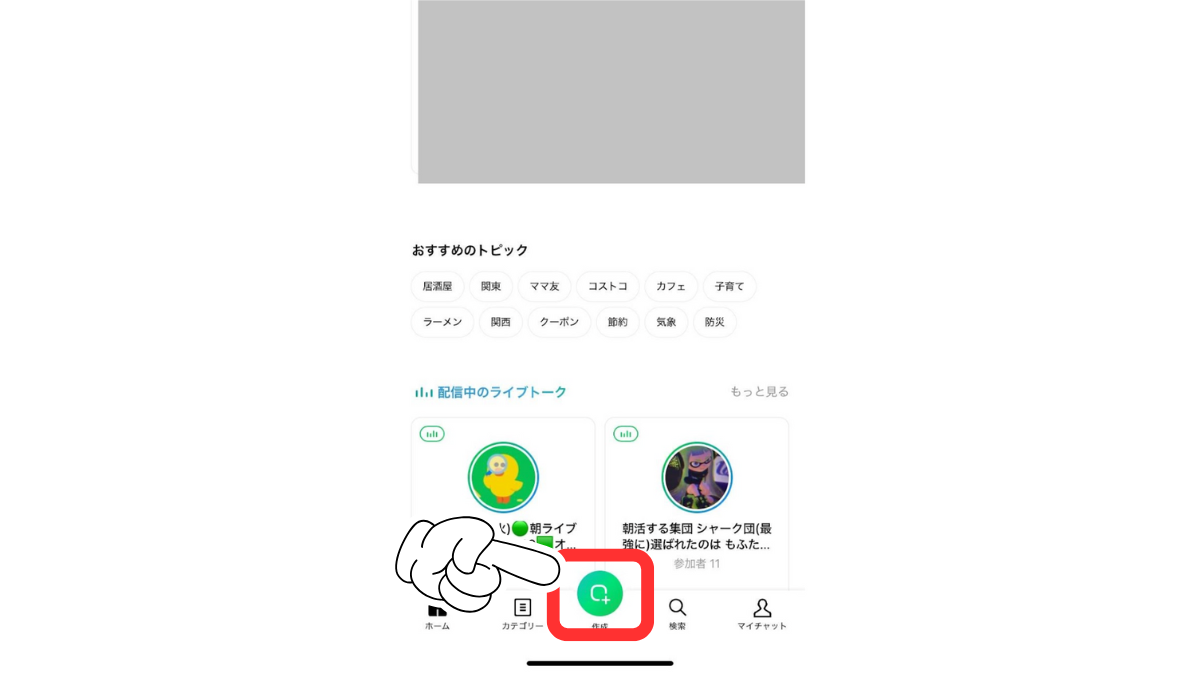
- Enter your open chat name and tap Next

- Create a profile in open chat and tap Finish
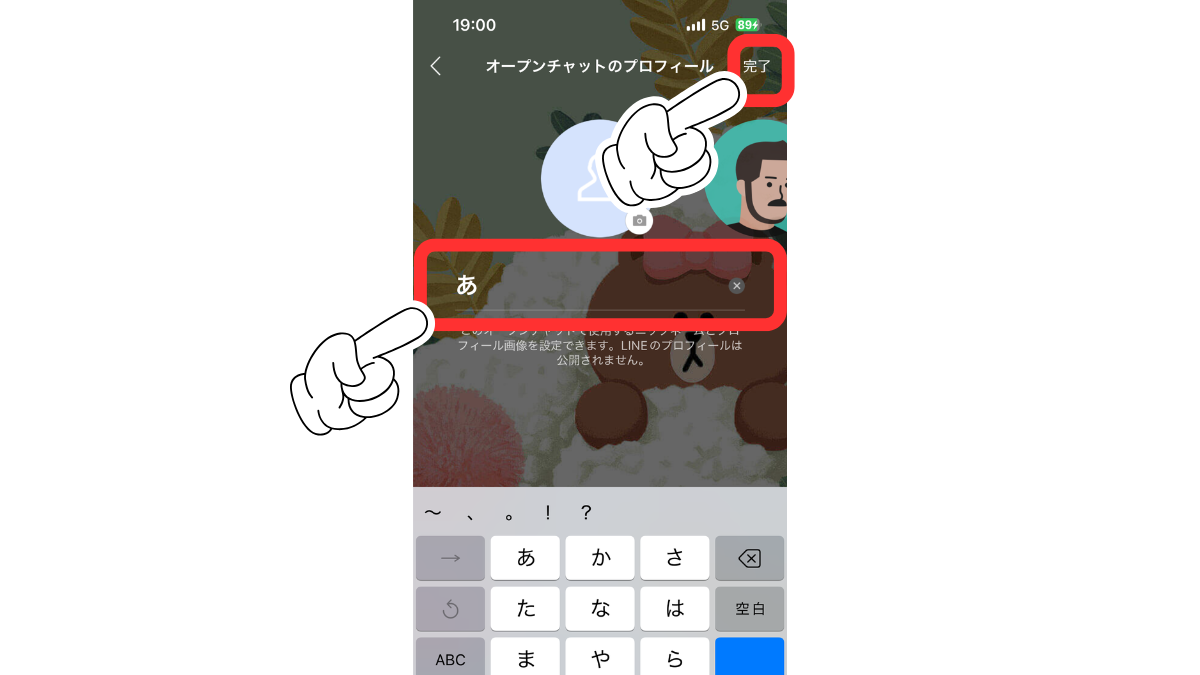
- Once the talk screen appears, it’s done

Use LINE WORKS
If you want to separate your accounts between work and personal use, we recommend LINE WORKS.
LINE WORKS is a business version of the line, and almost all of the same functions as LINE.
Those who use it will need to download the app, but if you want to separate LINE accounts within the company, you can start for free, so it’s a good idea.
Things to note when operating multiple LINE accounts

There are a few things to keep in mind when operating multiple LINE accounts.
By following these measures, you can manage your account more efficiently.
Maintain account management
When operating multiple accounts, it is important to properly manage your passwords and account information.
Be careful as this may lead to the possibility that you will not be able to log in either of these passwords.
Organize your notification settings
If you run multiple accounts, you may receive too many notifications and manage them in a complicated way.
You may miss important messages, especially if you have a mix of work and private accounts.
When you have two accounts, it is a good idea to make a detailed notification setting and set it up so that you only receive the necessary messages.
summary
In this article, we explained how to operate multiple accounts on LINE.
Basically, LINE is one account per phone number, but it may be possible to manage multiple accounts by using multiple smartphone duplication apps or devices.
By using different accounts for each purpose, you will be able to make communications at work and at your personal life even more smoothly.
Source: iPhone Mania