The iOS27 camera app will add “grid icons” that improve operability, “Siri mode” that works with AI, and “RAW9” that improves image quality. Additionally, a “reference mode” to prove authenticity is expected to be added. This time, we will explain the new features of the camera app based on the public beta version of iOS27.
This article was confirmed using the iOS27 public beta version and may be changed or deleted when it is officially released.
Redesigned in-app controls and tidying up from the Settings app
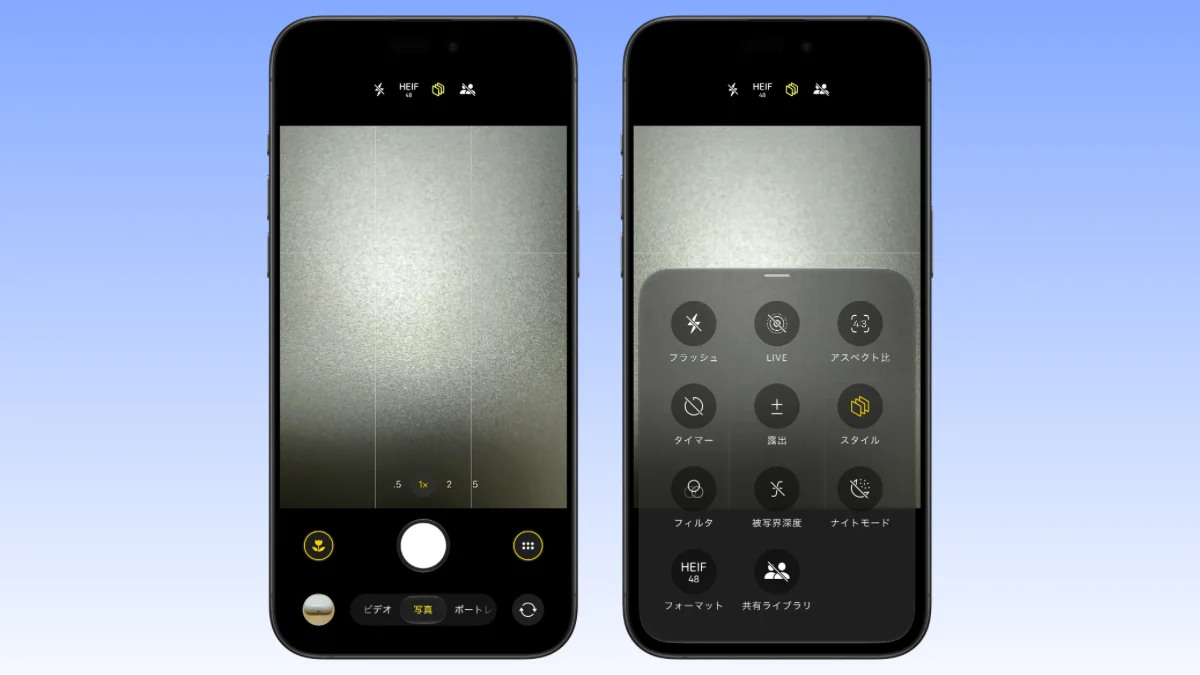
The shooting controls, which used to be hidden in a group of small icons at the top of the screen, have been completely redesigned. A new “grid icon” has been added to the right of the shutter button, and when you tap it, various controls will be displayed in a popover format at the bottom of the screen.
- The options displayed change dynamically depending on the current shooting mode, such as photo or video.
- You can now intuitively access various parameters such as exposure, timer, style, etc.
Apple is simplifying various settings to make it easier to access controls within apps. For example, some items such as “resolution” settings have been removed from “Camera” in the “Settings” app, and have been changed to a method that allows you to set them directly within the camera app.
If you assume that you’ll make adjustments in the settings app, you may lose track of what you’re looking for, so be sure to follow the steps to make detailed adjustments to the camera app by first opening the grid icon in the camera app.
The true value of this change lies in the “collective management of shooting parameters”. Detailed setting items that previously tended to be operated in separate locations have been consolidated into a “grid icon” within the camera app, making it possible to intuitively adjust exposure, timer, format, depth of field, etc. in one place.
New feature “Siri Mode” (integration of visual intelligence)
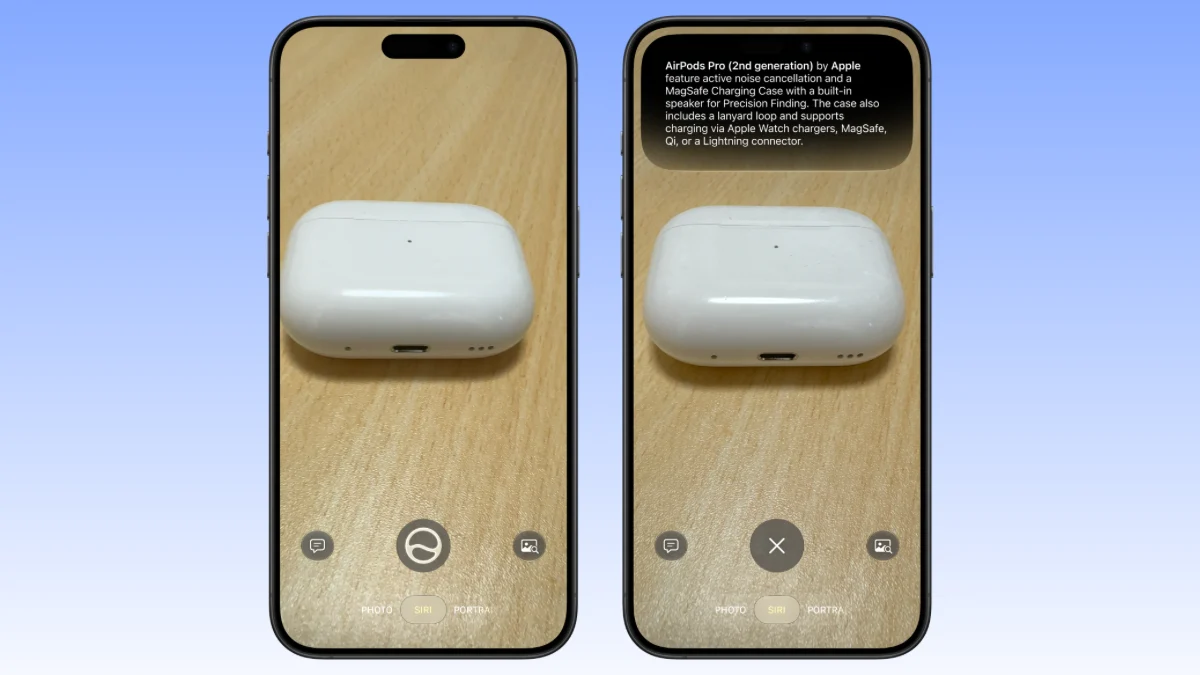
*Siri AI is used for the camera app’s Siri mode. Siri AI will be available in English as a beta version within this year, and will be available in other languages including Japanese after that, so it will not be available when iOS27 is released.
The second major change in iOS27 is the addition of a new shooting mode, “Siri Mode.” In the camera app, swipe left to switch to “video mode”, and swipe right to switch to this “Siri mode”.
Siri mode is both new and nostalgic. Before iOS26, “visual intelligence” was activated by long-pressing the camera control, but in iOS27, this visual intelligence is integrated as Siri mode within the camera app.
In addition, activation by long-pressing the camera control is still possible, and Siri mode will be displayed in the camera app.
Utilization techniques that dramatically improve the efficiency of daily life and business
It is an applied technique for improving productivity that is more than just a tool to look up the names of unusual things.
- Batch processing of business cards and invitations: Just hold the card over the business card or paper event invitation you received, and instantly register your calendar and add contacts without entering any text.
- Allergy management when traveling abroad and eating out: AI not only translates foreign language menus, but also explains what ingredients are used, so you can enjoy meals with peace of mind even overseas, where the food culture is different.
- Healthcare/Easy nutrition management: By quickly capturing and recognizing your daily meals, you can significantly reduce the effort of manually inputting them into health management apps.
Improved image quality and reliability (RAW9 and reference mode)
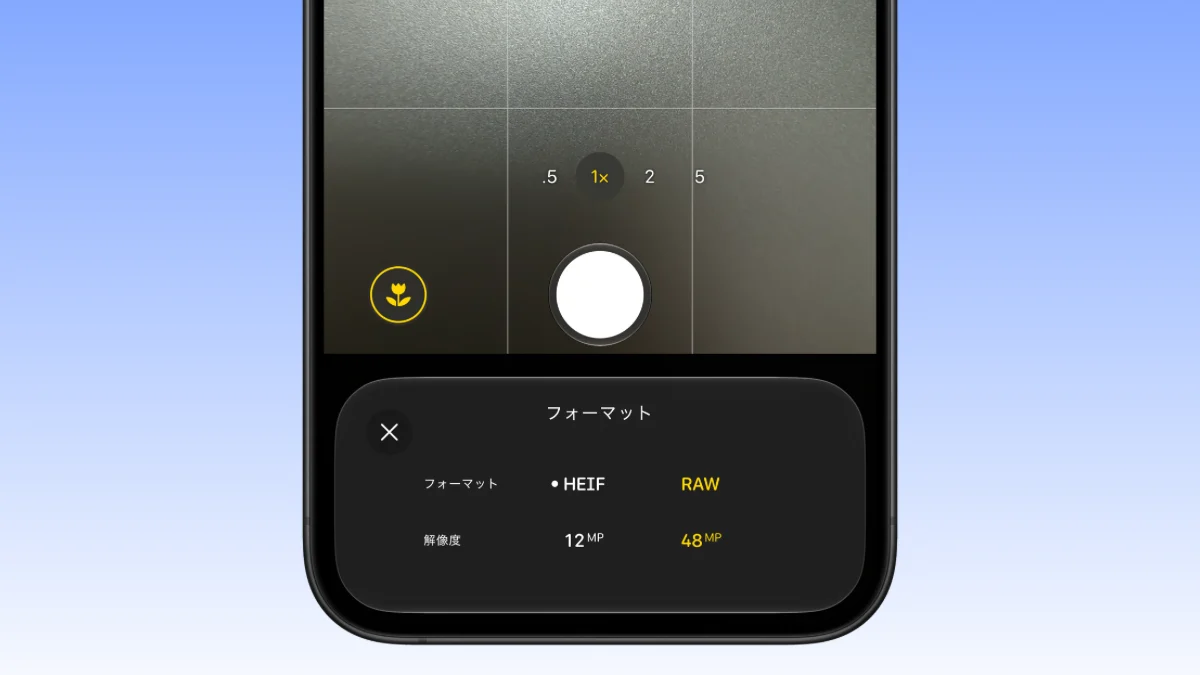
RAW9 support and reference mode have been added to the iOS27 camera app to improve image quality and reliability.
Evolution of the processing pipeline with RAW9 support
iOS27 introduces a new RAW image processing pipeline called “RAW9”. This applies not only to RAW photos taken with the iPhone itself, but also to RAW data imported from other companies’ cameras.
Apple calls this update “the biggest update to RAW support ever,” and it dramatically improves the rendering performance of RAW files.
Furthermore, we have adopted a new CoreML model and integrated demosaic processing (Demosaic) and noise reduction processing (Denoise). Processed completely in real-time on your device using the Neural Engine core.
Even compared to the conventional RAW8, it has achieved a very clear improvement in image quality in terms of both color separation and noise reduction.
“Reference mode” to prove the authenticity of photos
Code analysis of iOS27 Developer Beta 5 revealed that a new verification function is under development in response to the widespread use of generative AI.
This is a system that verifies and authenticates the source of the image based on the hardware information of the camera used to take the image, and proves that the image is a real photo (live action).
This is a feature that users can optionally enable, and upon verification, photos and their metadata are sent to Apple’s privacy technology, “Private Cloud Computing.” The submitted data will be discarded after the verification process and will never be stored on the cloud.
Transforming professional workflows and answering the deepfake era
“RAW9” for SLR users
By supporting the loading of RAW data from other companies’ cameras, the iPhone becomes a powerful “portable development and preview device” in the field. In particular, noise processing using a neural engine prevents details from being lost when shooting in dark locations, allowing professional-quality retouching to be completed in a mobile environment.
“Reference mode” as social infrastructure
In today’s world filled with AI-generated images, “proof that the photo is true” is essential for reporting, the judiciary, and transactions on flea market apps. The combination of privacy protection and authenticity verification through private cloud computing is a strength unique to Apple.
Hardware load caused by RAW9 and AI processing
The integrated demosaicing and noise reduction processing introduced in RAW9 and the constant object identification processing in Siri mode are expected to place an unprecedentedly high load on the internal neural engine.
When shooting outdoors in the summer or shooting RAW for long periods of time, you need to be careful about thermal throttling, which can cause the display brightness to drop or the frame rate to drop due to the body heating up.
In addition, battery consumption can be reduced by using different modes, such as using the standard format for everyday use such as snapshots, and enabling RAW9 only when shooting scenes with large contrasts or productions.
Differences in approach from other companies’ products
Google’s Pixel series is strongly pushing out “free re-editing and creation after shooting” using generation AI.
On the other hand, while Apple offers AI editing in its photo app, the camera app emphasizes the reliability of optics and recording, such as “faithful depiction at the time of shooting (RAW9)” and “certification that the photo is genuine (reference mode)”.
A creative AI editing function that allows you to easily enjoy creating works, and a function that protects “true records” that can withstand reporting, business, and evidence photography. Apple’s unique approach to iOS27 is the ability to achieve both of these.
Advantages and concerns of new camera functions
You can scroll
| function | Main benefits | Concerns during introduction |
|---|---|---|
| In-app UI redesign | Setting shooting parameters such as exposure can be completed in one place. | Confusion for users accustomed to traditional operating procedures. |
| Siri mode | Real-time analysis, calendar registration, translation, identification, etc. are possible during the shooting process. | When iOS27 was first released, Japanese was not supported. Power consumption due to AI processing. |
| RAW9 processing | Noise reduction and texture preservation through real-time integrated processing of CoreML and neural engine. | Increased heat generation and battery consumption when shooting continuously or for long periods of time. |
| Reference mode | Verify the source of the photo and prove that it is not a fake image (generated by AI). | Communication of verification data (private cloud computing) and the hassle of setting it up. |
Rumored features are not included
Before the announcement of iOS 27, there were rumors that a new camera app with fully customizable layouts would be released. However, what was actually announced and implemented was a more modest and consistent design change as predicted at WWDC.
Although these various functional enhancements are very positive improvements, they left a rather modest impression on users who were expecting more dramatic UI changes.
The reason why the completely free customization that was rumored in advance has been postponed is thought to be in order to maintain the most important aspect of a smartphone camera, which is the simplicity of “anyone being able to take pictures instantly and intuitively.”
At first glance, it may seem like a simple update, but it successfully solves the essential issues required in the modern shooting environment: “streamlining the UI,” “making the AI function native (Siri mode),” “improving professional-level image quality (RAW9),” and “guaranteeing photo reliability (Reference mode).”
The iOS27 camera app can be said to be a steady evolution that has become more reliable as a tool than flashiness.
Source: iPhone Mania