The other day, povo2.0 became compatible with 5G SA. An application is required to use 5G SA with povo2.0. You will also need to change your SIM or reissue an eSIM. This time, we will explain everything from applying for povo2.0 5G SA on iPhone to reissuing an eSIM.
First of all, what is “5G SA”? Differences from conventional 5G (NSA)
There are two types of 5G communication: NSA (Non Stand Alone) and SA (Stand Alone). Previous 5G NSAs used some 4G equipment, so during busy times the communication speed was not much different from 4G.
On the other hand, this 5G SA will use only 5G-dedicated equipment. This allows you to use 5G without being affected by 4G congestion, enabling faster, higher-capacity communication.
iPhones that support 5G SA and preparations
iPhone 14 and later are compatible with 5G SA. Please note that you may not be able to communicate with iPhone 13 or earlier.
Additionally, iOS must be kept up to date. Open “Settings” → “General” → “Software Update” and confirm that “iOS is up to date” is displayed.
[Important]4 points to be aware of before proceeding
- Restrictions on models that do not support 5G SA: Communication may not be possible with iPhone 13 or earlier.
- Check the iOS version: Even if your iPhone supports 5G SA, you may not be able to communicate if the iOS is not the latest version.
- Limit on the number of switching times (once per day): Switching between 5G and 5G SA can only be done once per day. If you accidentally change to a 5G SA compatible SIM on a non-compatible iPhone, you will not be able to change back and will be unable to use calls or data communications on the same day, so please be sure to confirm that your iPhone is 5G SA compatible.
- Plans eligible for 5G SA: 5G SA is applicable to “call + data” plans. You cannot apply for the “Data Only” plan.
- Regarding reissuance fees: It will be necessary to reissue the SIM as part of the procedure.
- Physical SIM card reissue: 3,850 yen including tax
- eSIM reissue: 440 yen including tax (eSIM reissue fee is free for the time being.)
Steps to change from povo app to 5G SA (for eSIM)
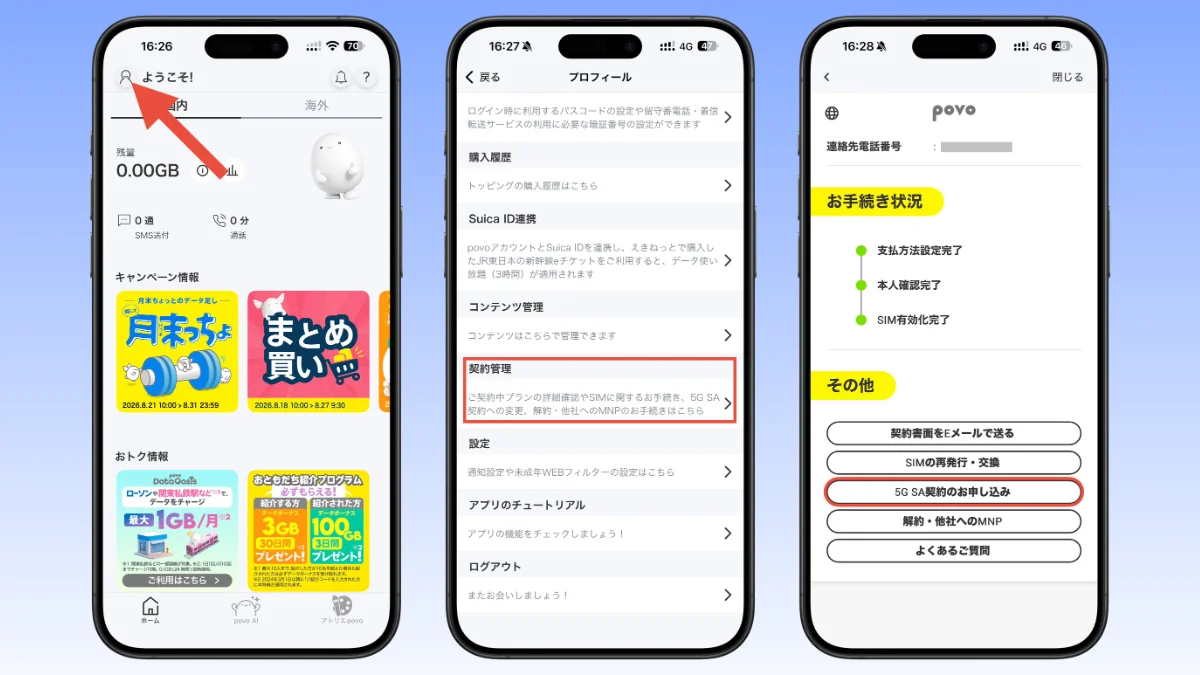
Open the povo app and tap the human icon in the top left. Select “Contract Management” and tap “5G SA Contract Application” at the bottom.
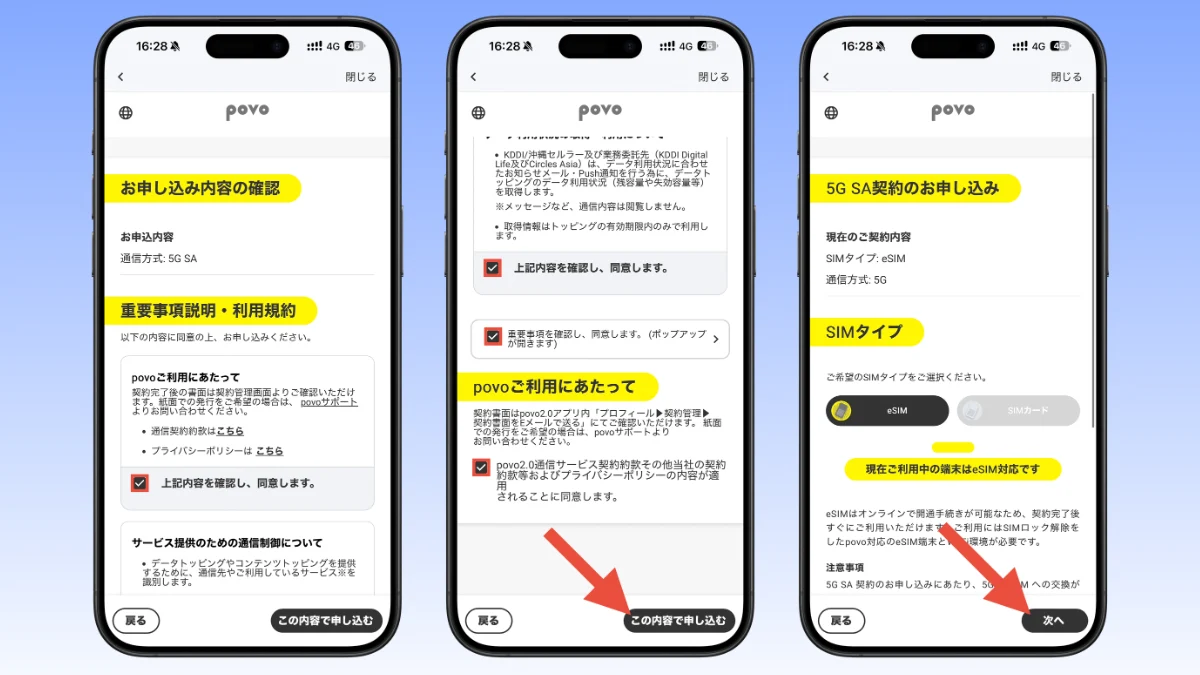
Check the four consent items and tap “Apply with these details”. Select your SIM type and tap “Next”.
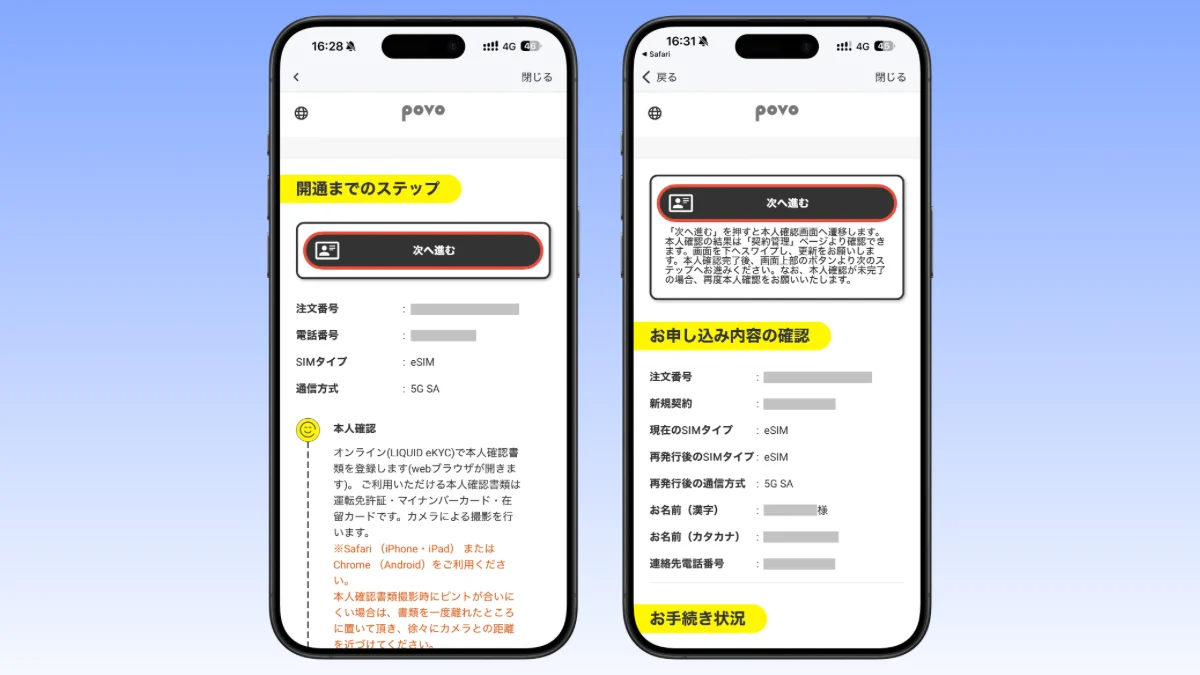
When you tap “Next” on the step-by-step screen, a browser will open and you will need to verify your identity. Once your identity has been verified, return to the povo app again and tap “Next”.
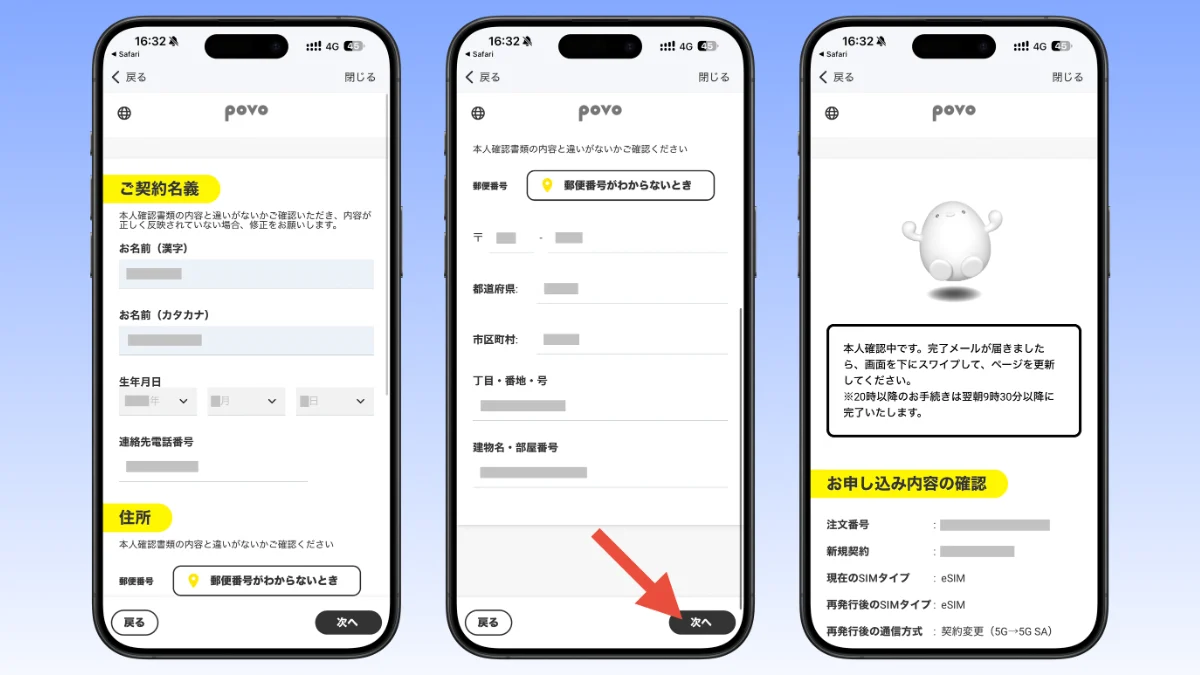
Check that the name and address information is correct and tap “Next”. Please wait for a while as you will receive an email after the identity verification is complete. If it is after 20:00, it will be completed after 9:30 the next morning.
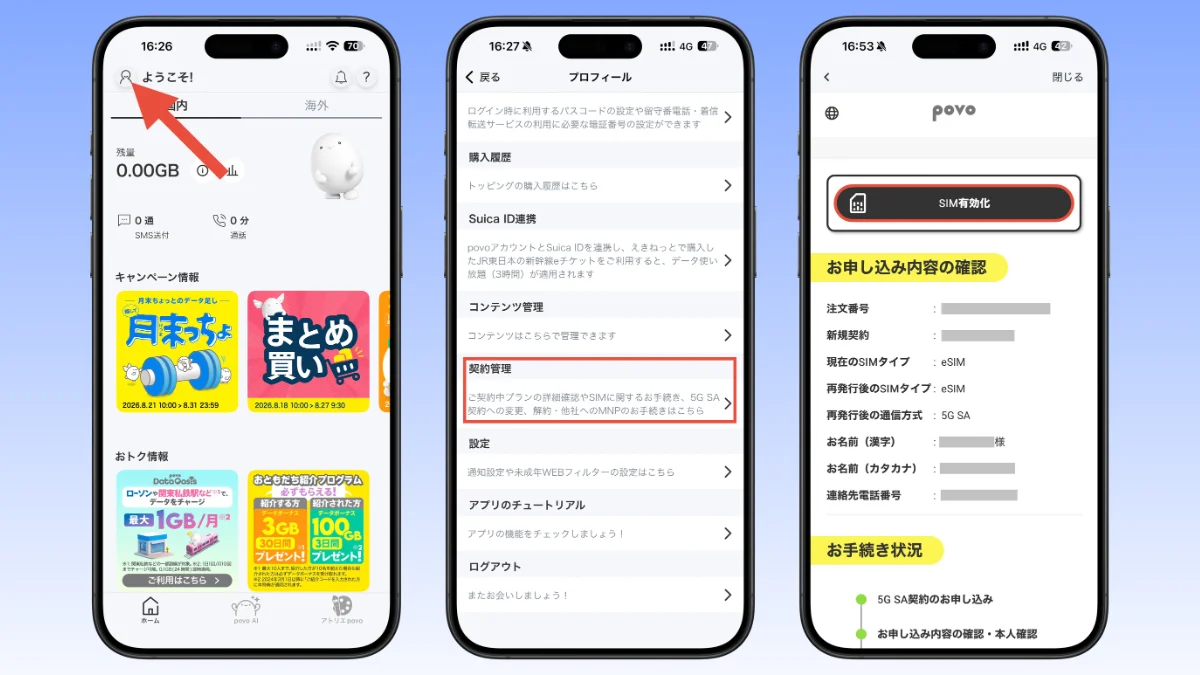
When you receive the email confirming your identity verification, open the povo app and select the human icon in the top left → “Contract Management”. Tap “SIM Activation”. Similar to identity verification, if SIM activation is performed after 20:00, it will be completed after 9:30 the next morning.
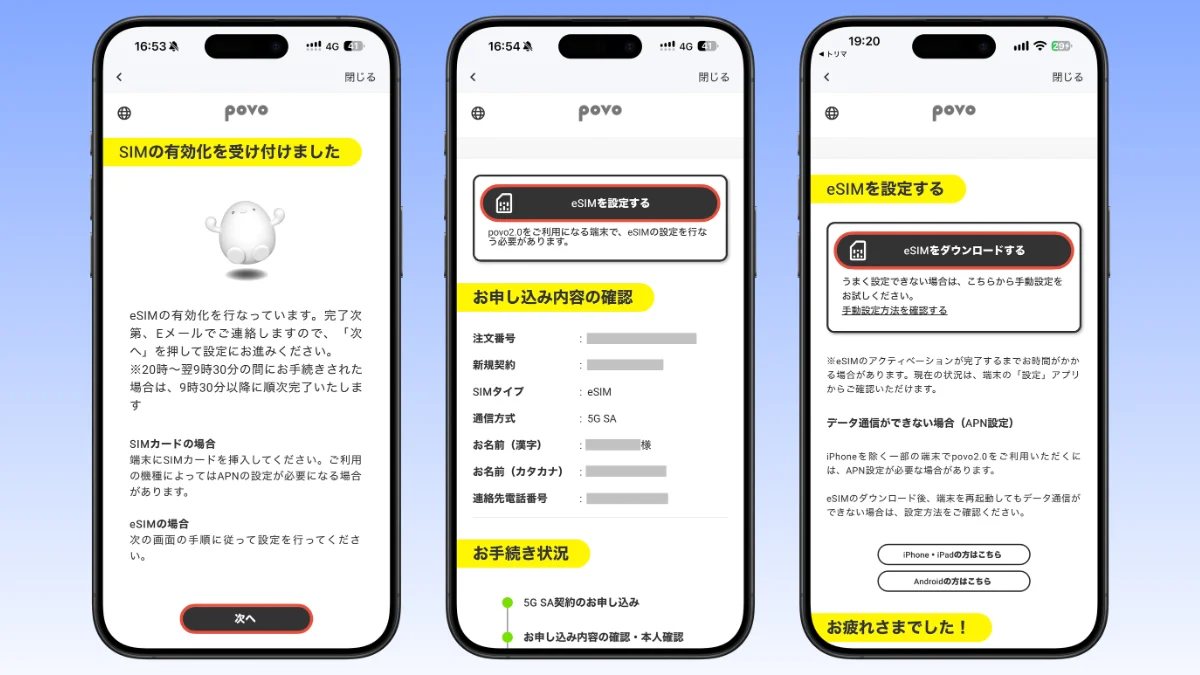
On the “SIM activation accepted” screen, tap “Next” and tap “Set up eSIM.” When the “Set up eSIM” screen appears, tap “Download eSIM”.
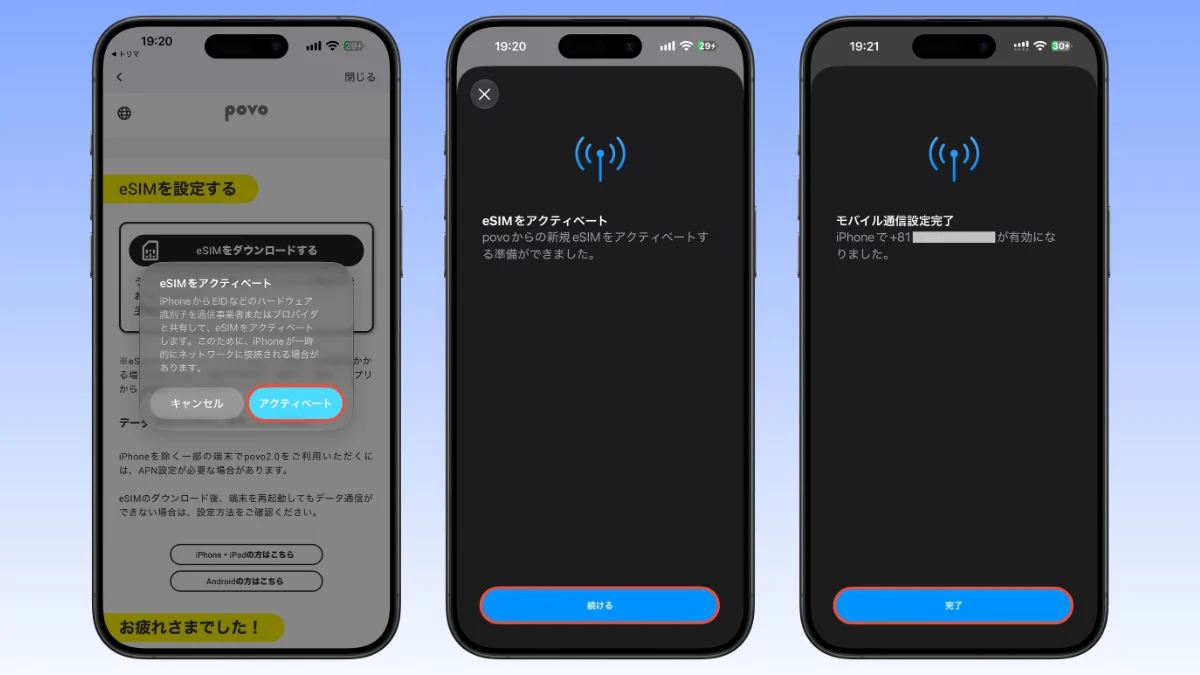
When the “Activate eSIM” dialog appears, tap “Activate”. Then tap “Continue” and wait until activation is complete. When “Mobile communication setup complete” appears, tap “Finish” to finish.
If you have two or more SIM cards, settings such as mobile communication plan name setting and default line selection will be displayed one after another.
5G SA launch commemorative campaign is also being held
A campaign is being held to commemorate the launch of 5G SA, and if you complete the application and activation of a 5G SA compatible SIM between August 25, 2026 and October 31, 2026, you will receive a promo code for unlimited data usage (24 hours).
The promo code will be sent to the email address registered with povo2.0 by the end of the month following SIM activation.
Source: iPhone Mania