
In Safari of macOS Tahoe 26.4 and iPadOS 26.4, which are now available to developers, the once-discontinued “Compact Tab Bar” has been reinstated as an option.
This feature was suddenly removed in a major update last fall, but due to strong user requests, it was re-implemented with unprecedented speed.
The long-awaited return of the compact tab bar in macOS 26.4
New settings related to Safari tab design are now available in Apple’s newly released macOS Tahoe 26.4 and iPadOS 26.4.
The space-saving layout that was unavailable with the macOS 26 update is now available again.
A design that combines the address bar and tabs into one line
A compact tab bar is a layout that displays the address bar that displays the URL and the tabs of open websites together in one row.
With this update, you can now easily switch to this layout from the Settings app. The feature’s return comes just a few months after it disappeared with the release of macOS Tahoe 26.
Background of the speedy restoration of the once-deleted function
It is extremely unusual for Apple to reinstate a feature that was once discontinued in such a short period of time.
It is thought that this was due to strong opposition from users who prioritize practicality.
Cutting off functions due to new design introduction
With the release of macOS Tahoe 26 and iPadOS 26, Apple introduced a new design language called “Liquid Glass” to Safari’s UI design, giving it a major visual overhaul.
At that time, perhaps to give priority to the overall sense of unity of the system, it was unified into a standard separate format (address bar and tabs are displayed on separate lines), and the compact display option was completely removed.
Frustration at losing valuable vertical screen space
The compact tab bar was a feature that was especially useful on devices with limited screen sizes, such as the 11-inch iPad Pro, iPad mini, or MacBook Air.
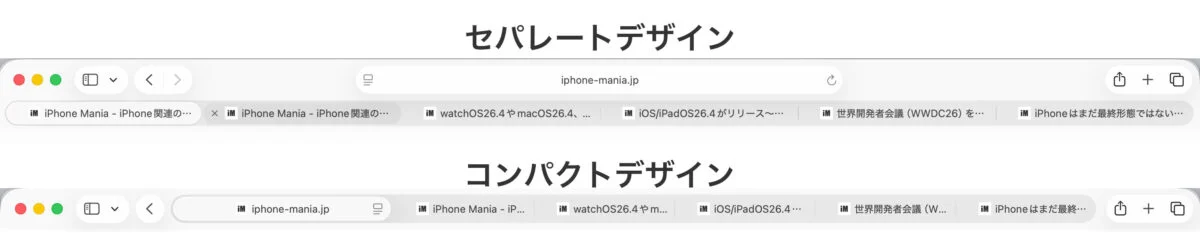
For mobile workers who want to secure a wide vertical display area, even if it’s just a few millimeters, forced transition to a standard design in which tabs are always separated into two lines will directly lead to a decrease in web browsing efficiency. As a result, there seemed to be a lot of dissatisfaction among the developer and user communities right after the update.
Apple’s new attitude to reflect user voices
The return of this feature can be said to be the result of Apple responding sensitively to feedback from the user community and flexibly making course corrections.
This seems to be highly praised as a response that prioritizes user convenience, rather than imposing a once-decided design.
Increased convenience brought about by freedom of choice
With this update, you can once again freely choose between a standard design that is easy for everyone to use, and a compact design for core users who seek work efficiency.
This can be set from “Tab Layout” under “Tabs” on the Safari settings screen.

Distribution of macOS Tahoe 26.4 and iPadOS 26.4 has already started.
Why not update to the latest OS and review your Safari tab settings?
Source: iPhone Mania