Apple released the latest firmware update (Firmware) for all its AirPods models earlier today (6/26), including AirPods 2, AirPods 3, AirPods Pro (1st and 2nd generations) and AirPods Max. The body versions are 6.5.8 (6F8) and 6A328 respectively. What improvements does the latest AirPods firmware bring? Let’s discuss the latest AirPods firmware update details and how to update AirPods.
AirPods full series latest firmware 6F8, 6A326 content
According to the AirPods firmware version support document released by Apple, the latest firmware update for AirPods is mainly to improve the stability and user experience of AirPods and fix some bugs. However, this update is for the AirPods Pro series firmware version number 6.5.8 (6F8). The other AirPods (3rd generation), AirPods Pro (1st and 2nd generation) and AirPods Max models will receive it. 6A326 firmware update.
What’s special is that even Beats Fit Pro and Beats Powerbeats Pro have also released firmware updates. The latest version number is 6F8. The firmware naming rules are the same as the AirPods Pro series.
AirPods latest firmware version (June 2024)
The following are the latest firmware versions released by Apple for various AirPods models:
- MagSafe Charging Case (USB-C) for AirPods Pro (2nd generation): 6F8
- AirPods Pro (2nd generation) with MagSafe charging case (Lightning): 6F8
- AirPods Pro (1st generation): 6A326
- AirPods (3rd generation): 6A326
- AirPods (2nd generation): 6A326
- AirPods Max: 6A326
Tips for checking the latest firmware version of AirPods Pro
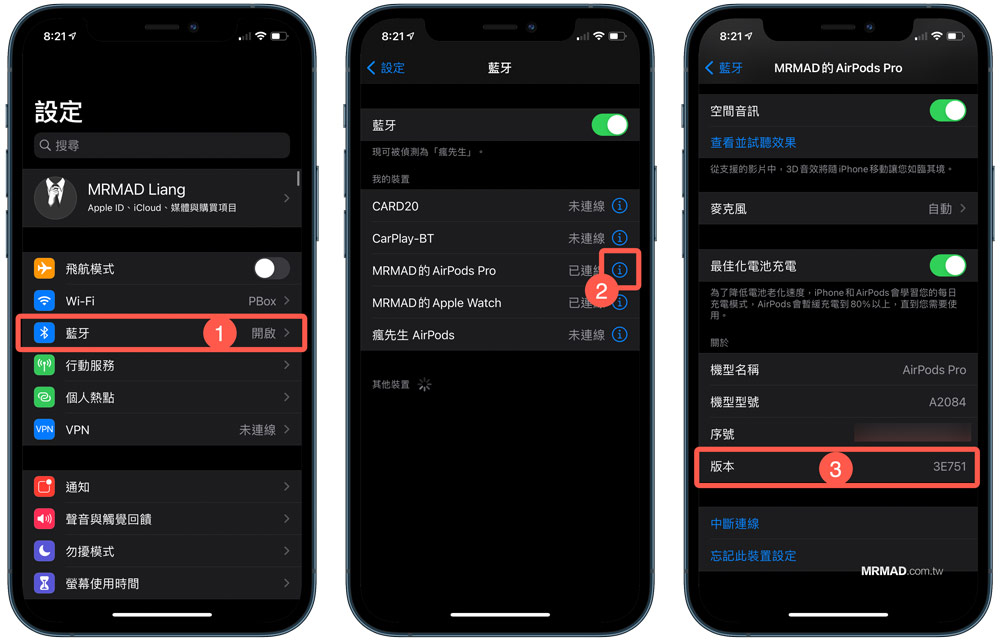
- Click iOS “Settings” > “Bluetooth”
- After connecting AirPods to iPhone, click the “i” button on the right side of the AirPods device
- Scroll to the bottom to see the device “Version” and confirm whether the firmware version is the latest version above.
How to update the firmware version of AirPods Pro
Since Apple releases AirPods Pro firmware updates in stages, it will not be fully rolled out on the day the new firmware is released. For detailed update methods, please refer to “AirPods Firmware Update Tutorial: Teach you how to check the device version and update. ”.
In addition, Apple has also issued the latest announcement before. If you find that AirPods cannot be updated automatically, or if you are only an Android phone user who wants to update AirPods, you can take the device to an Apple direct store or Apple authorized repair center to make an appointment and a specialist will solve the problem for you.
👉 General summary of Apple authorized repair centers in Taiwan (Studio A, Deyi, Shennao, Tsannkun)
Further reading: