Apple’s flagship FaceTime is mainly stable, high-definition and free, which also makes many iPhones accustomed to using FaceTime instead of regular voice calls. However, recently some netizens upgraded to iOS 26 and discovered that they received a phone bill of up to 5,700 yuan after using FaceTime to chat. After further comparison of call records, they were shocked to find that the culprit was suspected to be related to the automatic switching setting after the iOS 26 update. This article teaches you how to check key iPhone settings in 30 seconds to avoid falling into the trap of hidden Facetime charges.
Why does iPhone FaceTime become charged?
According to Apple’s design logic, FaceTime voice calls transmit data through Wi-Fi or 4G/5G mobile networks. In theory, they only consume network traffic and should not incur call charges at all.
There are netizens here Threads The report found that there was a hidden trap after updating to iOS 26. The default call app settings of some iPhone models were reset, causing the system to automatically switch the phone app call default to “Mobile Network Call (General Voice)” instead of using the original Facetime call method.
This leads to the fact that when many people are used to clicking the call icon of a contact, the iPhone does not use FaceTime to make Internet calls, but directly uses the general mobile phone number to make calls, which causes the phone bill to skyrocket.
 Screen capture from Threads platform
Many netizens also discovered that the fault was caused by the iOS 26 update after receiving a much higher phone bill. Most of them thought they were using FaceTime, but ended up incurring charges for the entire process. Some even discovered that they pressed the FaceTime icon, but it turned out to be a phone call.
How to change iPhone FaceTime back to free Internet calling setting?
To avoid becoming the next Facetime victim, please pick up your iPhone immediately and follow the steps below to confirm the settings:
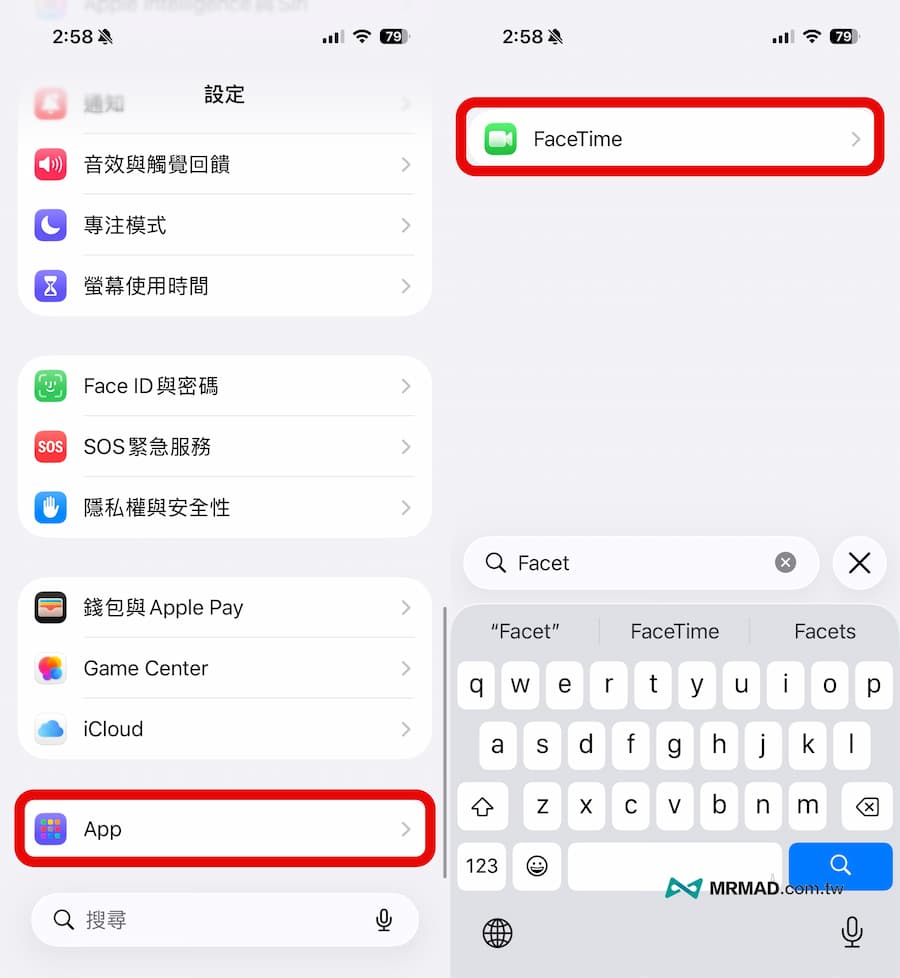
Step 1: Enter FaceTime settings
Open the “Settings” app on the iPhone’s home screen, slide down to the bottom and click the “App” menu, find and click “FaceTime”.
Step 2: Check the default calling method
In the FaceTime settings menu, directly find the “Default Call App” option and check whether “FaceTime Voice” is set. If the default is “Mobile Network Call”, it is recommended to change it immediately. This will cause the default calls to be charged.
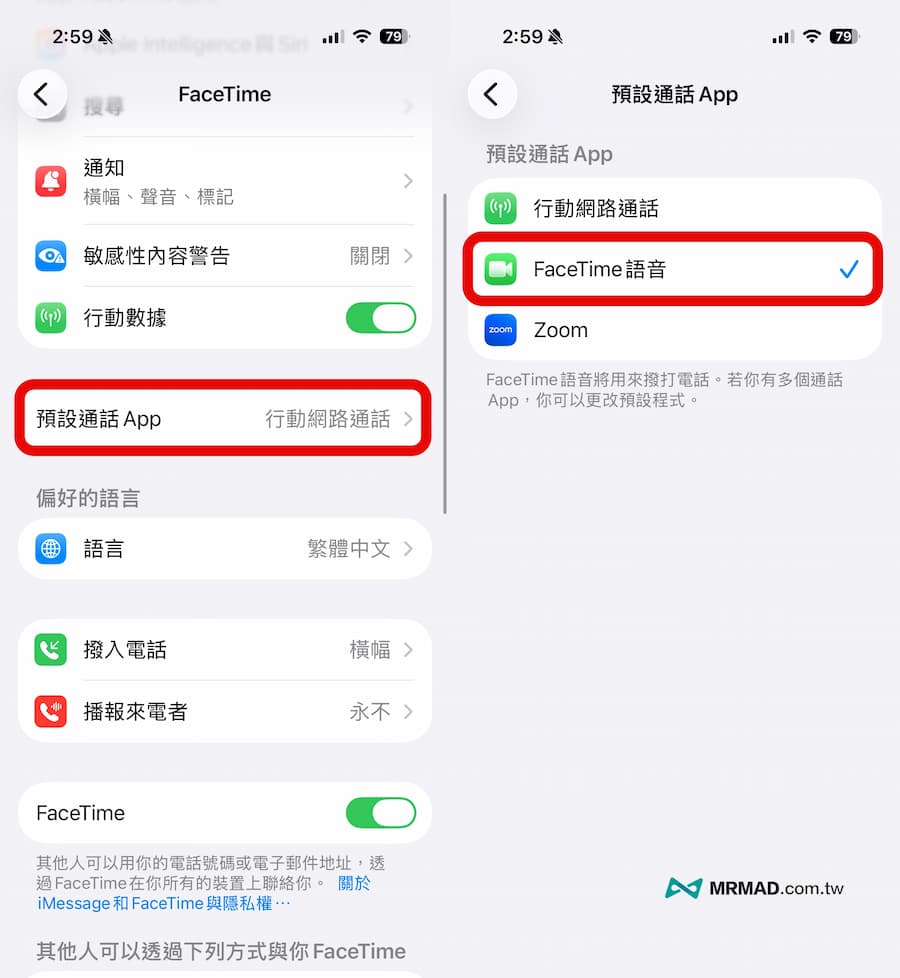
Step 3: Check the default calling method
As long as you change the default call setting back to “FaceTime Voice”, subsequent calls on your iPhone will be forced to use free Facetime network traffic and will no longer be billed additionally by telecom operators.
How to tell if the iPhone is making a pay call or FaceTime?
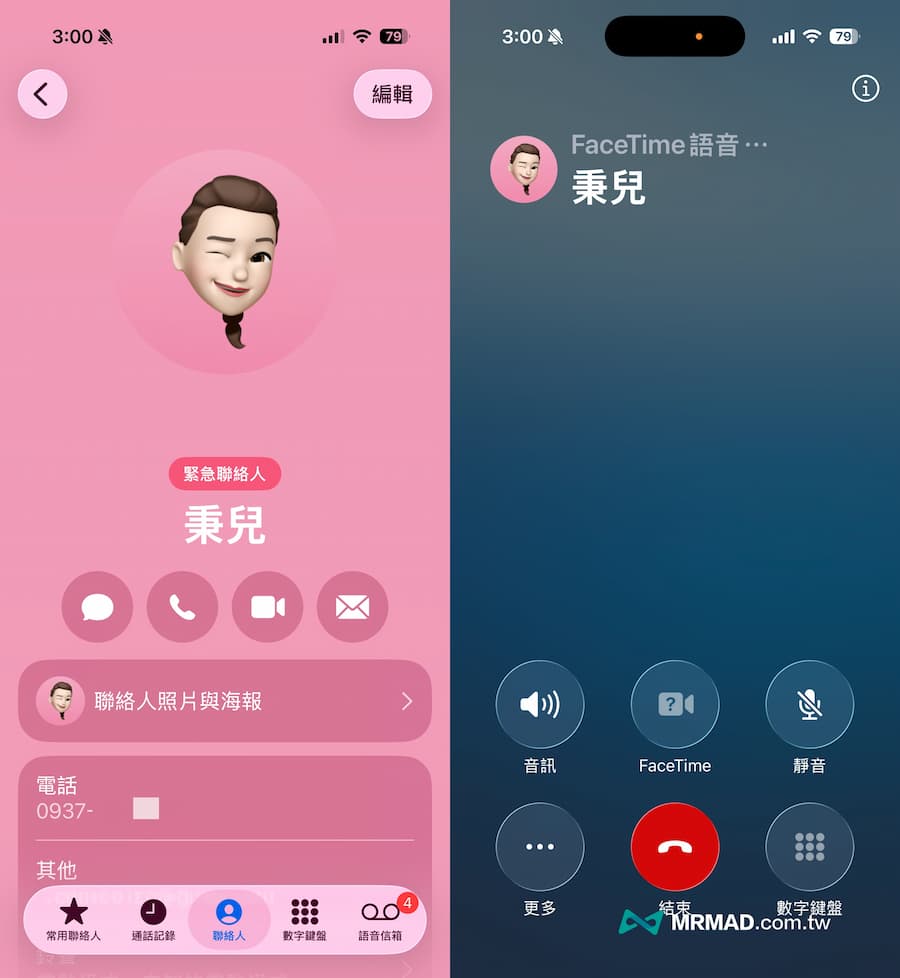
You can pay attention to the current screen of the iPhone when making a call. If it is FaceTime, the “FaceTime Voice” text mark is usually clearly displayed at the top of the interface. If the iPhone is used to make a call from an ordinary pay phone, usually only the other party’s name and timer are displayed, and the sound is muffled (not high-quality).
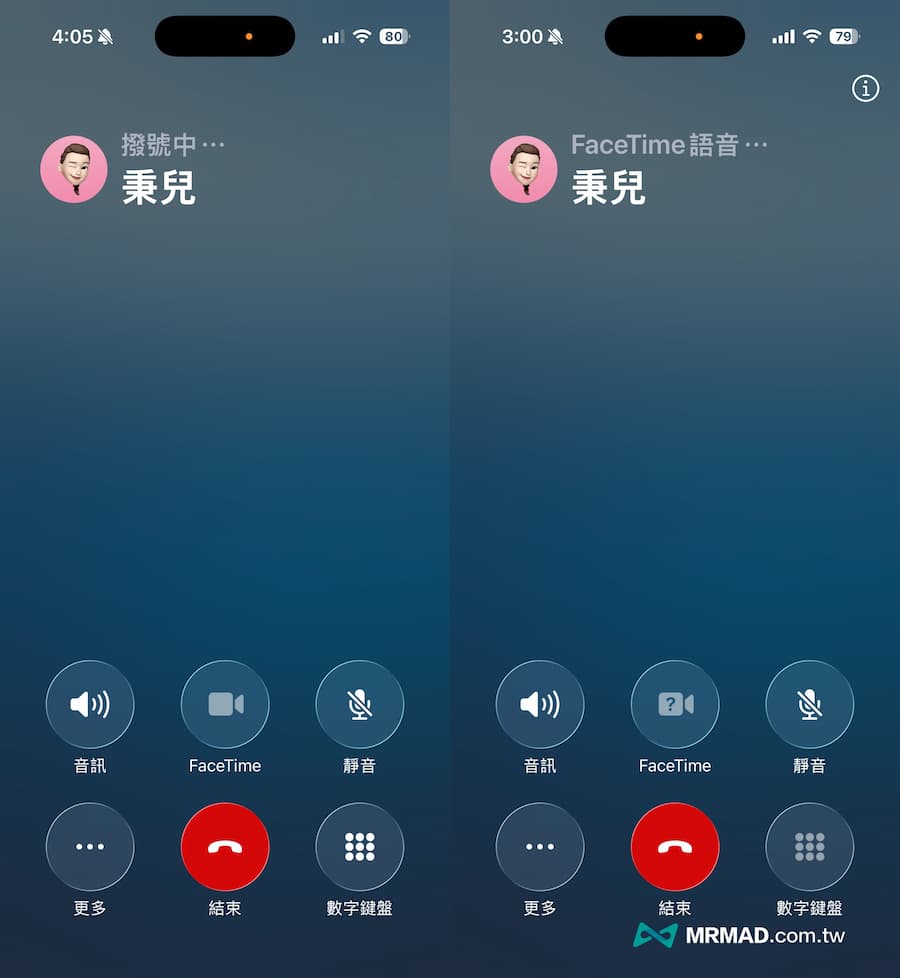 The picture on the left shows a call made using an iPhone regular payphone; the picture on the right shows a call made using a FaceTime voice call.
In addition, you can also directly press and hold the “phone icon” when opening the contact screen again. As long as it pops up, only the mobile phone number will pop up. Usually, there is no Facetime voice call, and the normal mobile phone paid call will be connected directly.
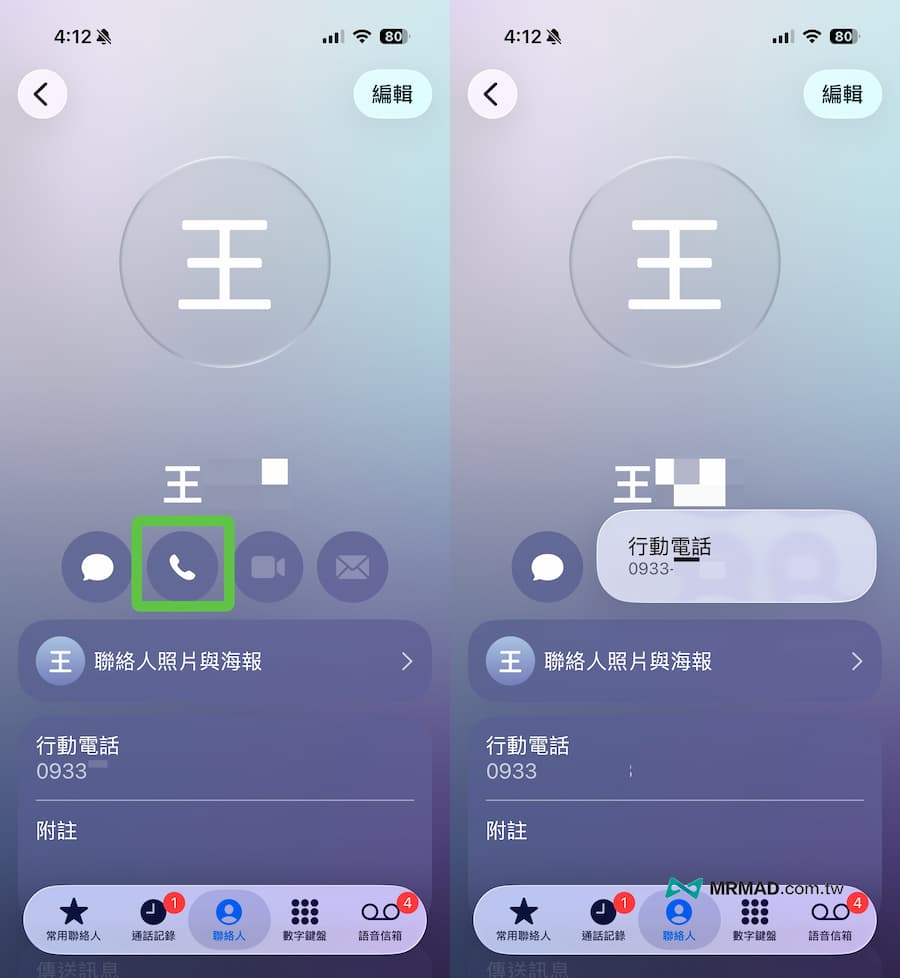
If the iPhone has been set up to make Facetime voice calls, basically as long as the other party is an iPhone and Facetime is turned on, as long as you long press the phone button icon, you will see that the voice call with FaceTime will be displayed. If you press the phone number later, you will also make a free voice call with Facetime.

Is this not the only disaster? 3 self-tests you must do after iOS 26 update
In addition to FaceTime, some privacy and network settings are often reset after the iOS 26 version is updated. In order to ensure that the phone operates normally and saves power, it is recommended to check the following items:
- Mobile service settings: Check whether “5G Auto Mode” is turned on? If you don’t have an all-you-can-eat plan, this could cause traffic to explode.
- Location service permissions: Some apps may be reset to “Always allow” access to location, which will cause the iPhone to consume abnormal power.
- App background rearrangement: It is recommended to turn off the background rearrangement of apps that are not commonly used to avoid unknowingly consuming data and power.
Facetime FAQ QA compilation
What is the difference between FaceTime and regular calls?
FaceTime voice calls use network data (Wi-Fi or 4G/5G), and the call quality is high and does not occupy the telecom voice quota; general calls are made through traditional telecom lines and are billed according to your tariff plan (such as intra-network/off-network rates).
Will FaceTime video calls also be charged?
Usually iPhone Facetime disaster mainly occurs during voice calls. Even if the setting is lost and the video is being played in an environment without Wi-Fi, although the phone bill will not be charged, it will consume a lot of mobile network traffic. Only non-all-you-can-eat users need to pay attention.
If I have incurred Facetime call charges, can I apply for compensation from Apple?
At present, Apple has not officially launched a compensation plan for the iPhone Facetime disaster. Since the fees are collected by telecom operators, it is usually difficult to seek compensation from Apple. It is recommended to contact telecom customer service to explain the situation first to see if you can get a case reduction, but the success rate varies.
If you want to know more Apple information, iPhone teaching and 3C information skills, please follow us
Crazy Mr. FB fan group,
Subscribe to Mr. Crazy Google News,
Telegram,
Instagramas well as
Subscribe to Mr. Crazy YouTube.