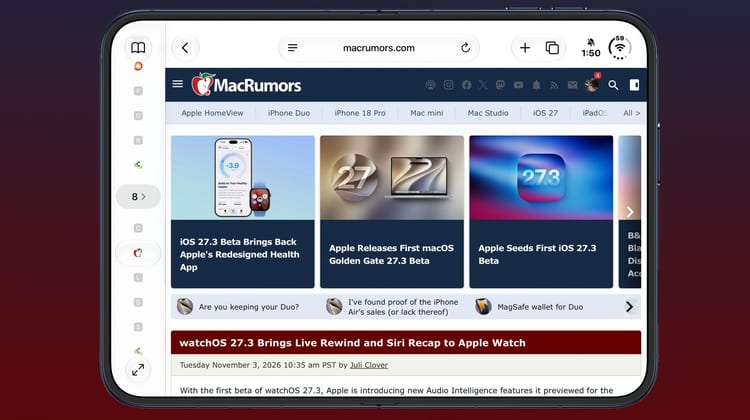
Safari in iOS 27.3 beta 1 has a new Vertical Tabs layout and Adaptive Dark Mode for bright websites. Apple seeded the first developer betas of iOS 27.3, iPadOS 27.3, and macOS Golden Gate 27.3 on November 3, about a day after iOS 27.2 shipped, and both Safari changes are in the build. 9to5Mac and MacRumors posted the details within the hour.
Vertical Tabs move the tab bar to the left side of Safari
With the Vertical Tabs design on, tabs are arranged vertically along the left-hand side of Safari instead of along the top. Tabs show as icons by default to save space. You can also resize the tab bar wider to see website titles.
Vertical Tabs work with Topics and Tab Groups. Topics are created when automatic Apple Intelligence tab sorting is turned on in iOS 27. Pinning tabs by dragging and quick swapping between Tab Groups also continue to work, so the old tab tools are not lost when you switch layouts. MacRumors notes the layout pairs well with the iPhone Duo’s larger display, though it is available across iPhone, iPad, and Mac. For most people the icons-only default is the one to keep. Widening the bar for titles costs page width on a phone.
On iPhone the option is in Settings > Apps > Safari. On Mac and iPad you can also enable it from the View menu in the Safari app directly. For the rest of Safari’s current switches, see our Safari settings checklist for iPhone and Mac after iOS 27.
Vertical tab layouts are not new to browsers. Arc from The Browser Company popularized the option, 9to5Mac notes. Arc ceased development last year, and The Browser Company said last month it will discontinue the browser altogether in December.
Adaptive Dark Mode renders dark pages for sites that have none
If Dark Mode is on and you open a website with a bright background, Safari now offers a “Try” button for Adaptive Dark Mode. Tap it and Safari renders a dark version of the page on its own.
The rendering darkens the background, changes text contrast, inverts logos and graphics, recolors vector artwork, lifts raised surfaces, and rebalances layered shadows. Not every tweak is applied to every site. Each website is adapted based on what is needed to make it readable.
You can opt to turn Adaptive Dark Mode on for all sites or use it site by site. It will not activate on a site that already has a native dark design. Developers can also add a tag that makes Safari skip Adaptive Dark Mode and show the page as they designed it.
Siri AI can sort tabs and clear history for one site
Siri AI can now take direct action on tabs and windows in iOS 27.3, iPadOS 27.3, and macOS 27.3. That covers sorting, moving, closing, and arranging tabs in Tab Groups.
Siri also has control over web history now. You can ask it to clear your history for one particular site and a set time period, such as the last 10 days. The bigger step, Siri understanding the full content of webpages including tabs not on screen, is coming in a future update and is not in the first beta. The Siri features need an Apple Intelligence-capable device. Our iOS 27.3 beta 1 story covers the wider Siri AI Developer Preview that arrived with this wave.
The Safari update ships to everyone in December
Developers can install the beta now via Settings > General > Software Update > developer beta. MacRumors reports that iOS 27.3, iPadOS 27.3, and macOS Golden Gate 27.3 will launch this December after several rounds of beta testing to refine the new features. 9to5Mac gives the same window. Details of the wider 27.3 wave, including the China Apple Intelligence subset, were in our November 4 beta date report.
Photo: MacRumors (Safari Vertical Tabs on iPad), 9to5Mac